DLT Registration India: Developer SMS Compliance Guide (2026)
Need to set up DLT registration in India? Follow this 2026 developer guide to register your business, approve SMS templates, or send OTPs without DLT.
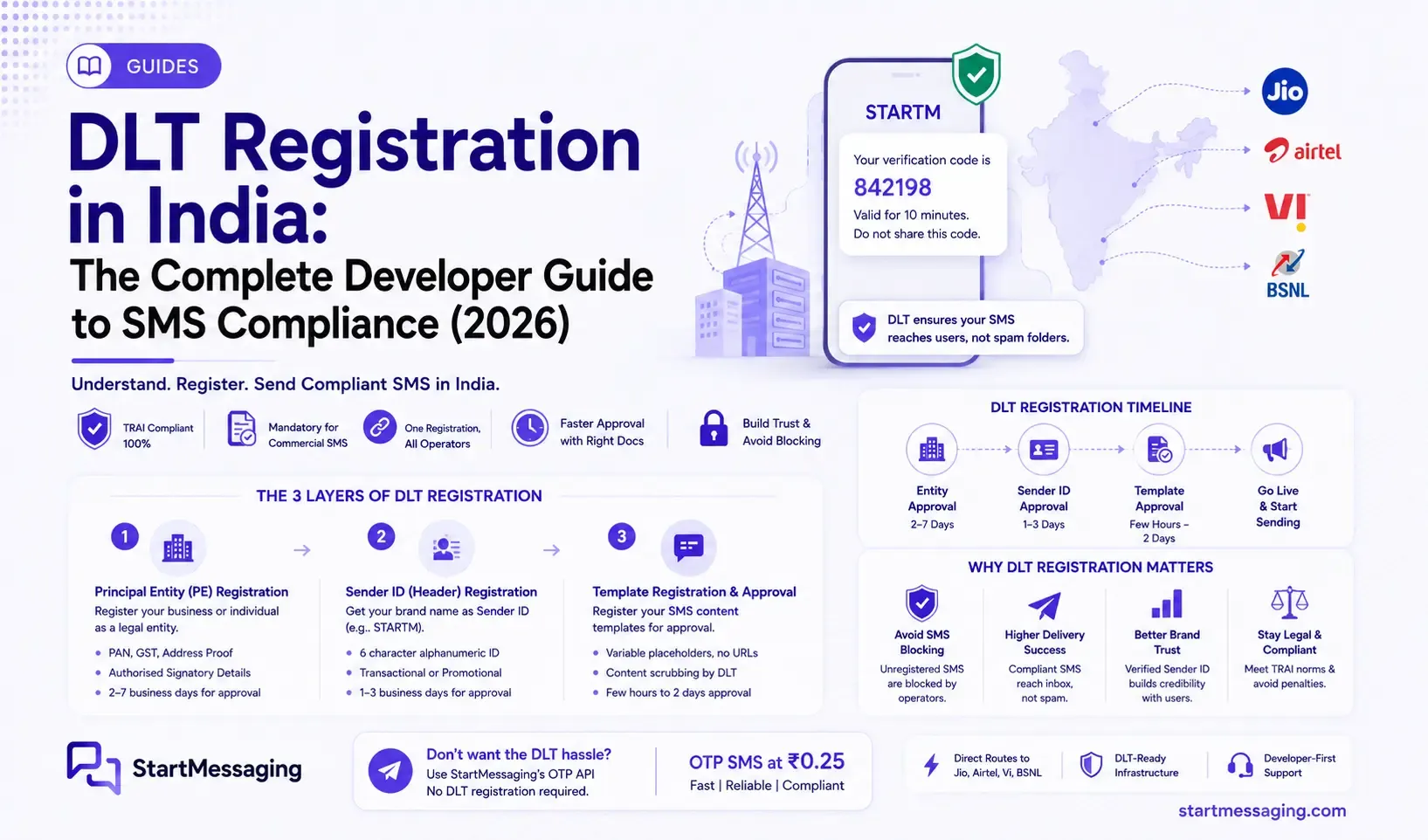
Meera, co-founder of a new logistics app called DropOff, is getting ready to ship her MVP to early users in Bengaluru. Her backend code is ready, the database is active, and she only needs to send a simple verification code to confirm phone numbers at sign-up. However, she quickly runs into the regulatory requirements of dlt registration india before she can send a single text message. She is faced with registering business documentation, verifying entity headers, and getting templates approved across carrier systems.
For developers building products for the Indian market, setting up SMS delivery requires navigating the Distributed Ledger Technology (DLT) framework mandated by the Telecom Regulatory Authority of India (TRAI). This guide explains what DLT compliance entails, provides a step-by-step walkthrough to get your credentials approved, details how to prevent production delivery failures, and highlights how to bypass the process entirely using a pre-configured routing platform.
What DLT Is and Why TRAI Made It Mandatory
Before 2019, commercial SMS spam in India was common. Mobile users received dozens of unsolicited marketing messages, phishing links, and fake bank alerts daily. This made SMS an unreliable communication channel, as critical transaction notifications were often buried under spam.
To address this, TRAI introduced the Telecom Commercial Communications Customer Preference Regulations (TCCCPR) in 2018, which established the DLT registration framework.
[Business Entity] ──> [DLT Portal (Jio/Airtel/Vi/BSNL)] ──(Sync)──> [Distributed Ledger]
                                                                            │
[Outgoing SMS] ─────────────(Real-Time Compliance Scrubbing)────────────────┘
The Technical Definition of DLT
DLT is a blockchain-based distributed database shared across India’s major telecommunications carriers: Reliance Jio, Bharti Airtel, Vodafone Idea (Vi), and Bharat Sanchar Nigam Limited (BSNL). This shared ledger stores record for:
- Principal Entities (PE): The registered businesses authorized to send SMS.
- Sender IDs (Headers): The 6-character alphanumeric identifiers displayed on recipient devices (e.g.,
STARTM). - Approved Content Templates: The exact message formats authorized for delivery.
When your application triggers an SMS API call, the routing carrier queries the shared DLT ledger in real time. If the sending entity, the Sender ID, or the exact text structure does not match an approved registration record, the carrier drops the message. The verification check occurs within milliseconds at the network operator level.
TRAI Enforcement Rules
The DLT framework was introduced in phases. Principal Entity registration became mandatory in March 2021, and template matching was enforced starting in late 2022.
Today, compliance is strictly enforced. Any SMS generated from an unregistered entity, an unapproved header, or an unmapped template is blocked by operator filters. The network drops the message without notifying your backend server or returning a direct API error code.
Identifying Who Needs DLT Registration
If your application sends automated notifications to Indian mobile numbers, you must comply with the DLT framework. This requirement applies to:
- Startups sending OTPs for login verification or password resets.
- Logistics and e-commerce platforms sending delivery notifications.
- SaaS platforms sending account updates, usage alerts, or billing receipts.
- Marketing teams sending promotional messages or discounts.
If you are a developer testing a prototype, a business that does not want to manage DLT portals, or an international company without an Indian business registration, you can use a pre-compliant gateway. A provider like StartMessaging routes your verification traffic through pre-approved headers and templates under their own DLT registration, allowing you to send sms without dlt registration india within minutes.
The Three Layers of DLT Registration
The DLT system operates in three dependent layers. You must complete these registrations in order, as each step requires credentials from the previous phase.
┌─────────────────────────────────┐
│ Layer 1: Principal Entity (PE)  │  <-- Register business PAN & GST
└────────────────┬────────────────┘
                 │ (Provides PE-ID)
                 ▼
┌─────────────────────────────────┐
│ Layer 2: Sender ID (Header)     │  <-- Register 6-character sender name
└────────────────┬────────────────┘
                 │ (Provides Header ID)
                 ▼
┌─────────────────────────────────┐
│ Layer 3: Content Template       │  <-- Register message body structures
└─────────────────────────────────┘
Layer 1: Principal Entity (PE) Registration
Principal Entity registration establishes your business identity on the carrier network. This is a one-time step where you submit your corporate registration documents, tax identifiers, and signing authorizations.
Once approved, you receive a 15-digit Principal Entity ID (PE-ID). This unique identifier must be included in the headers of every SMS API request your backend makes.
- Required Documentation: Business PAN card copy, GST Certificate (or other government registration certificate), Authorized Signatory authorization letter on company letterhead, and identity proof of the authorized signer.
- Portals: You can register on any major carrier’s DLT portal. The Jio Trueconnect platform is a common option for developers due to its online verification process.
- Multi-Operator Sync: You do not need to register on every carrier network. Once BSNL, Airtel, Vi, or Jio approves your Principal Entity profile, the record propagates to the other operators’ systems through the shared ledger network, though syncing can take 24 to 48 hours.
- Timeline: Processing typically takes between 2 and 7 business days, depending on document clarity and queue size.
Layer 2: Sender ID (Header) Registration
A Sender ID is the 6-character alphanumeric label that identifies the sender to the user (e.g., STARTM). Under DLT rules, headers are classified based on the category of traffic they carry:
- Transactional Headers (OTPs): Must consist of exactly 6 alphabetical characters. They are reserved for transaction-implicit messages like OTPs, purchase receipts, and banking alerts.
- Service Implicit Headers: Also require 6 alphabetical characters. They are used for notifications directly related to customer transactions (e.g., shipping updates or appointment changes).
- Promotional Headers: Must consist of exactly 6 numerical digits (e.g.,
584920) and are used for marketing alerts. These headers are blocked for users registered on the National Customer Preference Register (NCPR/DND).
You can register multiple Sender IDs under a single Principal Entity ID to represent different brands or product lines.
- Requirements: An approved Principal Entity ID, your requested 6-character label, and a justification for how the string relates to your business name.
- Timeline: Approvals generally take 24 to 72 hours. Once approved, the Sender ID must be mapped to your SMS API provider’s routing binds.
Layer 3: Template Registration
Template registration is the final step and is where most delivery failures occur. Every message body sent by your application must match an approved content template.
For dynamic messages like OTPs, you use variable placeholders formatted exactly as {#var#}:
Your verification code for DropOff is {#var#}. Valid for 10 minutes. Do not share this code.When registering templates, keep these rules in mind:
- Exact Matching: Every space, punctuation mark, and word in your outgoing SMS must match the approved template. A missing period or an extra space will cause the operator’s filter to block the message.
- Placeholder Limits: Each variable placeholder
{#var#}must be mapped to a dynamic value at runtime. Operators limit the value length to a maximum of 30 characters. - Category Mapping: Ensure your OTP templates are registered under the Service Implicit or Transactional category to prevent blocks for DND-registered subscribers.
- Propagation Sync: Freshly approved templates can take 24 to 48 hours to sync across all network operators.
Step-by-Step: Registering on Jio’s Trueconnect DLT Portal
This walkthrough explains how to complete your registrations on Jio’s Trueconnect portal, which is widely used by Indian developers.
Step 1: Create a Jio DLT Account
Go to the Jio Trueconnect portal at trueconnect.jio.com and select Register Now. Under the registration types, select Principal Entity. Select No when asked if you have a pre-existing PE-ID from another operator.
Step 2: Input Your Business Details
Complete the registration form with your business information:
- Enter the exact legal company name as displayed on your corporate PAN card.
- Input your 15-digit GSTIN (Goods and Services Tax Identification Number) and PAN.
- Select your business category (e.g., Logistics, FinTech, E-Commerce).
Step 3: Upload Verifying Documents
Upload clear scans of your business credentials. The portal accepts PDF or JPEG files:
- A copy of your Business PAN Card.
- Your GST Registration Certificate or Shop and Establishment License.
- An authorization letter on your company letterhead signed by a director or owner, certifying that you are authorized to manage the DLT profile.
- A government-issued ID (such as an Aadhaar Card or Passport) of the authorized signer.
Note: Avoid uploading blurry scans or document files with mismatched business names, as these are common reasons for registration rejections.
Step 4: Submit and Wait for Entity Approval
Review your submissions and complete the verification. Jio’s verification team will review the documents.
The dlt template approval time india for entity activation typically ranges from 2 to 7 business days. You will receive an email confirmation containing your 15-digit Principal Entity ID (PE-ID) once approved.
Step 5: Register Your Sender ID (Header)
Once your Principal Entity profile is active, log into the Trueconnect portal:
- Navigate to Header Management and select Header Registration.
- Select the Header Type (Transactional or Service Implicit for OTP verification codes).
- Choose the Category that matches your company profile.
- Enter your desired 6-character alphanumeric Header (e.g.,
STARTM). - Provide a short explanation in the justification box (e.g., “This represents our brand name StartMessaging used for sending customer authentication codes”).
- Submit the request. Approval typically takes 24 to 72 hours.
Step 6: Register Your SMS Template
After your Sender ID is activated, you can register your message templates:
- Navigate to Template Management and select Content Template Registration.
- Choose the Template Type (Transactional or Service Implicit).
- Select the Header you want to associate with this template.
- Name the template (e.g., “Onboarding OTP Template”).
- Input the message body using the
{#var#}format for dynamic values (such as verification codes or user names). - Submit the template. Most standard OTP templates are approved within 2 to 24 hours.
The Five Most Painful DLT Problems (and How to Avoid Them)
Managing DLT compliance presents several common challenges in production environments. Here is how to identify and avoid them.
Pitfall 1: Runtime Template Mismatches
If your application sends a message that deviates by even a single character from your approved DLT template, the operator will block it. The most common errors include:
- Inserting extra spaces before or after variable values.
- Adding trailing newlines or extra carriage returns at the end of the text.
- Passing variables that exceed the 30-character length limit.
To prevent these issues, you should implement a template matching validation step in your deployment pipelines. This ensures your code does not send mismatched strings to the SMS API.
Here is a Node.js utility function that checks outgoing messages against your registered DLT template structure before calling the SMS API:
// dltValidator.js

/**
 * Validates if an outgoing SMS message matches the approved DLT template.
 * @param {string} message - The actual runtime message string generated by your code.
 * @param {RegExp} templatePattern - A regex built from your approved DLT template structure.
 * @returns {boolean} - Returns true if the message matches, false otherwise.
 */
export function validateDltMessage(message, templatePattern) {
  // Test if the message structure matches the regex pattern
  if (!templatePattern.test(message)) {
    console.error(`[DLT Validation Failed] Outgoing message structure does not match approved DLT template.`);
    return false;
  }

  // Extract variables to verify length rules
  const matches = message.match(templatePattern);
  if (matches) {
    // Check variable placeholder values (ignoring the full match at index 0)
    for (let i = 1; i < matches.length; i++) {
      const variableValue = matches[i];
      if (variableValue.length > 30) {
        console.error(`[DLT Validation Failed] Variable index ${i} value ("${variableValue}") exceeds the 30-character DLT limit.`);
        return false;
      }
    }
  }

  return true;
}

// Example Usage in Production Core:
// Approved DLT template: "Your verification code for DropOff is {#var#}. Valid for 10 minutes."
// Dynamic variables are converted to a regex pattern matching any character (.+)
const approvedTemplateRegex = /^Your verification code for DropOff is (.+)\. Valid for 10 minutes\.$/;

const validMessage = "Your verification code for DropOff is 582910. Valid for 10 minutes.";
const invalidMessage = "Your verification code for DropOff is 582910 . Valid for 10 minutes. "; // Notice trailing space

console.log(validateDltMessage(validMessage, approvedTemplateRegex)); // Outputs: true
console.log(validateDltMessage(invalidMessage, approvedTemplateRegex)); // Outputs: false (fails regex match)
Running this check in your test suites or before API dispatch points helps prevent silent message drops.
Pitfall 2: Template Expiry Issues
Under carrier policies, DLT content templates have validity periods, which are often set to 1 year. Once a template expires, operators will silently drop any outgoing messages that use it.
To prevent this issue:
- Set calendar alerts 30 days before the expiration date of your registered templates.
- Monitor your delivery logs. If a template’s delivery rate drops to zero, check its status in your DLT portal.
Pitfall 3: Header Category Mismatch
If you attempt to route transaction codes (like OTPs) through a header registered as promotional, carriers will block the message for any users who have opted into the DND registry. Ensure that all transactional templates are mapped exclusively to transactional or service-implicit headers.
Pitfall 4: Entity Document Rejections
The most common reason for entity registration rejection is a mismatch between the legal name on your business PAN card and the name entered in the DLT registration form. Ensure that your inputs match your registration documents exactly, including punctuation and suffixes (such as “Pvt Ltd” or “LLP”).
Pitfall 5: Operator Sync Delay
When you approve a header or template on Jio’s portal, the approval is initially saved locally. It can take 24 to 48 hours for the new template metadata to sync across Airtel, Vi, and BSNL systems. Avoid deploying new message templates immediately after approval; wait 48 hours to ensure the change has propagated across all networks.
The No-DLT Alternative: How StartMessaging’s OTP Route Works
The complexity of DLT registration can be a barrier for startups, developers, or companies looking to test SMS integrations quickly.
[Your Backend] ──(API Call)──> [StartMessaging Gateway] ──> [Pre-Compliant DLT Route] ──> [User Handset]
                                     │                                 │
                          (Auto-formatted template)          (STARTM Header Bypasses PE Setup)
The Shared Compliance Model
If you do not want to manage DLT portals, you can use StartMessaging’s shared compliance routing. Instead of requiring you to register a Principal Entity ID, verify headers, and manage template lists, StartMessaging handles these compliance steps on its platform.
When you send an OTP through the StartMessaging API, the request is routed through a pre-registered DLT entity and Sender ID. The platform automatically formats the message structure to match approved templates, ensuring compliant delivery to Indian carrier networks.
Deciding Which Option Is Right for You
The best approach depends on your specific product requirements:
| Feature / Requirement | StartMessaging Shared OTP Route | Custom DLT Registration |
|---|---|---|
| Setup Time | Under 5 minutes | 2 to 14 days |
| Business Verification | Not required for initial testing | Mandatory business PAN/GST verification |
| Sender ID (Header) | Shared Sender ID (e.g., STARTM) | Custom branded Sender ID (e.g., MYCOID) |
| Portal Maintenance | Handled by StartMessaging | Managed by your team |
| Cost | ₹0.25 per OTP (pay-as-you-go) | Standard SMS rates + DLT registration fees |
| Best For | Startups, MVPs, developer testing | Enterprise brands, marketing campaigns |
Getting Started with StartMessaging
If you want to send SMS OTPs immediately without registering on a DLT portal, you can get set up in a few steps:
- Create a free StartMessaging account.
- Retrieve your API key from the developer dashboard.
- Call the
/otp/sendendpoint with the recipient’s phone number. StartMessaging will generate the code and handle delivery.
// sendOtp.js
import dotenv from 'dotenv';
dotenv.config();

async function sendVerificationOtp(phone) {
  const response = await fetch('https://api.startmessaging.com/otp/send', {
    method: 'POST',
    headers: {
      'Content-Type': 'application/json',
      'X-API-Key': process.env.STARTMESSAGING_API_KEY
    },
    body: JSON.stringify({ phoneNumber: phone })
  });

  if (!response.ok) {
    const error = await response.json();
    throw new Error(error.message || 'OTP dispatch failed');
  }

  const { data } = await response.json();
  return data.requestId;
}

// Example usage
sendVerificationOtp('+919876543210')
  .then(id => console.log(`OTP sent successfully. Request ID: ${id}`))
  .catch(err => console.error(`Error sending OTP: ${err.message}`));
Using this setup allows you to focus on building your application’s core features while the platform manages DLT compliance and carrier routing.
Frequently Asked Questions
Q: Is DLT registration mandatory for sending OTP in India?
A: Yes, DLT registration is mandatory for any business sending SMS to Indian phone numbers under TRAI rules. However, you can use a gateway like StartMessaging that routes messages through its own pre-registered DLT entity, allowing you to send transactional OTPs without going through the registration process yourself.
Q: How long does DLT registration take in India?
A: The complete registration process typically takes 1 to 2 weeks. Principal Entity registration takes 2 to 7 days, Sender ID approval takes 24 to 72 hours, and template registration takes 2 to 24 hours.
Q: Can I register on one DLT portal and send on all operators?
A: Yes. You only need to register on one operator’s DLT portal (such as Jio Trueconnect). Once approved, your registration records are synced across all other Indian carriers through the shared DLT network.
Q: What happens if my SMS template doesn’t match the DLT-registered template?
A: The carrier’s filters will block the message, and it will not be delivered to the recipient. The SMS API call may return a success response, but the message is dropped by the operator.
Q: Can I send OTP without DLT registration in India?
A: Yes. By using StartMessaging’s shared compliance route, your OTPs are sent using the platform’s pre-approved DLT templates and headers. This allows you to skip the registration process and start sending SMS immediately.
Q: Do I need separate DLT registration for each operator (Jio, Airtel, Vi, BSNL)?
A: No. A single registration on one operator’s portal is sufficient. The registration metadata is shared across all major operators in India.
Q: What is the difference between a transactional and promotional DLT header?
A: Transactional headers are 6-character alphabetical labels used for transactional alerts and OTPs. They can deliver messages to all subscribers 24/7. Promotional headers are 6-digit numerical codes used for marketing. They are blocked for DND-registered users and can only be sent between 9:00 AM and 9:00 PM.
Meera integrated StartMessaging’s API into DropOff’s signup logic, allowing her to send verification codes to her users immediately. This saved her team the time required to complete the DLT portal setup, allowing them to focus on preparing for their launch.
If you are looking to integrate OTP verification into your Indian startup or application without navigating the DLT registration process, you can get set up in minutes. StartMessaging offers direct carrier routes and pre-approved templates that deliver OTPs within 2 seconds at ₹0.25 per message. Sign up on StartMessaging to get started.
StartMessaging Team
StartMessaging Team