Powerful APIs for SMS & WhatsApp Campaigns
Scale your user verification, marketing broadcasts, and transactional updates globally with enterprise-grade reliability.
✦ No credit card required · Free credits to start · Setup in 5 minutes
Everything You Need to Message at Scale
-
WhatsApp Campaigns
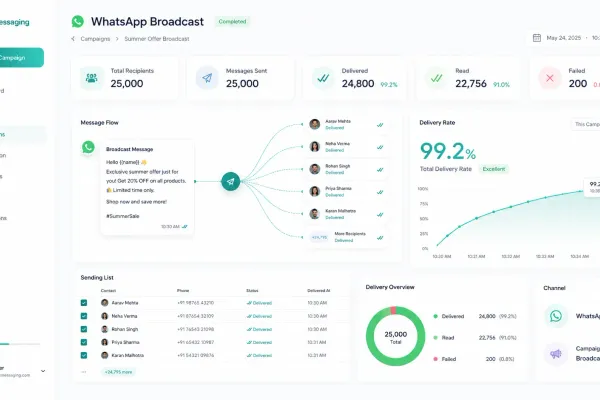
Send approved templates to tagged contacts, saved audiences or a CSV in a 3-step wizard — now or scheduled up to 60 days ahead. Opted-out contacts are skipped automatically, and every campaign gets a full funnel report. On Team and Business.
-
Shared Team Inbox
Work every WhatsApp chat as a team in real time: claim, assign and resolve chats, round-robin auto-assignment, quick replies, search, a media viewer and a 24-hour window countdown. On Team and Business.
-
CRM & Sales Pipeline
Contacts with tags, custom attributes, notes and follow-up dates, CSV import and export, and opt-outs tracked per number, on Team and up. Business adds a drag-and-drop pipeline with custom stages and the conversions your campaigns earn.
-
Auto-Replies & Chatbot Flows
Keyword auto-replies on Team and up. Business adds a visual no-code flow builder with buttons, lists, conditions, tags, pipeline stages and agent handoff. Start from an industry starter flow.
-
Templates & WhatsApp Forms
Build Marketing, Utility and Authentication templates with media headers, carousels, limited-time offers and up to 10 buttons. On Business, attach WhatsApp Forms and get structured answers in the inbox, the API and webhooks.
-
Click-to-WhatsApp Ad Attribution
Every contact records its source: WhatsApp, manual, CSV, link, API or a Click-to-WhatsApp ad, with the ad's details attached so you know which ads bring in chats.
-
Developer API & Signed Webhooks
Send messages, manage contacts and report conversions over a REST API with API keys limited to the scopes you grant. Receive HMAC-signed webhooks for message status and inbound events, with a delivery log and redelivery. The API comes with every plan; Developer plans are API only.
-
Analytics
Track conversations, response times, campaign funnels and what Meta charged for each campaign, with Meta message volume by pricing category. Business adds agent performance and Meta's own template insights.
-
Team Roles & Access
Invite teammates by email as Owner, Admin, Manager, Agent or Viewer. API keys carry only the scopes you grant, and recent API requests are logged for review.
-
Scheduling & Cost Control
Schedule campaigns from 2 minutes to 60 days ahead and see them on a calendar. Quiet hours hold sending overnight, and a pre-launch check estimates Meta's charge and warns before your daily limit runs out.
-
A/B Tests, Follow-ups & Repeats
On Business: test two versions and send the winner automatically, add up to 3 follow-ups that stop when someone replies, and repeat campaigns on a schedule.
-
Segments, Retargeting & Conversions
On Business: build audiences from engagement, birthdays, dates and pipeline stages, retarget people who didn't read, didn't reply or tapped a button in an earlier campaign, and report sales through the conversions API to see what each campaign earned.
Run Campaigns in Three Steps
Pick an approved template, choose your audience and review before launch. Map template variables from contact fields, attributes or fixed text, add header media, and optionally start a chatbot flow when customers reply. Send now or schedule it, respect quiet hours, and check Meta's estimated charge before you launch. Pause, resume, cancel or duplicate any campaign.
- Campaigns to tagged contacts or CSV audiences, opted-out contacts skipped automatically
- Variable mapping from contact fields, attributes or fixed text
- Funnel report from sent to replied, with Meta's charge and a recipients export
- Scheduling, quiet hours and a pre-launch Meta cost estimate on every plan with campaigns
- A/B tests, follow-ups, repeating campaigns and retargeting on Business
No-Code Chatbot Builder
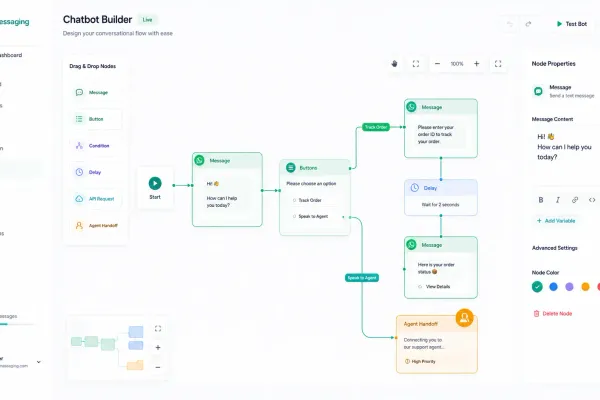
Design conversation flows visually on the Business plan. Trigger a flow on a customer's first message, any inbound message, a keyword or manually, then send messages and templates, wait for replies, branch on buttons, lists or conditions, update tags, fields and pipeline stages, and hand off to an agent — all without code.
- Visual flow builder with 4 industry starter flows
- Hand off to an agent in the shared inbox
- Keyword auto-replies on Team and up: exact, contains or starts-with match
SMS OTPs Without DLT Registration
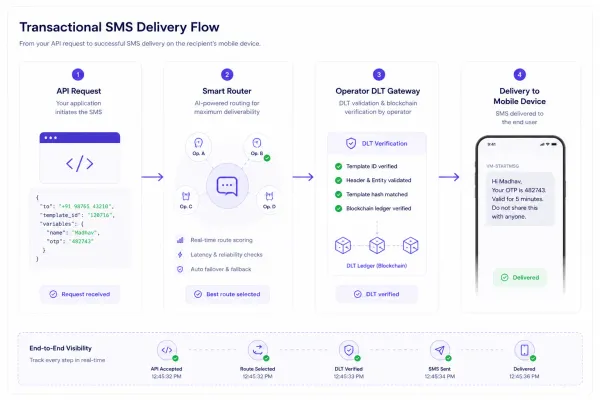
India-exclusive: send transactional OTPs at just ₹0.25/SMS without the hassle of DLT registration. Our pre-registered routes handle compliance automatically so you can focus on building your product.
- ₹0.25 per transactional SMS
- No DLT registration required
- Pre-registered compliant routes
- 99.9% delivery rate across all networks
StartMessaging vs Generic Providers
| Feature | StartMessaging | Others |
|---|---|---|
| Meta Tech Provider | ||
| 14-day free trial of Business | ||
| Meta bills messages directly to your WhatsApp Business Account | ||
| No-code chatbot builder | ||
| Meta cost estimate before every campaign | ||
| Real-time webhooks | ||
| Shared team inbox & CRM pipeline | ||
| Sub-second delivery |
Features — Frequently Asked Questions
Can I use StartMessaging for both marketing and transactional messages?
Yes. StartMessaging supports all WhatsApp message categories: marketing (promotions, broadcasts), utility (order updates, shipping alerts), authentication (OTPs) and service (customer support). Meta bills message charges directly to your WhatsApp Business Account. Under Meta's pricing since 1 October 2026, every delivered template is charged at its category's rate — utility too, even inside the 24-hour customer service window. Service replies are free up to a monthly allowance per number, and chats that start from a Click-to-WhatsApp ad get a 72-hour free window.
What programming languages does the API support?
Our REST API works with any language that can make HTTP requests. The docs include ready-to-copy examples for cURL, Node.js, Python, PHP, Java and Go, and the WhatsApp app shows the exact API request for each of your templates.
Does StartMessaging support rich media messages?
Yes. Templates support image, video or document headers, carousels and up to 10 buttons (quick reply, URL, phone, copy code, WhatsApp Form and more). In the shared inbox, agents can send attachments and interactive messages with up to 3 reply buttons or a list of up to 10 rows.
How does the chatbot handle complex queries?
Add an "assign agent" step to your flow. The conversation moves to the shared inbox, where the agent sees the full chat history and the contact's tags, attributes and notes before replying.
Which features come with which WhatsApp plan?
Developer is the API with a view-only dashboard, sized by API messages a month (Developer Free included). Team adds the shared inbox, contacts, interactive messages, campaigns with scheduling and analytics, and keyword auto-replies. Business adds chatbot flows, WhatsApp Forms, A/B tests, follow-ups, repeating campaigns, segments and retargeting, the sales pipeline with conversions, and agent analytics. Enterprise is Business on a custom contract. Every workspace starts with a 14-day free trial of Business.
Ready to Build with StartMessaging?
Get your API credentials and go live in less than 5 minutes.