Automate Customer Support on WhatsApp
Handle 70% of support queries automatically with WhatsApp chatbots. Route complex issues to human agents with full conversation context. Available 24/7.
✦ No credit card required · Free plan available · Setup in 5 minutes
Smart Support Automation
Our chatbot builder lets you create intelligent support flows that understand customer intent, provide instant answers to FAQs, check order status, process returns, and escalate to human agents when needed — all without writing code.
- No-code visual chatbot builder
- Automated FAQ matching & order tracking
- Intelligent live agent handoff routing
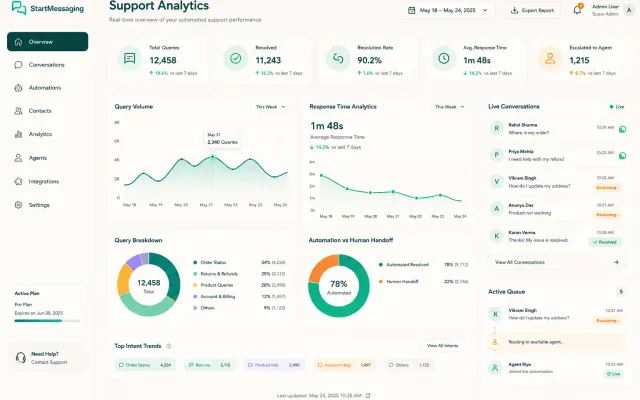
Seamless Bot-to-Human Handoff
1. Bot Resolution
The WhatsApp bot handles FAQs, user profiling, and simple transactional queries instantly.
2. Agent Request
For complex requests, the user clicks 'Talk to Agent', triggering a handoff event hook.
3. Live Takeover
The support dashboard routes the chat history to a live agent queue for immediate intervention.
WhatsApp Chatbot Support vs. Traditional Email Queue vs. Live Call Center
Compare resolution speeds, seat licensing costs, and customer accessibility across support platforms.
| Factor | WhatsApp Bot Support | Email Queue Support | Live Call Center |
|---|---|---|---|
| Average Response Speed | < 1 second (Instant) | 2 - 24 hours | 5 - 30 minutes (Hold queue) |
| Support Availability | 24/7/365 (Unattended) | Business hours queue | Shift-work availability |
| Seat Costs | Low flat API pricing | Per-agent CRM licenses | High telecom & staff overhead |
| CSAT (User Satisfaction) | 91% (High engagement) | 65% (Friction from delays) | 74% (Friction from hold times) |
Programmatic Support Handoff Trigger
curl -X POST https://api.startmessaging.com/v1/support/handoff \
  -H "Content-Type: application/json" \
  -H "X-API-Key: sm_live_your_api_key_here" \
  -d '{
    "conversationId": "conv_987654",
    "userId": "+919876543210",
    "reason": "user_requested_agent",
    "context": {
      "lastIntent": "refund_query",
      "botTurnCount": 4
    }
  }'
await fetch("https://api.startmessaging.com/v1/support/handoff", {
method: "POST",
headers: {
"Content-Type": "application/json",
"X-API-Key": "sm_live_your_api_key_here"
},
body: JSON.stringify({
conversationId: "conv_987654",
userId: "+919876543210",
reason: "user_requested_agent",
context: { lastIntent: "refund_query", botTurnCount: 4 }
})
});import requests
res = requests.post(
"https://api.startmessaging.com/v1/support/handoff",
headers={
"Content-Type": "application/json",
"X-API-Key": "sm_live_your_api_key_here"
},
json={
"conversationId": "conv_987654",
"userId": "+919876543210",
"reason": "user_requested_agent",
"context": {"lastIntent": "refund_query", "botTurnCount": 4}
}
)Customer Support — FAQ
Can the chatbot handle multiple languages?
Yes. You can create chatbot flows in multiple languages and our system automatically detects the user's preferred language based on their WhatsApp settings. You can also create separate flows per language for more nuanced responses.
Are there specific localized regulations for customer support chatbots?
No, user-initiated customer support chats are exempt from DLT template regulations, but standard data privacy rules apply.
Can I route customer chats to multiple support agents?
Yes. Our team inbox allows you to distribute conversations evenly or route them to specific departments (sales, technical support, billing) based on chatbot inputs.
Do you support customer support CRM integrations?
Yes. You can sync WhatsApp conversation logs and user profiles with Salesforce, HubSpot, Zendesk, and other popular CRMs via our webhook-driven API triggers.
Automate Your Support Today
Chatbot builder available on Premium and Enterprise plans.