Run High-Converting WhatsApp Campaigns
Segment audiences, schedule sends, A/B test templates, and track ROI — all from a single dashboard. 98% open rates vs 20% for email.
✦ No credit card required · Free plan available · Setup in 5 minutes
Intelligent Automation and Retargeting
Create advanced marketing funnels on WhatsApp. Set up conditional rules (like 'if recipient clicks Button A, trigger follow-up message B after 2 hours'). Segment your contacts based on tags, custom fields, and past behaviors to maximize relevance and conversion rates.
- Audience segmentation by customer tags
- Interactive quick replies and call-to-action buttons
- Timezone-aware campaign scheduling
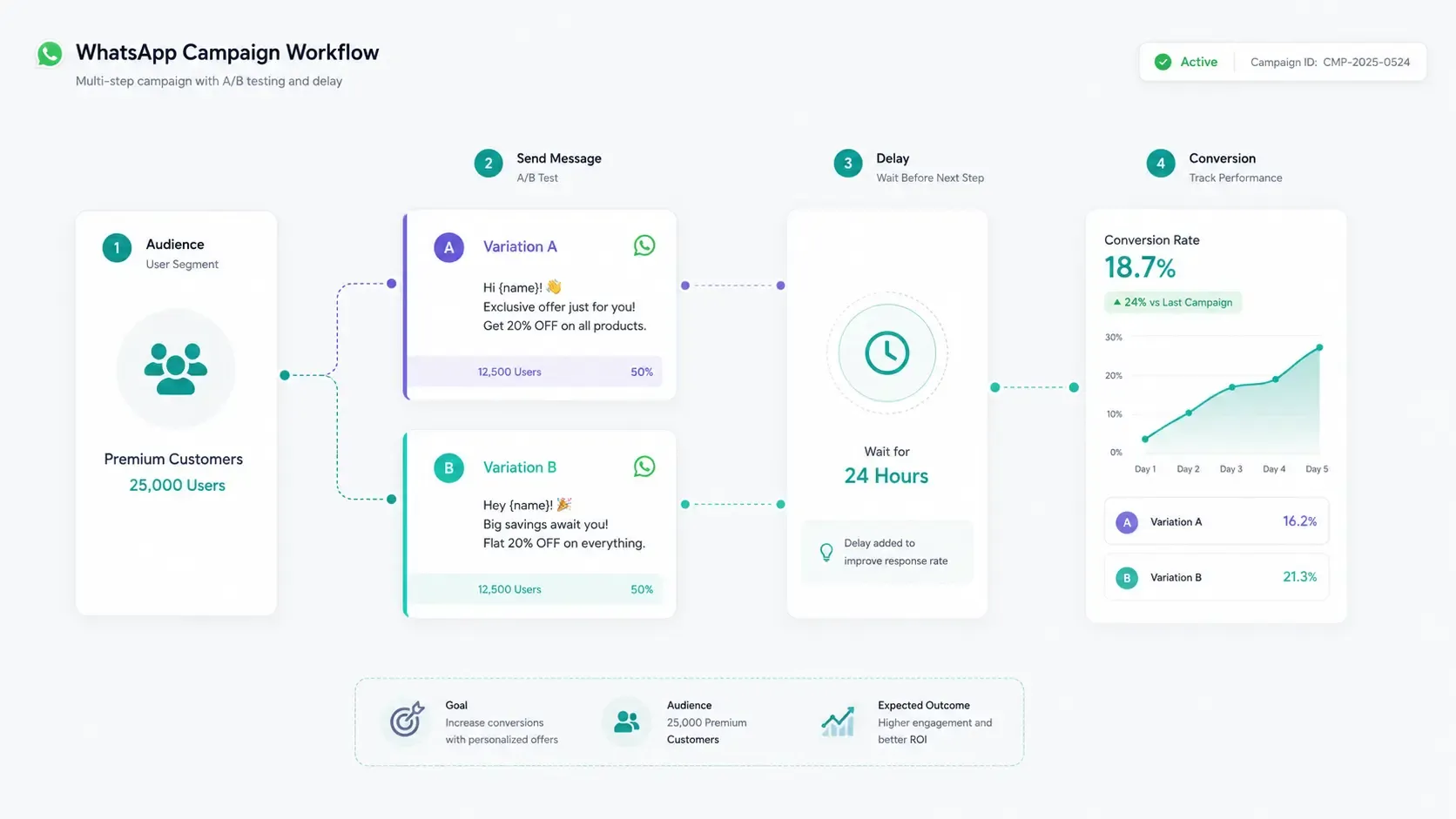
4 Steps to Launch a WhatsApp Campaign
1. Import & Segment
Upload your opted-in customer lists and divide them by tags, tags history, or geographic location.
2. Draft Templates
Write message templates with dynamic placeholders and buttons, submitting them to Meta for instant approval.
3. Schedule & Test
Perform an A/B test on a small test group first, then schedule the winning message variation.
4. Analyze Performance
Monitor delivery metrics, button clicks, and conversation read rates from your central dashboard.
Campaigns vs. Broadcast vs. Auto-responders
Choose the optimal approach to scale customer engagement on WhatsApp.
| Feature Set | WhatsApp Campaigns | One-off Broadcast | Simple Auto-responder |
|---|---|---|---|
| A/B Template Testing | |||
| Timezone-Aware Scheduling | |||
| Sequence Fallback Logic | ✓ (Multi-step) | ||
| Real-time Conversion ROI | Read receipts only |
Launch and Schedule Campaigns via API
curl -X POST https://api.startmessaging.com/v1/campaigns \
  -H "Content-Type: application/json" \
  -H "X-API-Key: sm_live_your_api_key_here" \
  -d '{
    "campaignName": "summer_sale_2026",
    "segmentId": "seg_xyz789",
    "templateA": "sale_variant_a",
    "templateB": "sale_variant_b",
    "testRatio": 0.15,
    "scheduledAt": "2026-06-20T10:00:00Z"
  }'
const response = await fetch("https://api.startmessaging.com/v1/campaigns", {
method: "POST",
headers: {
"Content-Type": "application/json",
"X-API-Key": "sm_live_your_api_key_here",
},
body: JSON.stringify({
campaignName: "summer_sale_2026",
segmentId: "seg_xyz789",
templateA: "sale_variant_a",
templateB: "sale_variant_b",
testRatio: 0.15,
scheduledAt: "2026-06-20T10:00:00Z"
})
});
const data = await response.json();
console.log(data);import requests
response = requests.post(
"https://api.startmessaging.com/v1/campaigns",
headers={
"Content-Type": "application/json",
"X-API-Key": "sm_live_your_api_key_here",
},
json={
"campaignName": "summer_sale_2026",
"segmentId": "seg_xyz789",
"templateA": "sale_variant_a",
"templateB": "sale_variant_b",
"testRatio": 0.15,
"scheduledAt": "2026-06-20T10:00:00Z"
}
)
print(response.json())$ch = curl_init("https://api.startmessaging.com/v1/campaigns");
curl_setopt_array($ch, [
CURLOPT_RETURNTRANSFER => true,
CURLOPT_POST => true,
CURLOPT_HTTPHEADER => [
"Content-Type: application/json",
"X-API-Key: sm_live_your_api_key_here",
],
CURLOPT_POSTFIELDS => json_encode([
"campaignName" => "summer_sale_2026",
"segmentId" => "seg_xyz789",
"templateA" => "sale_variant_a",
"templateB" => "sale_variant_b",
"testRatio" => 0.15,
"scheduledAt" => "2026-06-20T10:00:00Z"
]),
]);
$response = curl_exec($ch);
curl_close($ch);
$data = json_decode($response, true);import java.net.http.*;
import java.net.URI;
HttpClient client = HttpClient.newHttpClient();
String body = """
{
"campaignName": "summer_sale_2026",
"segmentId": "seg_xyz789",
"templateA": "sale_variant_a",
"templateB": "sale_variant_b",
"testRatio": 0.15,
"scheduledAt": "2026-06-20T10:00:00Z"
}
""";
HttpRequest request = HttpRequest.newBuilder()
.uri(URI.create("https://api.startmessaging.com/v1/campaigns"))
.header("Content-Type", "application/json")
.header("X-API-Key", "sm_live_your_api_key_here")
.POST(HttpRequest.BodyPublishers.ofString(body))
.build();
HttpResponse<String> response = client.send(request, HttpResponse.BodyHandlers.ofString());
System.out.println(response.body());package main
import (
"bytes"
"encoding/json"
"fmt"
"net/http"
"io"
)
func main() {
payload, _ := json.Marshal(map[string]interface{}{
"campaignName": "summer_sale_2026",
"segmentId": "seg_xyz789",
"templateA": "sale_variant_a",
"templateB": "sale_variant_b",
"testRatio": 0.15,
"scheduledAt": "2026-06-20T10:00:00Z",
})
req, _ := http.NewRequest("POST", "https://api.startmessaging.com/v1/campaigns", bytes.NewBuffer(payload))
req.Header.Set("Content-Type", "application/json")
req.Header.Set("X-API-Key", "sm_live_your_api_key_here")
resp, _ := http.DefaultClient.Do(req)
defer resp.Body.Close()
body, _ := io.ReadAll(resp.Body)
fmt.Println(string(body))
}Campaigns — Frequently Asked Questions
What types of campaigns can I run on WhatsApp?
You can run promotional campaigns (product launches, seasonal sales, event invitations), re-engagement campaigns (abandoned cart reminders, win-back offers), informational campaigns (product updates, feature announcements), and loyalty campaigns (rewards programs, VIP offers). All require opted-in contacts and pre-approved templates.
How does A/B testing work?
Create two or more template variations and split your audience. StartMessaging sends each variation to a test segment first, measures performance (delivery rate, open rate, click rate), then automatically sends the winning template to the remaining audience. You can test different copy, images, buttons, and CTAs.
Related Pages
Launch Your First WhatsApp Campaign
Free plan. No credit card. 5-minute setup.