Secure User Verification with OTP
Add phone-based OTP verification to your app in minutes. Support sign-up verification, two-factor authentication, password resets, and transaction confirmations via WhatsApp or SMS.
✦ No credit card required · Free plan available · Setup in 5 minutes
OTP Flow in 4 Steps
User enters phone number
Your app collects the user's phone number during sign-up, login, or transaction.
Your app calls our API
POST /otp/send with the phone number. We generate a random code and deliver it via WhatsApp (preferred) or SMS.
User enters the code
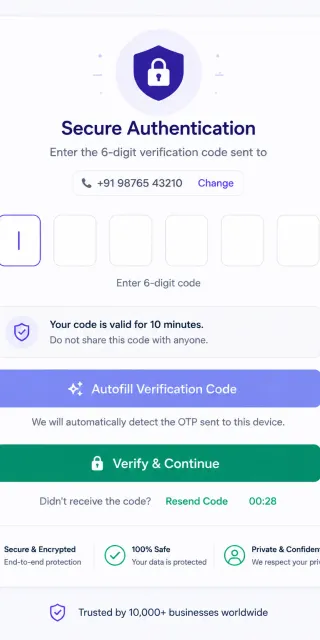
The user receives the OTP on their phone and enters it in your app's verification screen.
Your app verifies the code
POST /otp/verify with the request_id and code. We confirm the match and return verified: true/false.
Fast, High-Delivery OTP Verification
OTP delivery failures directly cause customer drop-offs. By routing authentication codes WhatsApp-first, you bypass network congestion and carrier spam block lists. Supported Android devices enable single-tap verification autofills, boosting conversions.
- 99%+ delivery rate via WhatsApp channels
- Auto-fallback to DLT-compliant SMS
- Android one-tap auto-fill button support
WhatsApp OTP Verification vs. Traditional SMS OTP vs. Email Authentication
Compare delivery rates, latency speed, user setup complexity, and costs.
| Comparison Vector | WhatsApp OTP | Traditional SMS OTP | Email Verification |
|---|---|---|---|
| Delivery Success Ratio | 99%+ | 82% - 88% | 70% - 80% |
| Average Delivery Latency | < 2 seconds | 10 - 30+ seconds | Seconds to minutes |
| One-Tap Autofill | ✓ (Android system native) | ✓ (Android & iOS native) | ✗ (Manual inbox copy) |
| Security Level (E2E) | ✓ (End-to-End Encrypted) | ✗ (Vulnerable to interception) | ✗ (Plain text server transfer) |
Send and Verify One-Time Passwords
curl -X POST https://api.startmessaging.com/otp/send \
  -H "Content-Type: application/json" \
  -H "X-API-Key: sm_live_your_api_key_here" \
  -d '{
    "phoneNumber": "+919876543210",
    "templateId": "YOUR_TEMPLATE_ID",
    "variables": {
      "otp": "123456",
      "appName": "YourApp"
    }
  }'
await fetch("https://api.startmessaging.com/otp/send", {
method: "POST",
headers: {
"Content-Type": "application/json",
"X-API-Key": "sm_live_your_api_key_here"
},
body: JSON.stringify({
phoneNumber: "+919876543210",
templateId: "YOUR_TEMPLATE_ID",
variables: { otp: "123456", appName: "YourApp" }
})
});import requests
res = requests.post(
"https://api.startmessaging.com/otp/send",
headers={
"Content-Type": "application/json",
"X-API-Key": "sm_live_your_api_key_here"
},
json={
"phoneNumber": "+919876543210",
"templateId": "YOUR_TEMPLATE_ID",
"variables": {"otp": "123456", "appName": "YourApp"}
}
)OTP Authentication — FAQ
What's the best practice for OTP expiry time?
We recommend 5 minutes for standard sign-up/login OTPs and 2-3 minutes for high-security transactions (payments, password resets). Our API supports configurable expiry from 30 seconds to 30 minutes. Shorter expiry times are more secure but may cause friction for users on slow connections.
What are the DLT registration rules for fallback SMS OTP in India?
In India, DLT registration requires you to associate your SMS templates with a registered Principal Entity (PE) ID and a Sender ID (Header). StartMessaging maps these variables dynamically so that if a WhatsApp OTP fails to deliver, the fallback SMS matches DLT compliance and delivers immediately.
Can we implement automatic fallback if the WhatsApp OTP fails?
Yes, our API does this automatically. If a WhatsApp message cannot be delivered within a defined timeout (e.g., 30 seconds due to no internet connection), the system automatically routes a fallback SMS OTP to ensure the user receives their verification code without delay.
Is there a limit on how many OTPs a user can request?
Yes, to prevent spam and SMS pumping fraud, we enforce a default rate limit of 3 OTP requests per 5 minutes per phone number. This protects your API balance from exhaustion. You can customize these limits or request increases via your account dashboard.
Related Pages
Add OTP to Your App Today
Free plan. API key in 30 seconds.