Build WhatsApp Chatbots Without Code
Design conversation flows visually with drag-and-drop. Handle support, sales, bookings, and FAQs 24/7. Seamless handoff to human agents when needed.
✦ No credit card required · Free plan available · Setup in 5 minutes
Visual Drag-and-Drop Flow Builder
No coding required. Our visual flow builder lets you create complex conversation trees with conditional logic, buttons, quick replies, and dynamic content. Test your chatbot in sandbox before going live.
- Visual drag-and-drop interface
- Conditional logic & branching
- Agent handoff with full context
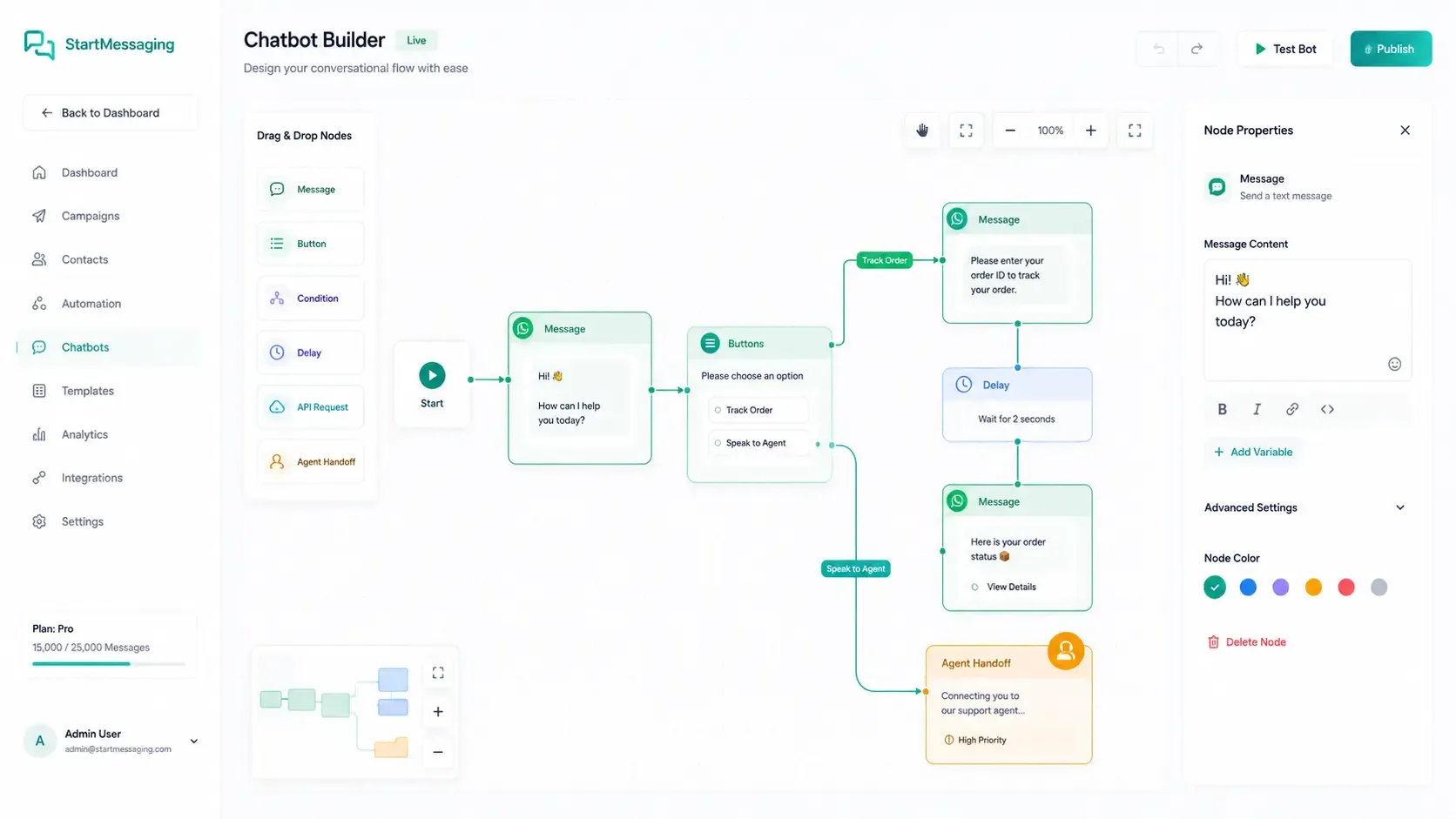
Seamless Bot-to-Human Agent Handoff
1. Bot Resolution Try
The chatbot addresses FAQs, collects primary details, and processes queries using visual logic rules.
2. Transfer Request
If a user chooses 'Speak to Agent' or triggers complex inputs, a webhook notification fires.
3. Direct Takeover
Live human agents receive the full conversational transcripts in their dashboard chat interface instantly.
Chatbot Automation vs. Interactive Menu vs. Live Support
Understand the response efficiency, setup complexity, and cost differences.
| Capability | Automated Chatbot | Interactive Button Menu | Pure Live Support |
|---|---|---|---|
| Response Latency | < 1 second (Instant) | < 1 second (Fixed options) | Minutes to hours (Queue dependent) |
| Complexity Level | High (AI & Dynamic routing) | Low (Fixed static routes) | High (Human capacity dependent) |
| Operating Hours | 24/7/365 (Unattended) | 24/7/365 (Unattended) | Business hours only |
| Operational Costs | Lowest (Fraction of a cent) | Low (Fixed pricing) | Highest (Per agent seat costs) |
Receive Customer Messages in Real-Time
{
  "event": "message.received",
  "timestamp": "2026-06-12T18:23:00Z",
  "data": {
    "from": "+919876543210",
    "message_id": "wamid.HBgLOTE5ODc2NTQzMjEwFQIAERgSQjMyM...",
    "type": "text",
    "body": "I need help tracking my order #5521"
  }
}
const express = require('express');
const app = express();
app.use(express.json());
app.post('/webhooks/whatsapp', (req, res) => {
const { event, data } = req.body;
if (event === 'message.received') {
console.log(`Received WhatsApp from ${data.from}: ${data.body}`);
// Trigger automated reply logic here...
}
res.sendStatus(200);
});from flask import Flask, request, jsonify
app = Flask(__name__)
@app.route('/webhooks/whatsapp', methods=['POST'])
def whatsapp_webhook():
payload = request.json
if payload.get('event') == 'message.received':
data = payload['data']
print(f"Message from {data['from']}: {data['body']}")
return '', 200Chatbot — FAQ
Can the chatbot hand off to a human agent?
Yes. When a conversation exceeds the chatbot's capabilities, it automatically transfers to a human agent with the complete conversation history and context. Agents see the full chat log, user profile, and chatbot interaction summary so they can help immediately without asking the customer to repeat anything.
Do I need coding skills to build a WhatsApp chatbot?
No. Our visual flow builder is completely no-code — just drag and drop conversation nodes, configure responses, and set up conditions. For advanced users, our API also supports programmatic chatbot logic through webhooks, so you can connect to external systems (CRM, database, AI) for dynamic responses.
What types of messages can the chatbot handle automatically?
The chatbot can handle text responses, interactive button menus, list messages, rich media (images, PDFs, audio), location sharing, and standard FAQ matches. This allows you to guide users through structured menus or answer open-ended questions instantly.
Can I connect the chatbot to my CRM or external database?
Yes. Using webhooks or integrations, your chatbot can fetch data (like order status or account balances) from external APIs and databases to customize responses. It can also send gathered user data directly to your CRM, database, or helpdesk tools in real time.
How do I test the chatbot before going live?
StartMessaging provides a secure sandbox environment. You can bind test phone numbers to your draft chatbot flows to interact with the bot in real time on WhatsApp before connecting it to your official, live WhatsApp Business API phone number.
Build Your First WhatsApp Chatbot
Available on Premium and Enterprise plans.