Automate WhatsApp Messages by User Events
Set up webhook-driven triggers that automatically send WhatsApp messages when users take specific actions — abandoned cart after 1 hour, welcome message on sign-up, review request after delivery.
✦ No credit card required · Free plan available · Setup in 5 minutes
Event-Driven Message Automation
Trigger highly personalized messages instantly based on user actions in your app or online store. Connect your webhooks to automate recovery flows for abandoned checkouts, dispatch transactional welcome messages on new sign-ups, and trigger feedback requests immediately after successful deliveries.
- Real-time webhook ingestion with automated retry queues
- Conditional delays and time-zone aware scheduling filters
- Seamless custom integrations with Shopify, WooCommerce, and custom backends
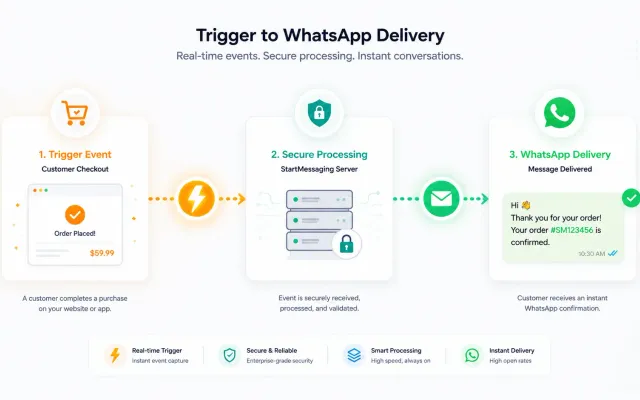
3 Steps to Automated Messaging
Define Your Trigger Event
Choose from pre-built events (abandoned cart, sign-up, purchase) or create custom webhook triggers from your backend systems.
Configure Your Template & Delay
Select a pre-approved WhatsApp template, set personalization variables, and configure the delay (e.g., 1 hour after cart abandonment).
Activate & Monitor
Turn on your trigger and monitor performance in real-time. Track delivery, opens, clicks, and conversion rates from your dashboard.
Event Triggers vs. Polling Systems vs. Manual Webhooks
Compare setup overhead, network latency, and infrastructure resource costs for event automation.
| Comparison Point | Real-time Event Triggers | Cron Polling Systems | Manual Direct Webhooks |
|---|---|---|---|
| Message Latency | < 1 second (Direct push) | Minutes to hours (Batch run) | < 1 second (Direct hook) |
| Development Effort | Low (Configure on UI/API) | Medium (Write scheduler logic) | High (Handle edge failures) |
| Server Load Overhead | Minimal (Event-driven) | High (Heavy periodic DB scans) | Minimal (Push updates) |
| Error Fallback Handling | ✓ (Built-in retry queues) | ✗ (Manual correction needed) | ✗ (Requires custom script queues) |
Register a Automated Message Trigger
curl -X POST https://api.startmessaging.com/v1/triggers \
  -H "Content-Type: application/json" \
  -H "X-API-Key: sm_live_your_api_key_here" \
  -d '{
    "trigger_name": "cart_abandoned_recovery",
    "event_source": "shopify_checkout_abandoned",
    "delay_seconds": 3600,
    "template_name": "abandoned_cart_discount",
    "fallback_channel": "sms"
  }'
await fetch("https://api.startmessaging.com/v1/triggers", {
method: "POST",
headers: {
"Content-Type": "application/json",
"X-API-Key": "sm_live_your_api_key_here"
},
body: JSON.stringify({
trigger_name: "cart_abandoned_recovery",
event_source: "shopify_checkout_abandoned",
delay_seconds: 3600,
template_name: "abandoned_cart_discount",
fallback_channel: "sms"
})
});Auto-Trigger — FAQ
Can I set delays for triggered messages?
Yes. You can configure delays from 0 seconds (instant) up to 72 hours after the trigger event. For example, send an abandoned cart reminder 1 hour after the user left your site, followed by a second reminder at 24 hours with a discount offer.
Automate Your Customer Journeys
Free plan. No credit card required.