OTP Not Delivered in India? Developer Debugging Guide (2026)
Is your OTP not delivered in India? Use this 2026 developer guide to debug DLT template mismatches, grey routes, carrier blocks, and spam filtering issues.
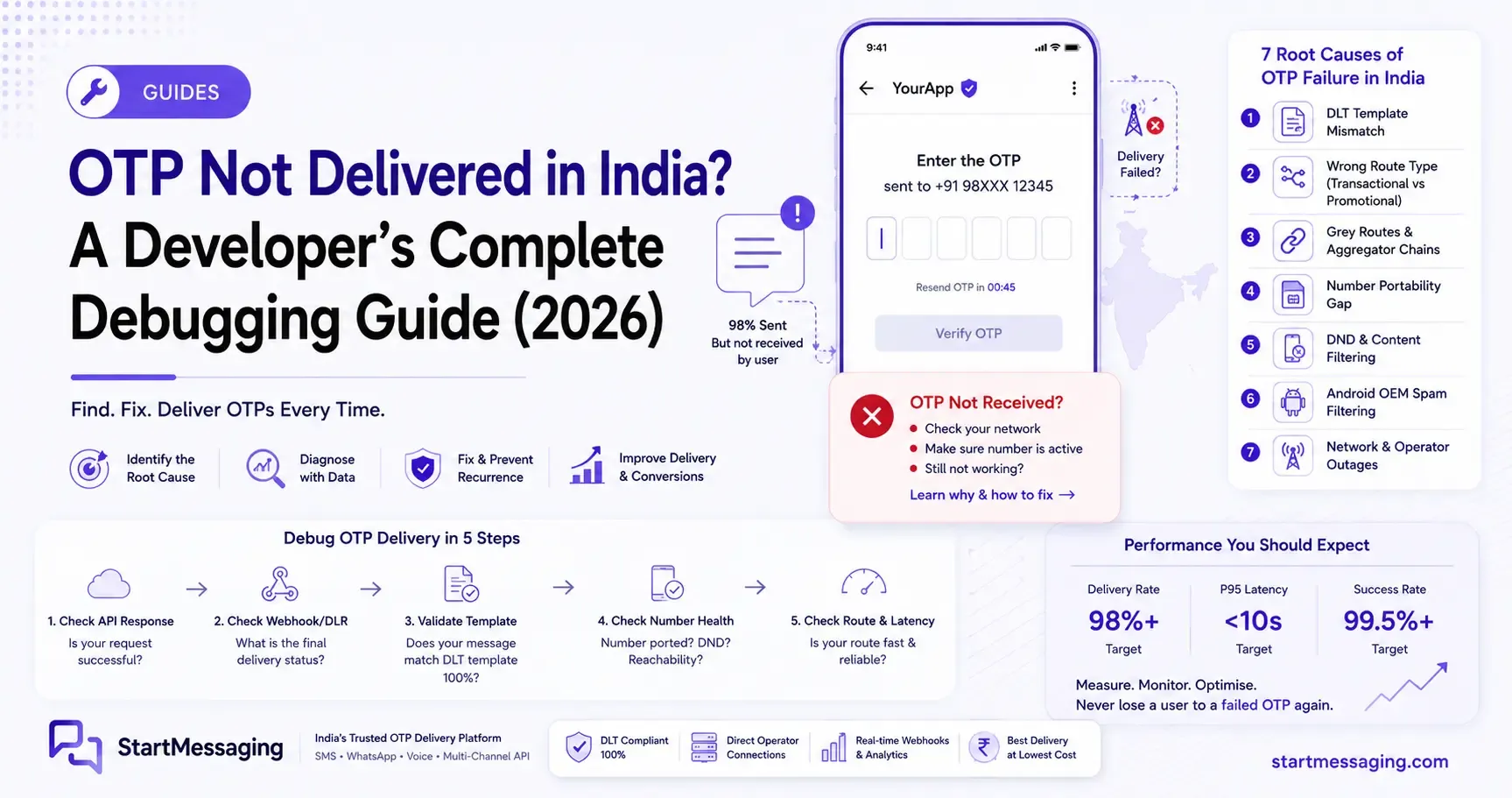
It is 11:30 PM on a Friday, and Rohan is watching the sign-up conversion dashboard for his startup, RupeeFlow, plummet from 82% to 41%. The on-call Slack channel is flooded with customer alerts: the SMS verification code is simply not arriving. If you are a developer in India, this scenario is a familiar nightmare when a critical otp not delivered india issue breaks your onboarding flow. What makes this problem painful is its silent nature—your API logs show HTTP 200 OK, but your users see nothing.
This troubleshooting guide is built for developers who need to diagnose and resolve SMS OTP delivery failures in production immediately. We examine the mechanics of Indian carrier networks, explain TRAI regulations, show how to decrypt delivery webhook payloads, and provide a framework to isolate exactly where your OTP is getting lost in transit.
Why OTP Failure Is Different From Ordinary SMS Failure
Ordinary SMS delivery failures are straightforward. If you send a bulk marketing message and it fails, the gateway usually rejects it with a clear API error code, or the delivery receipt indicates an invalid number. OTP failures, however, are dynamic and harder to detect because they often fail silently after your gateway reports success.
To resolve these errors, you must understand the distinction between hard failures and soft failures in your SMS pipeline.
The Invisible Failure Anomaly
When a backend service calls an SMS gateway, the gateway performs basic validation (checking API keys, credits, and formatting) and returns a standard HTTP 200 OK response. This success status does not guarantee delivery to the handset; it only indicates that the gateway accepted the message.
From this point, the message goes through operator-level DLT filtering, routing switches, and local handset filters. If a message is scrubbed by an operator’s filter, it is dropped silently. The gateway reports success, and your database marks the transaction as complete, yet the user never receives the verification code.
Hard Failures vs. Soft Failures
The first step in diagnosing why your sms otp failed india is to separate hard errors from soft errors:
- Hard Failures (Visible in Logs): These occur before the message leaves your provider. The API returns an explicit error code (e.g.,
400 Bad Requestfor invalid E.164 formatting,403 Forbiddenfor exhausted wallet credits, or429 Too Many Requestsdue to rate-limiting). These are easily caught using standard application try-catch blocks. - Soft Failures (Invisible in Logs): The message successfully exits your gateway but gets blocked downstream. This includes template mismatches at the operator level, routing delays on congested lines, silent spam filtering by Android OEM skins, or propagation delays on recently ported numbers. These failures do not return immediate errors to your API request.
The True Cost of OTP Drop-off
A raw 3% failure rate on general transactional messages might seem acceptable, but a 3% failure rate on OTP delivery is critical. OTP flows trigger at points of peak user intent: during account registration, checkout validation, or high-value payment authentication.
If a user fails to receive an OTP within 30 seconds, abandonment rates spike. Indian consumer data shows that a 3% OTP failure rate on signups typically results in an 8% to 15% drop in conversion rates. If users trigger multiple resend requests, your SMS costs double while your funnel performance degrades.
The Seven Root Causes of OTP Failure in India
If your API dashboard indicates success but users complain about missing messages, one of these seven root causes is likely responsible.
Cause 1: DLT Template Mismatch (Most Common)
Under the Telecom Regulatory Authority of India (TRAI) guidelines, every business sending transactional SMS messages in India must register their Principal Entity ID (PE-ID), Header (Sender ID), and message templates on a Distributed Ledger Technology (DLT) platform.
At runtime, the carrier’s DLT scrubber verifies that the outgoing text matches the registered template character-for-character. This match includes spaces, punctuation marks, line breaks, and variable placeholders (typically formatted as {#var#}).
If your backend code generates a string with an extra space, a misplaced period, or if the content inside a template variable deviates from the approved parameters, the operator’s DLT filter will block the message. The API call returns a successful status, but the operator drops the message, and the handset receives nothing.
How to Diagnose: Use a testing endpoint to output the exact string sent to the API. Compare it character-for-character using a string diff tool against your approved template on the DLT portal (e.g., Vilpower, PingConnect, or Jio DLT). Common issues include:
- Using double spaces instead of single spaces.
- Adding a trailing newline character at the end of the text.
- Passing variables that exceed the registered length limits (typically 30 characters per variable placeholder).
The Fix: Update your code to construct the string template exactly as approved. If you want to bypass the complexity of DLT template registration, use a service like StartMessaging that routes OTPs via pre-approved system templates, resolving this issue without manual registration.
Cause 2: Wrong Route Type (Transactional vs. Promotional)
Carriers categorize SMS routes into distinct lanes, each subject to different rules and cost structures:
| Route Type | Purpose | DND Delivery | Sending Window | Cost |
|---|---|---|---|---|
| Transactional | Dynamic OTPs only (banking/auth) | Allowed 24/7 | No restrictions | Higher |
| Service Implicit | Important alerts, shipping updates | Allowed 24/7 | No restrictions | Standard |
| Service Explicit | Opt-in promotional notifications | Blocked for DND | Restricted | Standard |
| Promotional | Unsolicited marketing materials | Blocked for DND | 9:00 AM – 9:00 PM | Lower |
If your provider incorrectly routes your OTP over a promotional route, or if your Sender ID is classified under the promotional category, any message sent to a user on the National Customer Preference Register (NCPR/DND) is blocked. Promotional routes also experience queuing during peak hours, and messages are dropped outside the allowed 9:00 AM to 9:00 PM window.
How to Diagnose: Review your failed delivery records. If you observe that delivery failures correlate with phone numbers registered on the DND registry, your messages are likely traveling over a promotional or service-explicit route.
The Fix: Verify your sender configurations in your provider’s dashboard. Ensure your OTPs use transactional or service-implicit routes and that your Sender ID matches your approved DLT header.
Cause 3: Grey Routes and Aggregator Chains
To offer lower prices, some aggregators use grey routes to deliver SMS traffic. A grey route operates by forwarding the SMS across multiple countries or hopping through several unregulated intermediary networks before returning to an Indian carrier.
These multi-hop chains introduce issues:
- High Latency: Every hop adds delay, causing OTPs to arrive after the user’s login session has timed out.
- No DLT Compliance: As carriers enforce stricter scrubbing rules on national links, grey route messages that bypass these checks are dropped by Indian operators.
- Low Delivery Rates: These routing links can fail without warning when carriers block unapproved gateways.
How to Diagnose: Measure the latency between when you send the OTP and when you receive the Delivery Receipt (DLR). If your p50 delivery time exceeds 8 seconds, or your p95 latency is over 30 seconds, your messages are likely traveling over a multi-hop grey route.
The Fix: Move your traffic to an API provider that uses direct, single-hop SMPP connections to tier-1 Indian telecommunication networks like Jio, Airtel, Vi, and BSNL.
Cause 4: Number Portability Propagation Gap
India has a high rate of Mobile Number Portability (MNP) activity. When a subscriber ports their number from one operator to another (for example, switching from Vi to Airtel to get a better data plan), the global routing databases must update their records.
There is a propagation gap of 24 to 72 hours where routing tables at various intermediate SMS gateways remain out of sync. During this period, an SMS sent to the ported number is routed to the old operator network. Since that operator no longer serves the subscriber, the message is dropped.
How to Diagnose: If you observe that OTP failures are concentrated on numbers that have recently changed networks, it points to a database update delay.
The Fix: Implement a retry mechanism with a 60-second cooldown that allows the user to request a resend. If the primary SMS fails to arrive, configure your backend to fall back to WhatsApp or a voice call verification code.
Cause 5: Android OEM Spam Filtering
Even if a carrier delivers the SMS to the handset, the user might not see it. Major Android device manufacturers in India—including Xiaomi (MIUI/HyperOS), OPPO (ColorOS), Realme UI, and Vivo (FuntouchOS), which make up more than 50% of the active market—use built-in spam filters that scan incoming SMS messages.
If the algorithm flags your sender ID or text pattern, it moves the message to a hidden “Spam & Blocked” folder. The phone does not ring or display a notification badge, leaving the user to assume the OTP was never sent.
How to Diagnose: This failure pattern shows as “Delivered” in your gateway’s Delivery Status report, but the user reports that they did not receive it. It is common on devices running customized Android operating systems.
The Fix: Avoid using generic, unverified Sender IDs. Use a clear, registered Sender ID (such as STARTM for StartMessaging). On your user interface, add a note below the input field: “If you do not see the OTP within 30 seconds, please check your SMS spam folder.”
Cause 6: DND Misclassification
Under TRAI rules, transactional OTPs are exempt from DND blocks. However, this exemption depends on correct classification by the operator’s filter.
If your templates are registered under the wrong category on your DLT platform (such as registering an authentication OTP under “Service Explicit” instead of “Service Implicit” or “Transactional”), carriers will block the message for users who have opted out of commercial communications.
How to Diagnose: Query your delivery status webhooks. If the gateway returns error codes indicating DND blocks for transactional messages, check the classification of the template in your DLT portal.
The Fix: Log into your DLT portal and verify that all templates containing OTP variables are registered under the Service Implicit or Transactional category.
Cause 7: Peak-Hour Operator Throttling
During major events—such as salary days, festive sales (like Flipkart’s Big Billion Days or Amazon’s Great Indian Festival), Diwali, or IPL cricket finals—carrier infrastructures experience significant traffic spikes.
To maintain network stability, Indian operators apply throttling limits on their SMS gateways. If your gateway hits these limits, messages are placed in queues, causing delivery delays of several minutes.
How to Diagnose: Analyze your delivery logs. A sudden increase in p95 latency that correlates with high-traffic calendar events points to operator-level congestion.
The Fix: Implement a queue-based sending system (using tools like BullMQ and Redis) to manage peak traffic. Ensure your system respects rate limits and queues outgoing requests rather than sending them all at once.
Building a Webhook-Based OTP Delivery Monitor in Node.js
Relying on manual dashboard checks to find delivery issues means you only discover problems after users complain. To monitor delivery performance in real-time, you should build an automated webhook receiver.
This Node.js application uses Express to receive status callbacks from your provider, track p50 and p95 delivery latency in memory, parse standard GSM error codes, and trigger a fallback flow if an SMS fails to deliver within 30 seconds.
The Express Webhook Receiver
First, initialize a new Node.js project and install Express:
npm install express dotenvCreate a file named server.js and add the following code to handle incoming status webhooks and track performance metrics:
// server.js
import express from 'express';
import dotenv from 'dotenv';

dotenv.config();

const app = express();
app.use(express.json());

// In-memory store for tracking sent OTPs and calculating latency
const otpTracker = new Map();
const latencyHistory = [];
const LIMIT_LATENCY_METRICS = 1000; // Limit history size to prevent memory leaks

// Helper function to calculate percentiles
function getPercentile(arr, percentile) {
  if (arr.length === 0) return 0;
  const sorted = [...arr].sort((a, b) => a - b);
  const index = Math.ceil((percentile / 100) * sorted.length) - 1;
  return sorted[index];
}

// Translate standard GSM error codes to developer-friendly diagnostic descriptions
function translateGsmErrorCode(code) {
  const codeNum = parseInt(code, 10);
  switch (codeNum) {
    case 1:
      return 'Unassigned/Unallocated Number (The number does not exist)';
    case 8:
      return 'Absent Subscriber (Phone is switched off, out of coverage, or SIM is deactivated)';
    case 27:
      return 'Destination Out of Service / Barred (Carrier block, operator routing failure)';
    case 29:
      return 'Facility Rejected / DND Blocked (User is registered on DND and route was promotional)';
    case 111:
      return 'Protocol Error / DLT Verification Failed (Template mismatch at carrier scrubber)';
    default:
      return `Unknown Operator Code: ${code}`;
  }
}

// Endpoint to simulate triggering an OTP send request
app.post('/api/send-otp', async (req, res) => {
  const { phoneNumber } = req.body;

  if (!phoneNumber) {
    return res.status(400).json({ success: false, error: 'Phone number is required' });
  }

  try {
    // Call the SMS API provider
    const response = await fetch('https://api.startmessaging.com/otp/send', {
      method: 'POST',
      headers: {
        'Content-Type': 'application/json',
        'X-API-Key': process.env.STARTMESSAGING_API_KEY
      },
      body: JSON.stringify({ phoneNumber })
    });

    if (!response.ok) {
      const errPayload = await response.json();
      throw new Error(errPayload.message || 'Gateway connection error');
    }

    const { data } = await response.json();
    const { requestId } = data;

    // Track the message sent time
    otpTracker.set(requestId, {
      phoneNumber,
      sentAt: Date.now(),
      status: 'sent',
      fallbackTimer: setTimeout(() => {
        triggerFallbackRoute(requestId);
      }, 30000) // 30-second fallback timer
    });

    return res.json({ success: true, requestId });
  } catch (error) {
    return res.status(500).json({ success: false, error: error.message });
  }
});

// Webhook endpoint to receive status delivery reports (DLR) from the provider
app.post('/webhooks/dlr', (req, res) => {
  const { requestId, status, errorCode, timestamp } = req.body;
  const record = otpTracker.get(requestId);

  if (!record) {
    return res.status(200).json({ status: 'ignored', reason: 'Request ID not found' });
  }

  const duration = Date.now() - record.sentAt;

  if (status === 'delivered') {
    // Clear the fallback timer since the message arrived
    clearTimeout(record.fallbackTimer);
    record.status = 'delivered';
    record.deliveredAt = timestamp ? new Date(timestamp).getTime() : Date.now();

    // Log the delivery latency
    const deliveryLatencySec = duration / 1000;
    latencyHistory.push(deliveryLatencySec);

    if (latencyHistory.length > LIMIT_LATENCY_METRICS) {
      latencyHistory.shift();
    }

    const p50 = getPercentile(latencyHistory, 50).toFixed(2);
    const p95 = getPercentile(latencyHistory, 95).toFixed(2);

    console.log(`[DLR Success] OTP ${requestId} delivered in ${deliveryLatencySec}s. Real-time p50: ${p50}s | p95: ${p95}s`);

    if (p95 > 15) {
      console.warn(`[ALERT] High latency detected. p95 delivery time is currently ${p95}s. Route degraded.`);
    }

    otpTracker.delete(requestId);
  } else if (status === 'failed') {
    clearTimeout(record.fallbackTimer);
    record.status = 'failed';

    const explanation = translateGsmErrorCode(errorCode);
    console.error(`[DLR Failure] OTP ${requestId} failed. Code: ${errorCode} | Reason: ${explanation}`);

    // Trigger immediate fallback since delivery failed
    triggerFallbackRoute(requestId);
  }

  return res.status(200).json({ received: true });
});

// Trigger fallback delivery via an alternative channel like WhatsApp
async function triggerFallbackRoute(requestId) {
  const record = otpTracker.get(requestId);
  if (!record || record.status === 'delivered') return;

  console.log(`[Fallback] SMS delivery failed or timed out for ${record.phoneNumber}. Routing to fallback channel.`);

  try {
    // Initialize the WhatsApp fallback request
    // TODO: Update to the final production endpoint and process once the WhatsApp API is officially released
    const fallbackResponse = await fetch('https://api.startmessaging.com/v1/messages', {
      method: 'POST',
      headers: {
        'Content-Type': 'application/json',
        'X-API-Key': process.env.STARTMESSAGING_API_KEY
      },
      body: JSON.stringify({
        to: record.phoneNumber,
        type: 'template',
        template: {
          name: 'whatsapp_otp_fallback',
          language: { code: 'en' },
          components: [
            {
              type: 'body',
              parameters: [
                { type: 'text', text: '582910' } // Example fallback code
              ]
            }
          ]
        }
      })
    });

    if (fallbackResponse.ok) {
      console.log(`[Fallback Success] Fallback message dispatched to ${record.phoneNumber} via WhatsApp.`);
      record.status = 'fallback_routed';
    } else {
      console.error(`[Fallback Failure] WhatsApp backup route returned status ${fallbackResponse.status}`);
    }
  } catch (error) {
    console.error(`[Fallback Error] Failed to execute fallback route: ${error.message}`);
  } finally {
    otpTracker.delete(requestId);
  }
}

const PORT = process.env.PORT || 3000;
app.listen(PORT, () => {
  console.log(`Webhook monitoring server is running on port ${PORT}`);
});
Analyzing Webhook Responses
Our webhook parser translates standard GSM status codes to help isolate issues. When a message fails, pay attention to the errorCode field:
- Error Code 8 (Absent Subscriber): Indicates the handset is unreachable. This occurs if the user’s phone is switched off, out of network coverage, or if the SIM card has been deactivated. Do not retry sending via SMS immediately; wait for the user to confirm their network status.
- Error Code 27 (Destination Barred): The operator has blocked messages to this destination. This can indicate an inactive account, an expired prepaid plan, or billing issues.
- Error Code 29 (Facility Rejected / DND Blocked): The carrier blocked the message because the user is on the DND registry and the message traveled over a promotional route. Verify that your template is correctly registered as transactional on your DLT portal.
The OTP Failure Prevention Checklist
Use this checklist during your pre-launch testing and operational reviews to minimize delivery issues.
1. DLT Template Verification
- Exact Match Audit: Verify that the strings sent by your backend match your approved DLT templates character-for-character, including spaces and punctuation.
- Variable Validations: Ensure all variable injections are limited to the allowed character length (usually under 30 characters).
- Header Mapping: Check that your registered Sender ID (Header) is correctly mapped to your sending account.
2. Route & Regulatory Checks
- Route Verification: Confirm with your SMS provider that your traffic is routed over transactional or service-implicit lines, not promotional routes.
- Sender ID Warmup: For new Sender IDs, run test sends to verify that local operators have updated their routing databases.
3. Monitoring Setup
- Webhook Integration: Set up status webhooks to receive real-time delivery reports.
- Latency Alerting: Configure metrics to track p95 latency and trigger notifications if it exceeds 15 seconds.
- GSM Code Mapping: Map incoming error codes to help customer support teams identify user-specific network issues.
4. UI/UX Implementations
- Spam Folder Hint: Add a micro-copy hint on your OTP verification screen reminding users to check their spam folder if they are on an Android device.
- Resend Cooldown: Implement a strict 60-second countdown timer on your “Resend OTP” button to prevent spam and rate-limit issues.
- Verification Fallback: Set up WhatsApp or voice verification as a backup channel if the primary SMS does not arrive.
Frequently Asked Questions
Q: My API shows the OTP was sent but the user never received it — what should I check first?
A: Perform a character-for-character comparison of the text sent by your application against your approved DLT template. If there is any difference in punctuation, spacing, or variable placeholders, carriers will scrub the message without returning an API error. If the template matches, check if the recipient’s number is registered on DND and verify that your route is classified as transactional.
Q: Does DND block OTP messages in India?
A: Transactional OTPs are exempt from DND restrictions under TRAI regulations. However, if your templates are registered under the promotional or service-explicit category instead of transactional or service-implicit, carriers will block them for DND-registered users.
Q: Why do OTPs fail on Xiaomi and OPPO phones specifically?
A: These manufacturers use custom Android interfaces (MIUI/HyperOS and ColorOS) with built-in spam filters that scan incoming SMS messages. If the filter flags the sender ID, the message is moved to a hidden spam folder without triggering a notification. The message is delivered to the device, but the user does not see it.
Q: What is a grey route and how do I know if my provider uses one?
A: A grey route is an indirect route that hops across multiple intermediary or international networks before reaching the destination carrier. You can identify grey routes by tracking delivery latency. If your p50 delivery latency is regularly above 8 seconds, or your p95 latency exceeds 30 seconds, your provider is likely using grey routes.
Q: How do I measure OTP delivery latency in production?
A: Configure your application to record the timestamp when you call the SMS API, and log the second timestamp when your webhook receiver receives the “delivered” callback. Calculate the difference to determine latency, and compute your p50 and p95 percentiles over a rolling window.
Q: Can a number porting event cause my OTP to fail?
A: Yes. When a subscriber ports their number to a new carrier, routing databases can take 24 to 72 hours to update. During this propagation gap, SMS messages sent to the number are often routed to the old carrier network and dropped.
Rohan updated RupeeFlow’s codebase to validate approved DLT templates at the code level, implemented the Express webhook receiver to monitor latency, and set up a fallback to route failed SMS codes over WhatsApp. After moving their core traffic to StartMessaging’s direct carrier links, RupeeFlow’s OTP delivery rate stabilized at 98.7%, and Rohan’s weekend alerts cleared.
If you are dealing with delivery delays, template matching issues, or carrier routing failures, you can simplify your configuration. StartMessaging provides direct carrier routes and pre-approved system templates that deliver OTPs within 2 seconds at ₹0.25 per message, without the need for manual DLT portal setup. Create a free account on StartMessaging to start sending OTPs.
StartMessaging Team
StartMessaging Team