How to Design OTP Flows That Stop Social Engineering
Learn how to design otp social engineering india developer defenses. A technical guide on secure OTP screen copy, backend rate limiting, and device binding.
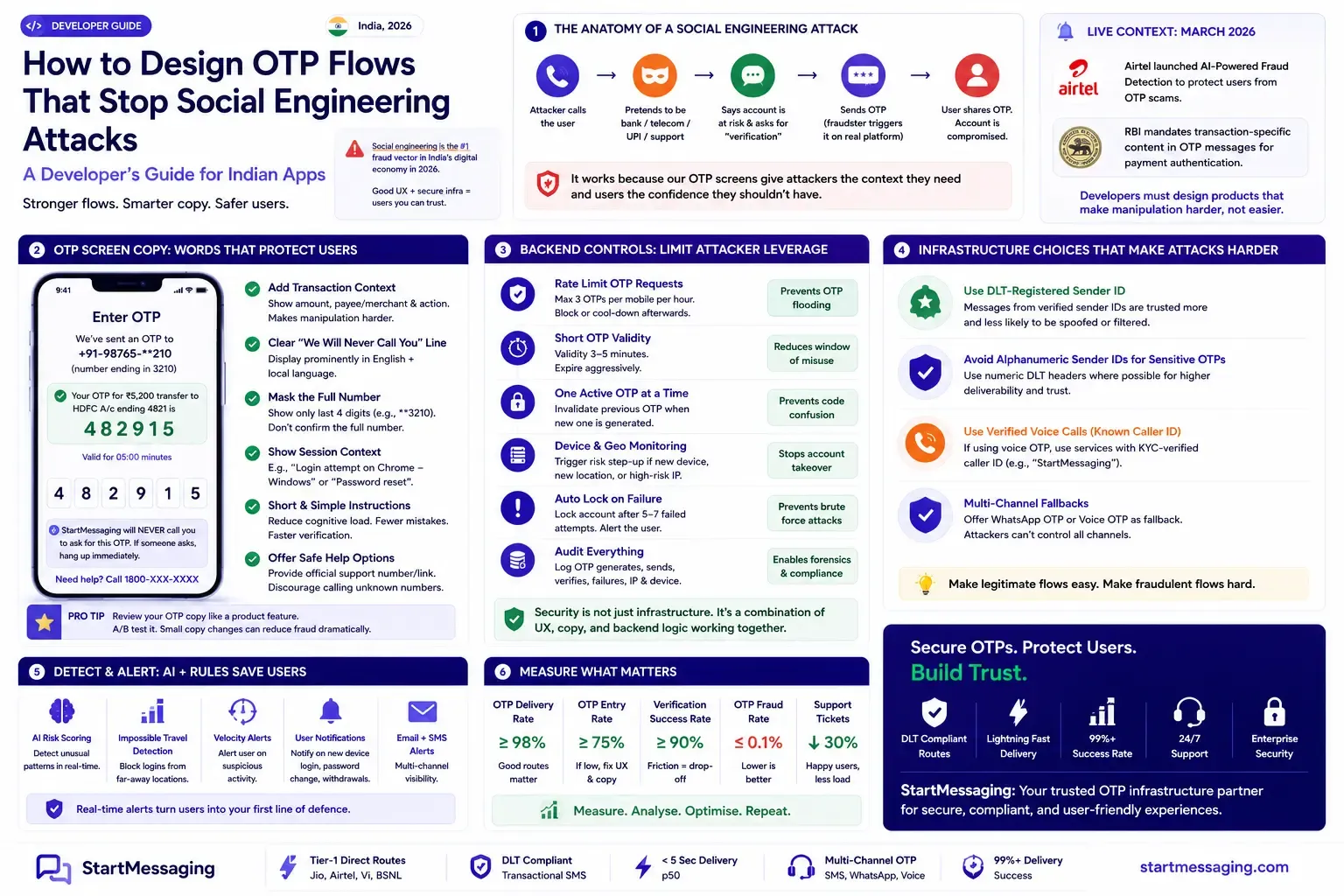
Priya stared at the support logs for PaySwift, a digital wallet app she had helped build for retail merchants across India. Over the past three weeks, merchant ticket submissions had spiked, all reporting unauthorized debits. The transactions were valid according to the database—they were authenticated using valid credentials and verified with SMS-delivered one-time passwords. Yet merchants insisted they had not authorized the payments. A review of these incidents revealed a pattern: a fraudster would call a merchant claiming to be a customer care representative from PaySwift or their bank. The scammer would claim that the merchant’s account had a pending reward or security update, trigger a real OTP from PaySwift’s backend, and then convince the merchant to read the OTP aloud. The problem was not a cryptographic vulnerability, but a product vulnerability. The standard OTP screen and generic message template (“Your OTP is 928301”) made it simple for attackers to exploit human psychology. This guide covers how developers can design secure OTP screen copy, implement backend rate-limiting, bind devices, and use clean infrastructure practices to protect users from social engineering.
Why Social Engineering Works on Indian OTP Flows
Social engineering attacks succeed because they exploit human behavior rather than technical flaws. In India, where millions of users have transitioned to digital payments, scammers have developed sophisticated manipulation tactics. A common attack sequence begins when a fraudster calls a target, posing as a bank manager, mobile carrier support representative, or payment network agent. The attacker claims the victim’s account will be blocked or that a fraudulent transfer is occurring, then triggers an OTP from the victim’s actual banking or wallet application. The attacker then convinces the victim to read out the code under the guise of “verification.”
This approach works because Indian users have been conditioned to receive OTP-related calls from legitimate customer service teams. Banks and carriers frequently call customers to verify account changes. When a scammer makes a similar call, it appears credible. Furthermore, standard OTP verification screens offer little details. A generic SMS message—such as "Your OTP is 482915. Do not share this code"—provides no transaction context, leaving the recipient unable to distinguish a legitimate session from a fraudulent request.
Attacker Flow:
[Scammer Calls Victim] ➔ [Impersonates Bank Agent] ➔ [Triggers App Login/Transfer]
  ➔ [Real OTP Sent to Victim] ➔ [Scammer Demands Code] ➔ [Victim Reads OTP] ➔ [Account Compromised]
This vulnerability makes secure flow design a product priority. Shipped OTP interfaces that lack transaction context, omit prominent warnings, or lack backend rate-limiting make users vulnerable to manipulation. Mitigating these threats requires developer and product team interventions at the UX, API, and infrastructure layers. The urgency of this issue was highlighted by Airtel’s launch of an AI-powered fraud detection system in March 2026, designed to flag scam calls in real-time. Product teams must also implement built-in defenses to secure the authentication experience.
OTP Screen Copy: Words That Prevent Sharing
The text on the OTP entry screen and in the SMS message represents a critical defense against social engineering. Most applications use generic text templates. Here are the specific changes to implement and the rationale for each:
1. Add Transaction-Specific Context to the OTP SMS
Rather than using generic verification templates, include specific transaction parameters in the SMS body. If the OTP is for a money transfer, state the payee name and amount. If it is for a password reset, say so.
- Weak Copy:
Your verification OTP is 482915. Valid for 10 minutes. - Secure Copy:
OTP for ₹5,200 transfer to HDFC a/c ending 4821 is 482915. Valid for 5 min. If you did not initiate this, call 1800-XXX-XXXX immediately.
This specific context alters the interaction. When a fraudster calls and asks for the OTP to “verify the account,” the user sees that the code is tied to a specific ₹5,200 transfer. This disparity makes the scam significantly harder to execute. The Reserve Bank of India (RBI) mandates this transaction-specific context for payment transactions, and extending it to other high-risk actions (like password changes or adding payees) is a security best practice.
2. Display Clear “We Will Never Call You” Warnings
Include a prominent, clear warning on the OTP entry screen. The message must state that your platform will never call to request the code. For applications serving users in tier-2 and tier-3 regions, provide this text in regional languages.
Verification Warning: PaySwift will never call you to ask for this OTP. If someone calls asking for this code, hang up immediately.
सत्यापन चेतावनी: पे-स्विफ्ट आपको इस ओटीपी को पूछने के लिए कभी कॉल नहीं करेगा। यदि कोई इस कोड को मांगता है, तो तुरंत फोन काट दें।
+-----------------------------------------------------------+
|                      Verify Your Account                  |
+-----------------------------------------------------------+
|                                                           |
| Enter the 6-digit OTP sent to number ending in 3210.      |
|                                                           |
|                       [ 4 ][ 8 ][ 2 ][ _ ][ _ ][ _ ]      |
|                                                           |
|  WARNING: PaySwift will never call you to ask for this   |
|  code. If someone asks for this OTP on a call, hang up    |
|  immediately.                                             |
|                                                           |
|  चेतावनी: पे-स्विफ्ट आपको इस ओटीपी के लिए कभी कॉल नहीं    |
|  करेगा। यदि कोई आपसे फोन पर यह ओटीपी मांगे, तो तुरंत      |
|  कॉल काट दें।                                             |
|                                                           |
|                      [ Submit Code ]                      |
+-----------------------------------------------------------+
3. Mask Destination Identifiers
Never print the full destination phone number on the OTP entry screen. If the screen displays OTP sent to +91-98765-43210, it confirms the user’s phone number to an attacker who may be shoulder-surfing or viewing a shared screen. Instead, display only the final four digits: OTP sent to number ending in 3210.
4. Provide Session Context
If the OTP was triggered by a login from a new device or an unusual location, display these details on the entry screen: You are attempting to log in from a new Chrome browser on Linux in Delhi. OTP sent to registered device. This context alerts users to unauthorized login attempts.
Backend Rate Limiting and Session Controls
Social engineering scams often require the attacker to trigger multiple OTPs to find a code the victim has not noticed, or to overwhelm the user with notifications. Backend rate-limiting prevents this abuse.
Let’s look at how to implement these controls using a Node.js/Express application with a Redis store. We will implement three backend defenses:
- Per-Minute Cooldown: 1 OTP request per phone number every 60 seconds.
- Daily Limit: A maximum of 5 OTP requests per phone number every 24 hours.
- Immediate Invalidation: OTP codes are deleted immediately upon verification to prevent replay attacks.
- Device Fingerprint Binding: Verification requests are rejected if they originate from a different device than the one that initiated the request.
// rateLimiter.js
import express from 'express';
import { createClient } from 'redis';
import crypto from 'node:crypto';

const app = express();
app.use(express.json());

const redisClient = createClient({ url: process.env.REDIS_URL || 'redis://localhost:6379' });
await redisClient.connect();

const DAILY_LIMIT = 5;
const OTP_EXPIRY_SECONDS = 300; // 5 minutes

/**
 * Middleware: Rate Limit OTP Generation
 * Limits requests to 1 per minute, and a maximum of 5 per day.
 */
async function rateLimitOTP(req, res, next) {
  const { phoneNumber } = req.body;
  if (!phoneNumber) {
    return res.status(400).json({ success: false, error: 'Phone number is required.' });
  }

  const phoneHash = crypto.createHash('sha256').update(phoneNumber).digest('hex');
  const minuteKey = `otp:rate:min:${phoneHash}`;
  const dailyKey = `otp:rate:day:${phoneHash}`;

  // 1. Enforce 60-second cooldown
  const isBlockedMin = await redisClient.get(minuteKey);
  if (isBlockedMin) {
    return res.status(429).json({
      success: false,
      error: 'Too many requests. Please wait 60 seconds before requesting another OTP.'
    });
  }

  // 2. Enforce daily limit of 5 requests
  const dailyCountStr = await redisClient.get(dailyKey);
  const dailyCount = dailyCountStr ? parseInt(dailyCountStr, 10) : 0;
  if (dailyCount >= DAILY_LIMIT) {
    return res.status(429).json({
      success: false,
      error: 'Daily limit exceeded. You can only request up to 5 OTPs per day for security reasons.'
    });
  }

  next();
}

/**
 * Endpoint: Request OTP with Device Binding
 */
app.post('/api/otp/request', rateLimitOTP, async (req, res) => {
  const { phoneNumber, deviceToken, purpose, amount, payee } = req.body;

  if (!deviceToken) {
    return res.status(400).json({ success: false, error: 'Device token is required for binding verification.' });
  }

  const phoneHash = crypto.createHash('sha256').update(phoneNumber).digest('hex');
  const minuteKey = `otp:rate:min:${phoneHash}`;
  const dailyKey = `otp:rate:day:${phoneHash}`;
  const storageKey = `otp:store:${phoneHash}`;

  const otpCode = crypto.randomInt(100000, 999999).toString();

  // Save OTP code, binding token, and attempt counts
  await redisClient.hSet(storageKey, {
    code: otpCode,
    deviceToken: deviceToken,
    attempts: '0'
  });
  await redisClient.expire(storageKey, OTP_EXPIRY_SECONDS);

  // Set minute cooldown and increment daily counter
  await redisClient.set(minuteKey, '1', { EX: 60 });
  await redisClient.incr(dailyKey);

  // Set daily TTL on first increment
  const ttl = await redisClient.ttl(dailyKey);
  if (ttl === -1) {
    await redisClient.expire(dailyKey, 86400); // 24 hours
  }

  // Build transaction-specific context
  let messageText = `Your PaySwift verification OTP is ${otpCode}.`;
  if (purpose === 'TRANSFER' && amount && payee) {
    messageText = `OTP for ₹${amount} transfer to ${payee} is ${otpCode}. Valid for 5 min. Do not share.`;
  }

  try {
    const response = await fetch('https://api.startmessaging.com/otp/send', {
      method: 'POST',
      headers: {
        'Content-Type': 'application/json',
        'X-API-Key': process.env.STARTMESSAGING_API_KEY
      },
      body: JSON.stringify({
        phoneNumber,
        variables: {
          otp: otpCode,
          customText: messageText // If using non-DLT flexible formatting
        }
      })
    });

    const result = await response.json();
    if (!response.ok || !result.success) throw new Error('SMS delivery failed');

    return res.status(200).json({
      success: true,
      otpRequestId: result.data.otpRequestId,
      message: 'Verification challenge dispatched successfully.'
    });
  } catch (error) {
    return res.status(500).json({ success: false, error: 'OTP delivery failed.' });
  }
});
3. Immediate Invalidation and Device Verification
Here is the corresponding verification endpoint. It verifies that the incoming request originates from the same device that triggered the OTP, and deletes the key immediately upon completion of the verification check.
/**
 * Endpoint: Verify OTP & Enforce Binding + Invalidation
 */
app.post('/api/otp/verify', async (req, res) => {
  const { phoneNumber, code, deviceToken } = req.body;
  const maxAttempts = 3;

  if (!phoneNumber || !code || !deviceToken) {
    return res.status(400).json({ success: false, error: 'Missing required parameters.' });
  }

  const phoneHash = crypto.createHash('sha256').update(phoneNumber).digest('hex');
  const storageKey = `otp:store:${phoneHash}`;

  const storedState = await redisClient.hGetAll(storageKey);
  if (!storedState || !storedState.code) {
    return res.status(400).json({ success: false, error: 'OTP has expired or does not exist.' });
  }

  // 1. Enforce Device Fingerprint Binding
  // Rejects validation if device token does not match the requesting device
  if (storedState.deviceToken !== deviceToken) {
    await redisClient.del(storageKey); // Proactively invalidate on mismatch
    return res.status(403).json({
      success: false,
      error: 'Verification denied: Device mismatch. OTP must be verified on the device that requested it.'
    });
  }

  const currentAttempts = parseInt(storedState.attempts, 10);
  if (currentAttempts >= maxAttempts) {
    await redisClient.del(storageKey);
    return res.status(403).json({ success: false, error: 'Maximum validation attempts exceeded.' });
  }

  // 2. Validate Code and Invalidate Key
  if (storedState.code !== code) {
    await redisClient.hIncrBy(storageKey, 'attempts', 1);
    return res.status(400).json({
      success: false,
      error: `Invalid verification code. Attempts remaining: ${maxAttempts - (currentAttempts + 1)}`
    });
  }

  // Success: Delete code immediately to prevent replay attacks
  await redisClient.del(storageKey);

  return res.status(200).json({
    success: true,
    message: 'Identity verified successfully.'
  });
});
This device binding flow ensures that if an attacker triggers an OTP on a victim’s device (Device A), they cannot verify the code from their own device (Device B). The mismatch results in immediate invalidation, securing the session.
Infrastructure Decisions That Secure Authentication Channels
UX and API controls are only as secure as the underlying delivery channels. Security-aware product teams should evaluate their communication infrastructure against the following criteria:
1. Verified DLT Sender IDs
Always use a consistent, recognized DLT sender ID (e.g. PRSWFT) for all transactional messages. Consistently using the same sender ID helps users recognize legitimate communications.
If your platform uses rotating sender IDs or generic transactional headers, users lose the ability to distinguish authentic messages from spoofed SMS alerts sent by scammers. StartMessaging provides a fixed, registered DLT sender ID across domestic routes to build brand consistency.
2. Avoid SMS Links in OTP Messages
Do not include links (e.g. Click here to verify) in OTP messages. Including URLs conditions users to click links in verification messages, which mirrors the behavior targeted by smishing attacks. The RBI bans clickable links in transactional banking and payment OTPs. Extending this practice to all authentication messages improves user security.
3. Maintain Consistent Voice Caller IDs
If your platform uses voice-based OTP verification as a fallback channel, route outbound calls through a consistent caller ID. Inform users during onboarding of the outbound number used for verification calls. An incoming call from an unrecognized mobile number is an indicator of a potential vishing attack.
4. Monitor DLT Sender Reputation Scores
Telecom operators evaluate DLT sender IDs for spam and abuse. If your sender ID’s reputation rating falls to “Yellow” or “Red” due to user spam reports or OTP pumping attacks, carriers will deprioritize your messages.
This drop in reputation results in delivery delays. When legitimate OTPs are delayed, users are more vulnerable to scammers who call and offer to “resend” codes to bypass network latency. Implementing rate-limiting prevents outbound spam and protects your sender score.
Checklist: Testing OTP Flow Social Engineering Resistance
Product and security teams should evaluate their OTP implementations against this test checklist before deploying to production:
- Rate Limiting: Can a client trigger more than one OTP request per minute for the same phone number? (Should be blocked by Redis middleware).
- Daily Cap: Can a client trigger more than five OTP requests within a 24-hour window? (Should return a
429 Too Many Requestserror). - Transaction Context: Does the SMS body contain the transaction amount, payee details, or action description? (Verify copy is dynamic and contextual).
- Device Binding: Can an OTP requested on Device A be successfully verified by sending a request from Device B? (Should result in verification failure and key invalidation).
- Immediate Invalidation: Is the OTP key deleted from the cache database immediately upon verification? (Verify key is cleared on success).
- Warning Copy: Does the OTP entry screen display a “we will never call you” warning in English and relevant regional languages?
- SMS Links: Does the OTP SMS contain any clickable links? (Ensure there are no URLs).
- Expiration Window: Is the OTP still valid if submitted 11 minutes after dispatch? (Ensure key has expired; recommended TTL is 5 minutes).
By implementing these rate limits and updating the OTP screen copy, Priya resolved the merchant ticket escalations on PaySwift. The transaction-specific OTP text and device-binding logic reduced successful social engineering attacks to near zero.
Securing your authentication flows requires going beyond telling users not to share their codes—it requires designing systems that make fraud structurally difficult to execute.
StartMessaging helps developers build secure authentication systems, offering low-latency, direct-route OTP delivery, fixed DLT sender IDs, and WhatsApp OTP fallbacks. Register for a StartMessaging account to access secure OTP delivery in India for ₹0.25 per OTP.
StartMessaging Team
StartMessaging Team