OTP Drop-Off in India: Signup Funnel Optimisation (2026)
Losing users at signup verification? Learn how to measure your OTP conversion funnel, reduce user abandonment, and configure compliant, high-converting UX.
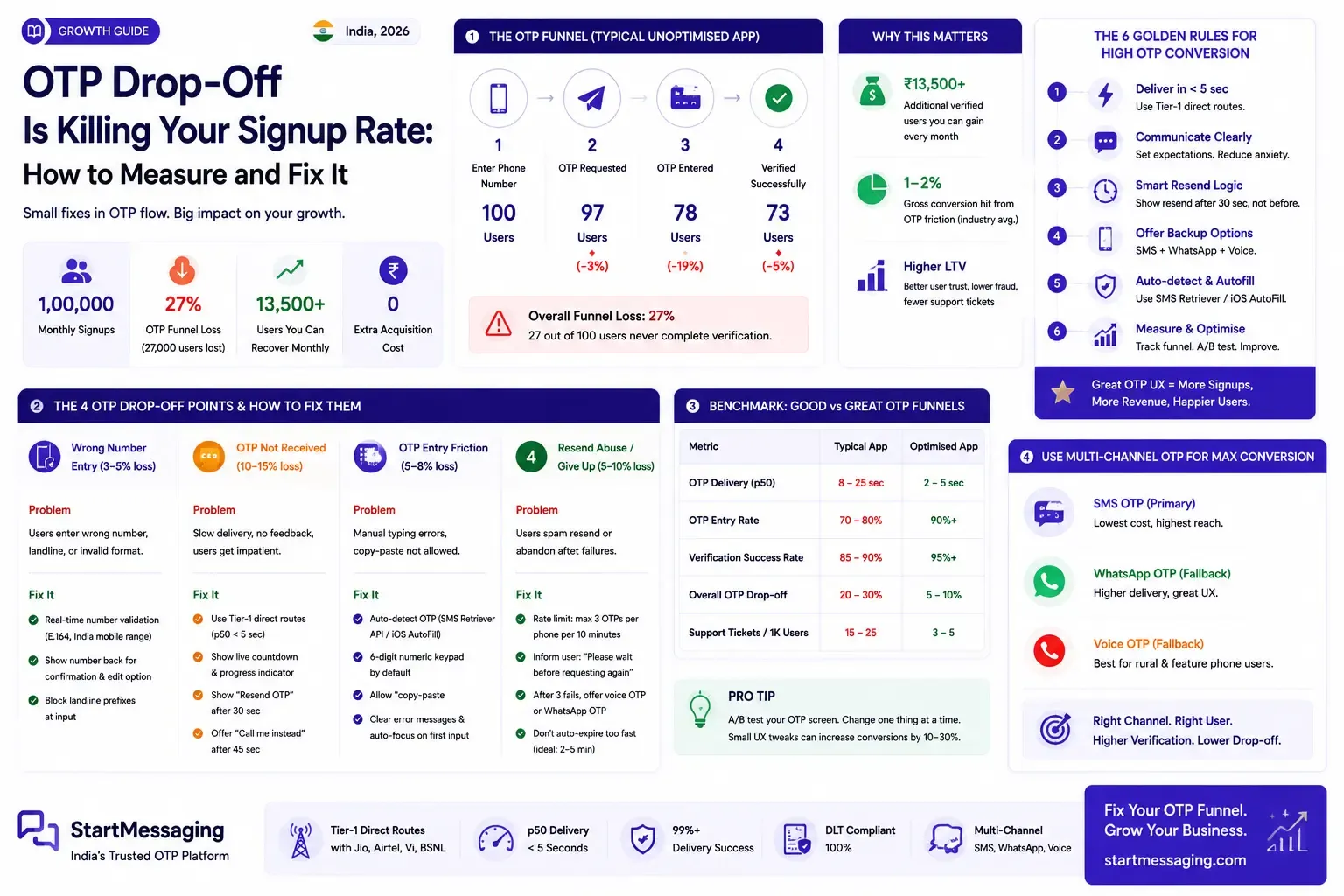
Karthik sat in the weekly growth review meeting at his Bengaluru-based fintech startup, staring at a Mixpanel dashboard that revealed a worrying trend. The company’s user acquisition team had successfully driven a 20% increase in app store installs, but the net signup conversion rate remained completely flat. As he mapped the onboarding sequence, he found the culprit: a massive drop-off at the verification screen. Out of every hundred users who entered their phone number and requested a verification code, twenty-seven abandoned the flow before completing verification. The engineering team assumed that the SMS gateway provider was experiencing carrier downtime, but the vendor’s dashboard reported a perfect 100% gateway delivery rate. The startup was losing thousands of potential customers to a silent bottleneck. It was a classic sign of OTP drop-off, a friction point that hurts signup conversion rates in Indian applications because of unoptimized user experience design and hidden delivery latency.
For product managers, developers, and startup founders in India, user onboarding is the most critical segment of the application funnel. While marketing teams invest heavily in paid search and social campaigns to drive user acquisition, minor inefficiencies in the verification step can wipe out these gains. SMS OTP is often treated as a background security function rather than a customer conversion channel. In practice, a single design correction in the verification layout can recover a significant portion of abandoned signups. Resolving this issue requires teams to move beyond basic dispatch logs, establish proper analytical tracking across the verification sequence, and implement best practices for mobile interface design.
The OTP Funnel Most Indian Apps Are Getting Wrong
To optimize signup conversions, product teams must analyze the verification sequence as a structured multi-step funnel. A standard verification flow consists of five sequential steps:
- The user inputs their phone number on the signup page.
- The user taps the “Send OTP” button.
- The server validates the number format and calls the SMS gateway API.
- The user waits for the carrier network to deliver the SMS to their device.
- The user reads the code, enters it into the input fields, and submits it.
Each step in this sequence has a distinct friction point where users drop out. In typical, unoptimized Indian mobile apps, the conversion funnel looks like this:
- Phone Number Entered: 100 users.
- OTP Sent (API Call): 97 users (3% lost due to input format errors).
- Code Received and Entered: 78 users (19% lost due to delivery delays, carrier blocks, or user impatience).
- Verification Completed: 73 users (5% lost due to expired codes or manual typing mistakes).
This represents a total funnel loss of 27%. The startup loses more than a quarter of its warm leads at the final step of the signup flow.
Unoptimised Funnel (27% Loss):
[Input: 100] -> (Errors) -> [API: 97] -> (Delay/Impatience) -> [Entered: 78] -> (Expiry/Typo) -> [Verified: 73]
This drop-off carries direct financial consequences. For a startup acquiring 1,00,000 users monthly with an average customer acquisition cost (CAC) of ₹150, a 27% loss at the verification step means ₹40,50,000 in marketing spend is wasted on users who never complete onboarding. Recovering half of these lost users through optimization adds 13,500 verified accounts monthly without requiring any new marketing investment. Since verification codes are essential to reduce fraudulent signups and secure payment pipelines—such as verifying orders to prevent cash-on-delivery fraud—teams cannot simply remove the step. They must optimize it to minimize drop-off.
The Four Drop-Off Points and Their Specific Fixes
Resolving conversion bottlenecks requires identifying where users exit the funnel. Each failure point has a specific root cause and a corresponding solution.
Drop-off Point 1: Phone Number Entry and Format Errors
Approximately 3% to 5% of users fail verification because they enter an invalid mobile number. Common mistakes in the Indian market include entering a landline number, typing 9 or 11 digits instead of 10, or getting confused by country code prefixes (such as typing +91 twice or prefixing a local number with a single 0). When these errors occur, the backend server triggers an API request to an invalid destination. The message is sent to a dead route, leaving the user waiting indefinitely for a code they will never receive.
To resolve entry errors, implement real-time input validation on the client side:
- Length Constraints: Restrict the text field to accept exactly 10 digits when the country code is pre-selected. Prevent users from typing letters or special characters.
- Prefix Scrubbing: Automatically detect and strip leading
0or duplicate+91entries as the user types. - Confirmation Prompts: Before calling the API, display the formatted number back to the user: “We’ll send an OTP to +91-XXXXX-XXXXX. Is this correct?” provide a one-tap option to edit the number to prevent verification delays.
- Landline Blocking: Indian mobile numbers begin with digits
9,8,7, or6. If a user enters a number starting with a landline area code (such as011or022), block the input and display a clear guidance message.
Drop-off Point 2: Delivery Latency and Impatience
Indian consumer behavior is defined by a low tolerance for friction. Research indicates that 60% of users who wait more than 20 seconds for an SMS verification code will either close the app or tap the “Resend” button repeatedly, creating duplicate requests that clog carrier queues. Slow delivery is driven by cheap routing channels. Low-cost vendors route traffic through multi-hop aggregators or international grey routes, causing delivery times to stretch to 30 or 45 seconds. We have explained these issues in our guide on Direct vs Grey Route SMS in India.
Direct SMPP Route (Low Latency):
[API Request] ---> [Direct Connection] ---> [Carrier SMSC] ---> [Delivery: 2-5 Seconds]

Grey Route (High Latency):
[API Request] ---> [Overseas Loop] ---> [SIM Box Network] ---> [Blocked / Delayed: 30s+]
Fixing delivery delays requires changes to both infrastructure and interface design:
- Infrastructure: Connect to a direct carrier gateway like StartMessaging. Direct SMPP links with Jio, Airtel, and Vi ensure p50 delivery under 5 seconds, beating grey routes.
- UI Countdown Timers: Show a visual progress indicator. A countdown timer stating “Your verification code will arrive in 25 seconds” keeps the user engaged and prevents them from abandoning the page.
- Resend Constraints: Disable the resend option for the first 30 seconds. Activating the resend button immediately leads to duplicate API requests, raising costs and causing template blocks.
- Voice Fallback: Show a “Call me instead” option after 45 seconds. This triggers a voice OTP, delivering the code via an automated phone call to bypass network congestion.
Drop-off Point 3: Rigid Code Expiration Timelines
Many developer tutorials recommend setting an OTP expiration limit of 60 seconds to maximize security. In the Indian market, this short window causes high signup failure rates. Users in rural areas or Tier 2/3 cities often face fluctuating cellular coverage, causing SMS delivery to take 90 seconds. In other cases, users multitask, switching to another app to copy their phone details and returning after the 60-second window has expired. When they enter the delayed code, they see an “OTP Expired” error and must restart the process.
To improve conversion, extend the signup verification expiration to 10 minutes. The security risk of a longer signup window is minimal if paired with strict rate limits:
- Limit Resends: Block requests after 3 attempts per phone number within a 10-minute window.
- Limit Daily Attempts: Lock the phone number for 24 hours after 5 total failures.
- Display Expiry: Show the time remaining on screen (e.g., “Code valid for 9:45”) to reduce user anxiety.
Drop-off Point 4: Code Entry Errors and Typos
Entering a 6-digit code manually introduces typing errors, especially on small screens or for users with low technical literacy. If your validation script expires the session after a single incorrect entry, you force the user to request a new code.
To resolve entry errors:
- Allow Multiple Attempts: Set your backend validation logic to allow 3 incorrect attempts before invalidating the transaction.
- Interface Autofills: Configure the HTML input field with the attribute
textContentType="oneTimeCode"to trigger iOS QuickType keyboard suggestions. - Android SMS Retriever API: Implement the SMS Retriever API in Android apps. This SDK allows your application to read the incoming verification SMS automatically and complete verification with zero user typing.
- Split-field Autofocus: If using a split-field UI (separate boxes for each digit), ensure the cursor advances to the next box automatically as the user types, and shifts backward on backspaces.
How to Instrument Your OTP Funnel Correctly
Most product teams treat verification as a binary check: they track only when an OTP is requested and when verification succeeds. This creates a blind spot. If your signup rate drops, you cannot tell if the failure is caused by carrier latency, DLT template blocks, or UX friction.
To track funnel metrics effectively, your telemetry system must record five distinct events:
[otp_requested] ---> [otp_sent] ---> [otp_delivered] ---> [otp_entered] ---> [otp_verified]otp_requested: Triggered when the user clicks the “Send OTP” button. Log the hashed phone number, browser client, and device OS.otp_sent: Triggered when the provider API returns a success code. Log the response code and the routing channel used.otp_delivered: Triggered when the telecom operator returns a delivery receipt (DLR) webhook to your server. Calculate the latency asdelivered_time - requested_time.otp_entered: Triggered when the user submits a code. Log the attempt count and time elapsed since delivery.otp_verified: Triggered when the code is confirmed as correct.
The Node.js analytics helper function below demonstrates how to structure this telemetry, sending events asynchronously to prevent blocking the user’s login response:
// otpTelemetry.js
import axios from 'axios';
import crypto from 'crypto';

function hashPhoneNumber(number) {
  return crypto.createHash('sha256').update(number).digest('hex');
}

export async function logOtpEvent(eventName, payload) {
  const eventData = {
    event: eventName,
    properties: {
      distinct_id: payload.userId,
      token: process.env.ANALYTICS_API_TOKEN,
      phone_hash: hashPhoneNumber(payload.phoneNumber),
      timestamp: Date.now(),
      device_platform: payload.platform || 'web',
      delivery_channel: payload.channel || 'sms',
      latency_ms: payload.latencyMs || null,
      attempt_count: payload.attemptCount || 1,
      elapsed_seconds: payload.elapsedSeconds || null
    }
  };

  // Dispatch event asynchronously in the background
  axios.post('https://api.mixpanel.com/track', eventData)
    .catch(error => {
      console.error(`Telemetry error for ${eventName}:`, error.message);
    });
}
By logging these five events, product managers can calculate three critical conversion metrics:
- Delivery Rate (
delivered / sent): Reveals network quality and carrier blocks. - Abandonment Rate (
delivered / entered): Identifies UX issues. If delivery is fast but users do not enter the code, the screen design is confusing. - Accuracy Rate (
entered / verified): Pinpoints expired codes or typing errors.
The OTP Screen UX Checklist for Indian Apps
To optimize signup conversions, verify that your verification interface includes the following design details.
- Masked Number Display: Show the target number as
+91-XXXXX-XX34. This confirms the destination to the user while protecting privacy. - Client-side Validation: Prevent submission of numbers that do not fit the 10-digit Indian mobile format.
- Progress Timers: Show a countdown timer of at least 30 seconds before activating the resend button.
- Conditional Resend Button: Keep the resend button disabled during the initial countdown to prevent carrier queue congestion.
- Voice Fallback Link: Display a “Call me instead” button 45 seconds after the initial dispatch.
- Autofocus Input: Automatically focus the text input when the screen loads so users do not have to tap the field manually.
- Autofill Attributes: Set
autocomplete="one-time-code"on web inputs and configure the native SDKs for SMS autofill support. - Multi-attempt Tolerance: Allow up to 3 entry attempts before expiring the session to accommodate typos.
- Friendly Error Copy: Avoid generic warnings like “System Error.” Instead, use clear copy: “Incorrect code entered. You have 2 attempts remaining.”
Funnel Benchmark: Unoptimised vs. Fully Optimised India App OTP Conversion
To understand the business impact of these changes, we can compare signup conversion rates before and after optimization. The benchmark data below is based on telemetry metrics from Indian startups that optimized their verification funnels.
The Baseline (Unoptimised Funnel)
A typical startup uses a budget SMS provider (relying on cheap grey routes) and a standard 60-second expiration script. It has no input validation and displays the resend button immediately.
- Out of 100 users: 97 trigger an API request, 78 receive the code before leaving, and 73 complete verification.
- Net Conversion: 73%.
- Funnel Loss: 27%.
Step 1: Infrastructure Upgrade
The startup switches from a cheap aggregator to StartMessaging’s direct Tier-1 carrier route. Average delivery latency drops from 18 seconds to 3.2 seconds. Because users receive the code quickly, cart abandonment from impatience drops.
- Net Conversion rises to: 79%.
- Funnel Loss drops to: 21%.
Step 2: UX and Expiration Optimisations
The startup adds input validation, disables the resend button for 30 seconds, extends the expiration limit to 10 minutes, and allows 3 attempts.
- Net Conversion rises to: 88%.
- Funnel Loss drops to: 12%.
Step 3: Platform Autofill Integration
The startup implements the SMS Retriever API for Android and QuickType matching for iOS, eliminating manual typing errors for most users.
- Net Conversion rises to: 91%.
- Funnel Loss drops to: 9%.
Conversion Progression:
Baseline (73%) -> Tier-1 Infrastructure (79%) -> UX & Expiry Fixes (88%) -> Autofill (91%)
By applying these three changes, the startup recovers 18 lost users out of every 100 registration attempts. This represents a 24% relative increase in signup conversion with zero increase in marketing spend. For any platform trying to scale, optimizing the onboarding step is the most cost-effective way to drive growth. For a deeper look at managing delivery quality, see our guide on analyzing OTP delivery rates and review our troubleshooting steps for resolving delayed SMS delivery.
Frequently Asked Questions
Q: What is a good OTP conversion rate for Indian apps?
A: A well-optimized onboarding funnel in India should achieve a conversion rate between 88% and 92% (from initial OTP request to successful verification). Rates below 80% indicate issues with carrier routing latency or confusing user interfaces.
Q: How long should an OTP be valid before expiry in India?
A: For signup and onboarding flows, set the expiration window to 10 minutes. A 60-second window is too short because cellular network fluctuations can delay delivery, locking out legitimate users. Protect the longer window by limiting requests to 3 per 10 minutes.
Q: Why should I wait 30 seconds before showing the Resend OTP button?
A: Disabling the resend button for 30 seconds prevents users from triggering duplicate requests when a message is slightly delayed. Duplicate requests increase API costs and confuse users when multiple codes arrive out of order.
Q: Does SMS Retriever autofill work on all Indian Android phones?
A: The SMS Retriever API works on all Android devices that run Google Play Services, which covers over 90% of the active Android phone market in India. It does not require special permissions, making it a secure choice for developers.
Q: How do I track OTP drop-off separately from signup drop-off?
A: Track five distinct events (otp_requested, otp_sent, otp_delivered, otp_entered, otp_verified). If users drop off between delivered and entered, the issue is screen UX. If they drop off between sent and delivered, the issue is carrier routing.
Q: What is the biggest single change that improves OTP conversion in India?
A: The most effective change is switching to a direct, low-latency Tier-1 route provider to bring delivery times under 5 seconds. If the code does not arrive before the user loses patience, frontend interface tweaks cannot recover the conversion.
Karthik deployed the optimized hybrid controller and user interface updates to production. Within a week, the startup’s onboarding telemetry showed a dramatic shift: the median delivery latency dropped to 2.8 seconds, and the signup conversion rate rose from 73% to 90.4%. The checkout support ticket queue cleared, and the marketing team saw their CAC yield increase without any change to ad spend. If your startup is losing users at the onboarding stage, you can optimize your funnel metrics and secure your verification flow. Learn more about the StartMessaging API features or review our developer pricing to start recovering your lost conversion revenue today.
StartMessaging Team
StartMessaging Team