WhatsApp OTP for Indian Developers: Templates, Autofill, and Fallback
A complete 2026 developer guide to WhatsApp OTP in India. Covers Meta authentication templates, iOS 26 autofill, Node.js code, and SMS fallback.
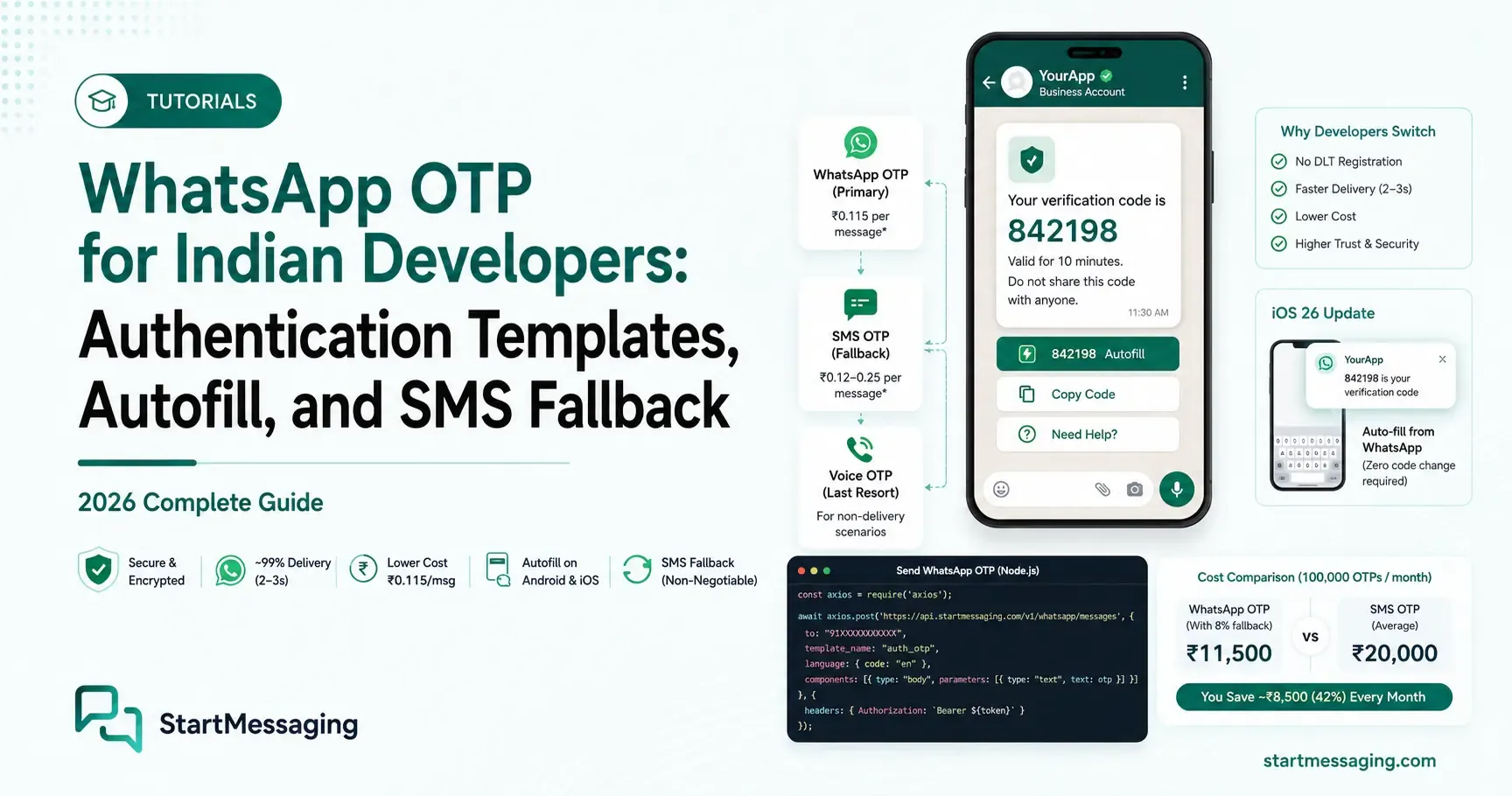
Vikram sat back in his chair at 11:45 PM, staring at the metrics dashboard for RupeeFlow, a Bengaluru-based neo-banking startup. The sign-up funnel conversion chart was bleeding red. Over the last 30 days, the platform had lost nearly 14% of onboarding users at the mobile verification step. The cause wasn’t a broken frontend UI or slow database queries; it was SMS OTP latency. Jio and Airtel subscribers in tier-2 cities were regularly waiting up to 45 seconds for their 6-digit codes to arrive. Many just closed the app. Even worse, the startup’s monthly SMS bill was scaling faster than actual transaction volume, driven by rising telecom carrier rates and aggressive OTP pumping bots. Vikram knew they needed an alternative, and WhatsApp OTP was the obvious candidate.
But switching authentication channels is never a drop-in replacement. As Vikram’s team soon discovered, moving to WhatsApp OTP in the Indian market requires navigating Meta’s strict authentication template rules, understanding the 2026 push notification autofill changes on iOS and Android, handling the 10% of users who do not have WhatsApp installed, and avoiding the costly international WABA pricing trap. This guide breaks down the exact steps, architectural decisions, and Node.js code required to implement a production-grade WhatsApp OTP flow with a secure SMS fallback cascade.
Why Indian Developers Are Moving to WhatsApp OTP in 2026
The shift from traditional SMS OTP to WhatsApp verification in India is driven by three main factors: developer friction, transactional costs, and delivery performance. However, designing a reliable authentication system means evaluating these advantages against real-world limitations.
Bypassing the DLT Bureaucracy
For any developer who has set up SMS verification in India, the Distributed Ledger Technology (DLT) mandate is a source of constant friction. (See our step-by-step DLT registration guide or learn how to write compliant DLT template variables). Mandated by the Telecom Regulatory Authority of India (TRAI), DLT registration requires entity verification, header (sender ID) approvals, and strict content template scrubbing.
Under the DLT system, if you want to tweak a single word in your SMS OTP text, you must submit it to the DLT portal (such as Jio, VIL, or BSNL DLT) and wait anywhere from 48 hours to 2 weeks for approval. If you send an OTP message that deviates by even a single whitespace character from the approved template, the telecom carriers scrub and block it at the gateway. The headers themselves are constrained by strict 6-character alphabetic rules (e.g., AD-RPFLOW), which are hard to reserve and manage.
SMS DLT Flow:
[Submit Template to DLT] ➔ [Wait 2-14 Days for Manual Review] ➔ [Approve Header] ➔ [TRAI Gatekeeper Scrubbing] ➔ [Strict Match Block on Handset]

WhatsApp Flow:
[Submit Meta Template] ➔ [Auto-Scanned by Meta AI Console] ➔ [Approved in < 1 Hour] ➔ [Direct API Send via BSP]
WhatsApp completely bypasses the DLT gateway. Meta’s template approval process is programmatic and automated. Because authentication templates follow a pre-approved, standardized structure, approvals typically take less than 10 minutes, allowing engineering teams to ship updates rapidly. There are no principal entity registrations (PE-ID) to link to headers, and no carrier-level message filtering to debug.
The Cost Equation (Including 18% GST)
For high-volume applications, cost is the deciding factor. In India, the cost of a transactional SMS OTP fluctuates between ₹0.12 and ₹0.25 depending on your aggregator, routing quality, and volume commitments.
In contrast, Meta’s official utility and authentication rates in the Indian market are highly competitive. As of 2026, a delivered WhatsApp authentication message costs approximately ₹0.115.
| Billing Category | SMS OTP (Average Route) | WhatsApp OTP (Authentication) |
|---|---|---|
| Base Price per Message | ₹0.180 | ₹0.115 |
| 18% GST (India) | ₹0.032 | ₹0.021 |
| Effective Cost per Unit | ₹0.212 | ₹0.136 |
| Est. Monthly Cost (100k Sends) | ₹21,240 | ₹13,570 |
| Est. Monthly Cost (500k Sends) | ₹1,06,200 | ₹67,850 |
When operating at millions of transactions per month, this price differential translates into direct bottom-line savings. Additionally, unlike SMS where you are billed for sent messages (even if they fail to deliver due to network issues, handset power-offs, or SIM inactivation), WhatsApp charges are based on delivered conversations, meaning you do not pay for messages that never reach the user’s handset.
Delivery and User Retention
SMS relies on cellular signal and ss7 signaling protocols. In high-density apartments or basement offices across urban India, cellular signals degrade, causing SMS delivery delays. WhatsApp, running on IP networks, delivers messages over mobile data and Wi-Fi.
Average delivery latency for a WhatsApp OTP is 2 to 3 seconds, compared to SMS which frequently spikes to 15–30 seconds during peak hours. This speed directly reduces sign-up abandonment rates; if users receive their code instantly, they complete the authentication flow without turning to competitor apps.
However, WhatsApp OTP is not a silver bullet. Roughly 8% to 12% of mobile users in India—predominantly in rural demographics, senior citizen segments, or BSNL-heavy networks—do not have active WhatsApp accounts or use internet-connected smartphones. If your app relies solely on WhatsApp, you lock out these users from the onboarding funnel. For this reason, a secure SMS fallback cascade must be treated as a core architectural requirement, not an optional feature (read more on our SMS deliverability checklist or check our head-to-head comparison of SMS OTP vs WhatsApp OTP).
WhatsApp Authentication Templates: Casing, Autofill, and Pitfalls
Unlike promotional templates, Meta enforces strict layout rules on authentication templates. You cannot include custom text, URLs, media attachments, or promotional copy. The template must consist solely of the transaction code, an optional security disclaimer, and interactive buttons.
The Template Anatomy
A standard authentication template comprises:
- Body Text: A predefined message:
"Your verification code is {{1}}."or"{{1}} is your verification code. For your security, do not share this code." - Footer: Optional expiration disclaimer, such as
"This code expires in 10 minutes." - Buttons: Interactive tap targets to help the user complete verification.
{
  "name": "auth_otp_secure",
  "category": "AUTHENTICATION",
  "components": [
    {
      "type": "BODY",
      "text": "Your verification code is {{1}}."
    },
    {
      "type": "FOOTER",
      "text": "This code expires in 10 minutes."
    },
    {
      "type": "BUTTONS",
      "buttons": [
        {
          "type": "OTP",
          "otp_type": "COPY_CODE",
          "text": "Copy Code"
        }
      ]
    }
  ]
}
Button Configurations: Copy Code vs. One-Tap Autofill
Meta offers three primary interactive button options for authentication templates:
- Copy Code Button (Universal): Renders a simple button that, when tapped, copies the 6-digit OTP to the user’s clipboard. The user then switches back to your app and pastes the code. This works on all platforms (iOS, Android, Web).
- One-Tap Autofill Button (Android): When clicked, this button triggers an Android Intent that directly communicates with your application, autofilling the input field and submitting the login form without requiring the user to copy or type anything. This uses the SMS Retriever API equivalent for WhatsApp.
- Zero-Tap Autofill (Android Advanced): Requires implementing a specific Broadcast Receiver in your Android app code. The app listens for the incoming WhatsApp push notification payload and verifies the number silently in the background.
To implement One-Tap Autofill on Android, you must configure your Meta template with the app’s package name and the SHA-256 hash of your app’s signing certificate. This ensures that only your application can intercept the intent containing the code, preventing security interception.
The iOS 26 Push Notification Update (June 15, 2026)
Starting in mid-2026 with the release of iOS 26, Apple introduced native keyboard detection for WhatsApp verification codes. If a WhatsApp notification contains a structured authentication template code, the iOS keyboard automatically parses the numeric string from the push notification preview and suggests it in the autofill bar.
This brings the frictionless login experience of SMS OTP to WhatsApp on iOS without requiring developers to write complex app-level notification listener extensions or modify their Objective-C/Swift codebase. The keyboard takes care of the extraction as long as the push notification permissions are active.
The Authentication-International Rate Trap
This is the single most common mistake engineering teams make during transition. Meta determines the pricing of WhatsApp messages based on the country code of the recipient and the registration origin of your WhatsApp Business Account (WABA).
If your startup is headquartered in Bengaluru, but your WABA was set up using a US entity (or via a global partner hosted in Europe/Singapore), Meta will classify your domestic Indian OTP sends as Authentication-International.
Domestic WABA:
[India Registered WABA] ➔ [Send to Indian Number (+91)] ➔ Domestic Rate (₹0.115)

International WABA:
[US/SG Registered WABA] ➔ [Send to Indian Number (+91)] ➔ International Rate (up to ₹2.30)
Instead of ₹0.115 per message, you will be billed up to ₹2.30 per OTP—nearly 20 times the domestic cost. To avoid this, always register your WABA using verified Indian business documents (GSTIN or Business PAN) and integrate through a domestic Business Solution Provider (BSP) like StartMessaging that routes traffic natively.
Full Node.js Implementation: End-to-End
Let’s build a secure WhatsApp OTP verification flow. We will use Node.js, Express, Redis to manage secure session state, and Axios to interact with the API.
Prerequisites
Before writing code, ensure you have:
- A registered WhatsApp Business Account (WABA) pointing to your verified Indian entity.
- An approved template named
auth_otp_secureusing the standard Meta schema. - An active API key from StartMessaging.
- A running Redis instance for temporary OTP storage.
1. Generating a Secure OTP and Storing in Redis
Never use Math.random() to generate One-Time Passwords. It is a pseudo-random number generator that is cryptographically insecure. Instead, use Node’s native crypto module.
// otpService.js
import crypto from 'node:crypto';
import { createClient } from 'redis';

const redisClient = createClient({ url: process.env.REDIS_URL || 'redis://localhost:6379' });
await redisClient.connect();

const OTP_EXPIRY_SECONDS = 600; // 10 minutes standard window

/**
 * Generate a cryptographically secure 6-digit numeric OTP.
 */
function generateSecureOTP() {
  return crypto.randomInt(100000, 999999).toString();
}

/**
 * Hash recipient phone number for DPDP Act audit alignment.
 * Never store plaintext phone numbers alongside OTP states in cache databases.
 */
function hashPhoneNumber(phone) {
  return crypto.createHash('sha256').update(phone).digest('hex');
}

/**
 * Save OTP to Redis with attempt rate tracking.
 */
async function storeOTP(phone, otp) {
  const hashedPhone = hashPhoneNumber(phone);
  const redisKey = `otp:${hashedPhone}`;

  // Save OTP and set attempts tracking structure
  await redisClient.hSet(redisKey, {
    code: otp,
    attempts: '0',
    createdAt: Date.now().toString()
  });

  await redisClient.expire(redisKey, OTP_EXPIRY_SECONDS);
}

export { generateSecureOTP, storeOTP, hashPhoneNumber, redisClient };
2. Sending the WhatsApp Authentication Message
Now we make the API call to send the template. The payload uses the standard StartMessaging API contract, forwarding the template name and assigning the variable arguments.
// whatsappClient.js
import axios from 'axios';

const STARTMESSAGING_API_URL = 'https://api.startmessaging.com/v1/messages';
const API_TOKEN = process.env.STARTMESSAGING_API_KEY;

/**
 * Send WhatsApp authentication template containing the generated OTP.
 */
async function sendWhatsAppOTP(phone, otp) {
  const payload = {
    to: phone,
    channel: 'whatsapp',
    type: 'template',
    template: {
      name: 'auth_otp_secure',
      language: { code: 'en' },
      components: [
        {
          type: 'body',
          parameters: [
            {
              type: 'text',
              text: otp // Maps to {{1}} in body template
            }
          ]
        },
        {
          type: 'button',
          sub_type: 'url',
          index: 0,
          parameters: [
            {
              type: 'text',
              text: otp // Maps to value expected by dynamic copy button
            }
          ]
        }
      ]
    }
  };

  try {
    const response = await axios.post(STARTMESSAGING_API_URL, payload, {
      headers: {
        'Authorization': `Bearer ${API_TOKEN}`,
        'Content-Type': 'application/json'
      }
    });

    // Return unique platform message ID for tracking fallback state
    return response.data.messageId;
  } catch (error) {
    console.error('WhatsApp API dispatch failed:', error.response?.data || error.message);
    throw new Error('WHATSAPP_DISPATCH_FAILED');
  }
}

export { sendWhatsAppOTP };
3. Server-Side Verification with Lockout Counter
To prevent brute-force attacks, we must limit verification attempts. If a user inputs the wrong OTP 3 times, we immediately delete the key and lock them out for a cooling-off period. (Read our guide on OTP failed attempt lockout strategies and see how to structure your OTP database schema.)
// verifyService.js
import { hashPhoneNumber, redisClient } from './otpService.js';

const MAX_VERIFICATION_ATTEMPTS = 3;

/**
 * Verify submitted OTP against cached Redis state.
 */
async function verifyUserOTP(phone, submittedOtp) {
  const hashedPhone = hashPhoneNumber(phone);
  const redisKey = `otp:${hashedPhone}`;

  const otpState = await redisClient.hGetAll(redisKey);

  if (!otpState || !otpState.code) {
    return { success: false, reason: 'OTP_EXPIRED_OR_NOT_FOUND' };
  }

  const currentAttempts = parseInt(otpState.attempts, 10);

  if (currentAttempts >= MAX_VERIFICATION_ATTEMPTS) {
    await redisClient.del(redisKey); // Clear trace
    return { success: false, reason: 'MAX_ATTEMPTS_EXCEEDED' };
  }

  if (otpState.code !== submittedOtp) {
    // Increment wrong attempt counter
    await redisClient.hIncrBy(redisKey, 'attempts', 1);
    return { success: false, reason: 'INVALID_OTP' };
  }

  // Successful verification - delete state to prevent replay attacks
  await redisClient.del(redisKey);

  return { success: true };
}

export { verifyUserOTP };
4. Handling Meta Webhooks for Status Tracking
Meta sends delivery status events to your webhook URL when messages are sent, delivered, read, or fail. Below is the webhook handler implementation to inspect payload events.
// webhookHandler.js
import express from 'express';
const router = express.Router();

/**
 * Sample Meta Webhook Payload Structure:
 * {
 *   "event": "message.status",
 *   "messageId": "msg_984712530182",
 *   "status": "delivered",
 *   "timestamp": 1782482651
 * }
 */
router.post('/startmessaging', (req, res) => {
  const { event, messageId, status, error } = req.body;

  if (event === 'message.status') {
    switch (status) {
      case 'sent':
        console.log(`Message ${messageId} successfully sent from server.`);
        break;
      case 'delivered':
        console.log(`Message ${messageId} reached recipient device.`);
        break;
      case 'read':
        console.log(`Recipient opened/read the message ${messageId}.`);
        break;
      case 'failed':
        console.warn(`Message ${messageId} failed delivery. Error code: ${error?.code} - ${error?.message}`);
        // This is a direct trigger for SMS failover
        break;
    }
  }

  res.sendStatus(200);
});

export default router;
SMS Fallback Architecture
Building a resilient login architecture means preparing for network degradation, delivery failures, or cases where a user simply does not have WhatsApp. If you do not configure an automatic SMS failover channel, your registration funnel will suffer.
API Dispatch Flow:
[Send WhatsApp OTP] ➔ [Webhook delivery fail OR 30s timeout] ➔ [Send SMS via DLT Route] ➔ [Success]
Fallback Triggers and Logic
An ideal fallback cascade should trigger under two conditions:
- Immediate Failure Webhook: When you dispatch a WhatsApp message to a non-existent number, Meta’s API immediately returns an error code or sends a
failedstatus webhook with error subclassing indicating the phone number is not registered on WhatsApp. - Delivery Confirmation Timeout: If the message is successfully sent to Meta, but you do not receive a
deliveredstatus webhook from the user’s device within 30 seconds, it indicates the recipient lacks network data or has uninstalled the app. The system must immediately trigger an SMS.
Building the Unified Failover Cascade
The following backend route exposes a unified endpoint. It attempts a WhatsApp send, starts a timeout monitor, and falls back to SMS if needed.
// app.js
import express from 'express';
import { generateSecureOTP, storeOTP } from './otpService.js';
import { sendWhatsAppOTP } from './whatsappClient.js';
import webhookRouter from './webhookHandler.js';
import axios from 'axios';

const app = express();
app.use(express.json());
app.use('/api/webhooks', webhookRouter);

const SMS_FALLBACK_URL = 'https://api.startmessaging.com/v1/sms/send';
const API_TOKEN = process.env.STARTMESSAGING_API_KEY;

// Store pending fallback timeouts to prevent double sends
const pendingFallbacks = new Map();

/**
 * Helper to dispatch SMS fallback via DLT approved route
 */
async function sendSMSFallback(phone, otp) {
  const payload = {
    to: phone,
    text: `Your RupeeFlow verification code is ${otp}. Valid for 10 minutes. Please do not share this OTP with anyone.`,
    dltTemplateId: '1407161298463510294', // Approved Transactional SMS DLT ID
    senderId: 'RPFLOW'
  };

  try {
    await axios.post(SMS_FALLBACK_URL, payload, {
      headers: {
        'Authorization': `Bearer ${API_TOKEN}`,
        'Content-Type': 'application/json'
      }
    });
    console.log(`SMS fallback dispatched successfully to ${phone}`);
  } catch (error) {
    console.error(`SMS fallback failed for ${phone}:`, error.message);
  }
}

/**
 * Unified OTP Dispatch Endpoint
 */
app.post('/api/auth/send-otp', async (req, res) => {
  const { phone } = req.body; // Expects international format with +91 prefix

  if (!phone || !phone.startsWith('+91')) {
    return res.status(400).json({ error: 'INVALID_INDIAN_PHONE_NUMBER' });
  }

  const otp = generateSecureOTP();
  await storeOTP(phone, otp);

  try {
    const messageId = await sendWhatsAppOTP(phone, otp);

    // Set 30-second fallback timer
    const timeoutId = setTimeout(async () => {
      if (pendingFallbacks.has(messageId)) {
        console.log(`WhatsApp delivery timeout for ${phone}. Triggering SMS fallback.`);
        pendingFallbacks.delete(messageId);
        await sendSMSFallback(phone, otp);
      }
    }, 30000); // 30 seconds

    pendingFallbacks.set(messageId, { phone, otp, timeoutId });

    return res.status(200).json({ success: true, method: 'whatsapp', messageId });
  } catch (error) {
    // Immediate failure (e.g. API error or network issue) -> Trigger SMS instantly
    console.warn(`WhatsApp dispatch failed for ${phone}. Cascading to SMS instantly.`);
    await sendSMSFallback(phone, otp);
    return res.status(200).json({ success: true, method: 'sms' });
  }
});

/**
 * Webhook handler to catch delivery events and intercept fallback triggers
 */
app.post('/api/webhooks/startmessaging-status', (req, res) => {
  const { event, messageId, status } = req.body;

  if (event === 'message.status') {
    // If the message is delivered, clear the fallback timer
    if (status === 'delivered' || status === 'read') {
      const activeFallback = pendingFallbacks.get(messageId);
      if (activeFallback) {
        clearTimeout(activeFallback.timeoutId);
        pendingFallbacks.delete(messageId);
        console.log(`WhatsApp delivered to ${activeFallback.phone}. Fallback canceled.`);
      }
    }

    // If delivery explicitly fails, execute SMS instantly
    if (status === 'failed') {
      const activeFallback = pendingFallbacks.get(messageId);
      if (activeFallback) {
        clearTimeout(activeFallback.timeoutId);
        pendingFallbacks.delete(messageId);
        console.log(`WhatsApp delivery failed for ${activeFallback.phone}. Triggering instant SMS fallback.`);
        sendSMSFallback(activeFallback.phone, activeFallback.otp);
      }
    }
  }

  return res.sendStatus(200);
});

app.listen(3000, () => console.log('Authentication backend listening on port 3000'));
For a production-ready fallback routing configuration, check out our guide on multi-region failover for OTP APIs or learn about queue-based OTP delivery using BullMQ and Redis.
The Three-Tier Fallback Cascade
For enterprise applications where sign-up rates dictate operational revenue, relying solely on SMS as a fallback can still leave gaps (e.g. DLT route failures or carrier gateways blocking). Top tier Indian applications use a three-tier cascade:
[1. WhatsApp OTP]
      │
      ├─► (if fails/timeout after 30s)
      ▼
[2. SMS Transactional DLT Route]
      │
      ├─► (if fails/timeout after 45s)
      ▼
[3. Voice OTP (Phone Call Verification)]- WhatsApp: Primary authentication layer, cost-efficient and high speed.
- SMS: Second-tier fallback for users without WhatsApp or out of data coverage.
- Voice OTP: Final failover layer that calls the user’s mobile and reads the code via text-to-speech. Highly resilient because voice channels bypass SMS queue congestion entirely.
Security, Compliance, and Cost Optimization
Implementing OTP infrastructure in India requires strict adherence to security best practices and the Digital Personal Data Protection (DPDP) Act of 2023 (see our guide on DPDP Act compliance for OTP).
Mitigating OTP Pumping Attacks on WhatsApp
A common misconception is that OTP fraud and traffic pumping attacks only target SMS networks. (To prevent these, see our guide on preventing SMS pumping fraud in India or read about general OTP rate limiting guidelines). Fraudsters routinely script bot networks to hit OTP endpoints, generating millions of automated requests to drain API wallets.
While WhatsApp is safer because Meta charges are based on delivery and are harder to route through virtual phone numbers, you must still secure your backend:
- IP-Based Rate Limiting: Limit OTP requests to 1 request per IP address every 60 seconds.
- Device Level Cooldowns: Implement a strict 60-second retry cooldown per phone number at the API level.
- Daily Caps: Restrict a single phone number to 5 OTP requests per day.
- Behavioral Risk Scoring: Use CAPTCHA challenges or silent recaptcha/Cloudflare Turnstile verifications on the client side before triggering the backend OTP send logic.
DPDP Act 2023 Compliance
Under India’s Digital Personal Data Protection Act (DPDP), customer phone numbers and login transactions are classified as personal data. Your OTP infrastructure must incorporate:
- Consent Integration: Ensure your user interface explicitly mentions that by submitting their phone number, the user consents to receive service updates and verification codes via WhatsApp and SMS.
- Plaintext Data Minimization: Never store raw numeric OTP codes or plaintext phone numbers in debug logs, request logging platforms, or metrics aggregation systems. Use hashed identifiers (like the SHA-256 implementation shown in the code above) when verifying states or indexing logs.
Financial Modeling: WhatsApp vs. SMS
To understand the financial implications, let’s look at a realistic model for an Indian application processing 500,000 monthly sign-ups. We assume an average SMS price of ₹0.20 and a WhatsApp fallback rate of 10% (users without WhatsApp or failing delivery).
Traditional SMS Only (500k sends):
500,000 × ₹0.20 = ₹1,00,000 + 18% GST = ₹1,18,000 total monthly cost.

WhatsApp-First with SMS Fallback:
WhatsApp Delivered (450k): 450,000 × ₹0.115 = ₹51,750
SMS Fallback (50k):          50,000 × ₹0.200 = ₹10,000
Total Base Cost:                             = ₹61,750
Total + 18% GST:                             = ₹72,865 total monthly cost.

Net Monthly Savings: ₹45,135 (38.2% cost reduction)
At scale, the financial benefits of routing through WhatsApp as the primary channel are significant, while still ensuring 100% login coverage via the fallback SMS tier.
Frequently Asked Questions
Q: Does WhatsApp OTP require DLT registration in India?
A: No. WhatsApp Business API messages bypass the DLT registration network entirely. Template review, approval, and deliverability are managed directly through Meta’s automated developer console, requiring no interaction with Indian telecom operator portals.
Q: Can WhatsApp OTP autofill like SMS Retriever on Android?
A: Yes. By configuring a Meta authentication template with a one-tap autofill button and registering the appropriate Broadcast Receiver in your Android codebase, you can capture the verification code automatically without requiring clipboard paste actions from the user.
Q: What happens if the user doesn’t have WhatsApp installed?
A: If a recipient does not have WhatsApp, the API instantly returns an error webhook (phone_not_on_whatsapp or failed). Best-practice architecture handles this event immediately by falling back to traditional transactional SMS or Voice OTP channels to ensure verification completion.
Q: Does RBI accept WhatsApp OTP as a valid second factor for payment authentication?
A: Yes. The Reserve Bank of India (RBI) mandates a secure Additional Factor of Authentication (AFA). It does not restrict the communication channel. WhatsApp OTPs, secured via end-to-end Signal encryption, are accepted as a valid AFA, provided the code is cryptographically generated and validated on a secure server environment.
Q: Is WhatsApp OTP cheaper than SMS OTP in India?
A: Yes. Meta’s official Indian domestic authentication rate is approximately ₹0.115 per delivered message, which is significantly cheaper than high-quality transactional SMS routes (averaging ₹0.18 to ₹0.25). You also only pay for successfully delivered messages on WhatsApp.
Ready to upgrade your login flow and reduce authentication costs? StartMessaging offers a unified API that handles primary WhatsApp delivery, automated SMS fallback, and fallback monitoring natively. Sign up for a developer account today or check out our OTP API Documentation to integrate in minutes.
StartMessaging Team
StartMessaging Team