API de Autenticação — Verifique Usuários Instantaneamente
Kit completo de verificação: envie OTPs via SMS/WhatsApp, verifique códigos e valide números — tudo em uma única API REST.
✦ No credit card required · Free plan available · Setup in 5 minutes
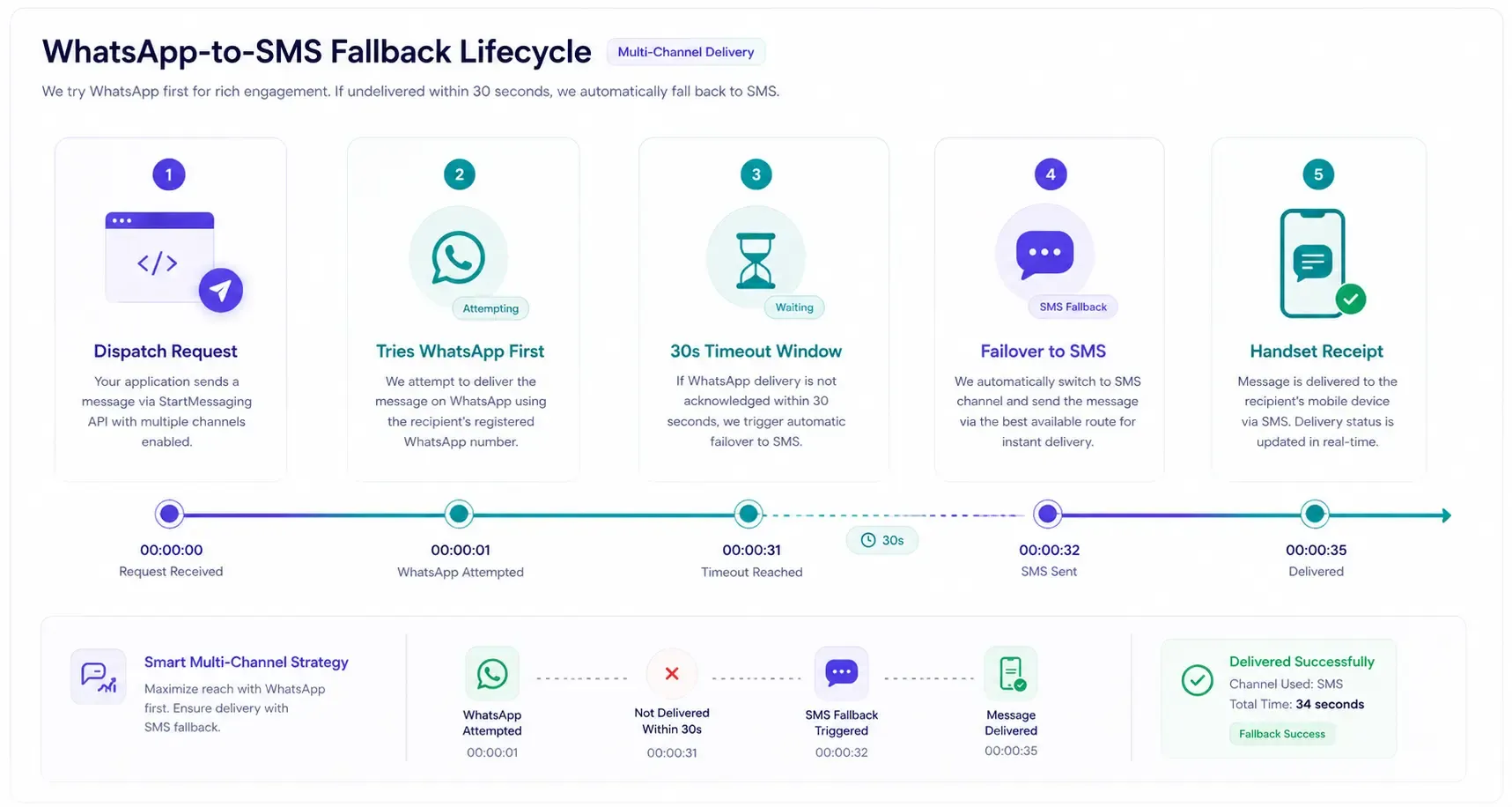
Multi-Channel Verification Routing
Deliver OTP codes with smart failovers. Tries WhatsApp first for higher conversion rates and automatically falls back to transactional SMS if not delivered in 30 seconds.
- WhatsApp-first with SMS fallback
- Real-time delivery analytics
- Global E.164 phone number formatting checks
Authentication
All API requests require your secret API key passed in the X-API-Key header. You can generate keys inside your developer dashboard.
X-API-Key: sm_live_your_api_key_hereBase URL
Submit all API payloads to the following root address:
https://api.startmessaging.comRecursos da API
-
POST /otp/send
Generate and dispatch a one-time password code to a phone number. Customize template placeholders easily.
-
POST /otp/verify
Validate the code entered by the user. Simple 1-call verification that checks request expiration.
-
GET /messages/:id
Fetch the real-time delivery status of the SMS or WhatsApp message.
-
Fraud Prevention
Enforces rate-limits, carrier risk lookups, and device rules to mitigate fake signups.
Generate and Send OTP Code
curl -X POST https://api.startmessaging.com/otp/send \
  -H "Content-Type: application/json" \
  -H "X-API-Key: sm_live_your_api_key_here" \
  -d '{
    "phoneNumber": "+919876543210",
    "templateId": "YOUR_TEMPLATE_ID",
    "variables": {
      "otp": "123456",
      "appName": "YourApp"
    }
  }'
const response = await fetch("https://api.startmessaging.com/otp/send", {
method: "POST",
headers: {
"Content-Type": "application/json",
"X-API-Key": "sm_live_your_api_key_here",
},
body: JSON.stringify({
phoneNumber: "+919876543210",
templateId: "YOUR_TEMPLATE_ID",
variables: {
otp: "123456",
appName: "YourApp",
},
}),
});
const data = await response.json();
console.log(data);import requests
response = requests.post(
"https://api.startmessaging.com/otp/send",
headers={
"Content-Type": "application/json",
"X-API-Key": "sm_live_your_api_key_here",
},
json={
"phoneNumber": "+919876543210",
"templateId": "YOUR_TEMPLATE_ID",
"variables": {
"otp": "123456",
"appName": "YourApp"
},
},
)
data = response.json()
print(data)$ch = curl_init("https://api.startmessaging.com/otp/send");
curl_setopt_array($ch, [
CURLOPT_RETURNTRANSFER => true,
CURLOPT_POST => true,
CURLOPT_HTTPHEADER => [
"Content-Type: application/json",
"X-API-Key: sm_live_your_api_key_here",
],
CURLOPT_POSTFIELDS => json_encode([
"phoneNumber" => "+919876543210",
"templateId" => "YOUR_TEMPLATE_ID",
"variables" => [
"otp" => "123456",
"appName" => "YourApp"
]
]),
]);
$response = curl_exec($ch);
curl_close($ch);
$data = json_decode($response, true);import java.net.http.*;
import java.net.URI;
HttpClient client = HttpClient.newHttpClient();
String body = """
{
"phoneNumber": "+919876543210",
"templateId": "YOUR_TEMPLATE_ID",
"variables": {
"otp": "123456",
"appName": "YourApp"
}
}
""";
HttpRequest request = HttpRequest.newBuilder()
.uri(URI.create("https://api.startmessaging.com/otp/send"))
.header("Content-Type", "application/json")
.header("X-API-Key", "sm_live_your_api_key_here")
.POST(HttpRequest.BodyPublishers.ofString(body))
.build();
HttpResponse<String> response = client.send(request, HttpResponse.BodyHandlers.ofString());
System.out.println(response.body());package main
import (
"bytes"
"encoding/json"
"fmt"
"net/http"
"io"
)
func main() {
payload, _ := json.Marshal(map[string]interface{}{
"phoneNumber": "+919876543210",
"templateId": "YOUR_TEMPLATE_ID",
"variables": map[string]string{
"otp": "123456",
"appName": "YourApp",
},
})
req, _ := http.NewRequest("POST", "https://api.startmessaging.com/otp/send", bytes.NewBuffer(payload))
req.Header.Set("Content-Type", "application/json")
req.Header.Set("X-API-Key", "sm_live_your_api_key_here")
resp, _ := http.DefaultClient.Do(req)
defer resp.Body.Close()
body, _ := io.ReadAll(resp.Body)
fmt.Println(string(body))
}Confirm User Codes Instantly
curl -X POST https://api.startmessaging.com/otp/verify \
  -H "Content-Type: application/json" \
  -H "X-API-Key: sm_live_your_api_key_here" \
  -d '{
    "requestId": "req_abc123",
    "otpCode": "123456"
  }'
const response = await fetch("https://api.startmessaging.com/otp/verify", {
method: "POST",
headers: {
"Content-Type": "application/json",
"X-API-Key": "sm_live_your_api_key_here",
},
body: JSON.stringify({
requestId: "req_abc123",
otpCode: "123456",
}),
});
const data = await response.json();
console.log(data);import requests
response = requests.post(
"https://api.startmessaging.com/otp/verify",
headers={
"Content-Type": "application/json",
"X-API-Key": "sm_live_your_api_key_here",
},
json={
"requestId": "req_abc123",
"otpCode": "123456"
},
)
data = response.json()
print(data)$ch = curl_init("https://api.startmessaging.com/otp/verify");
curl_setopt_array($ch, [
CURLOPT_RETURNTRANSFER => true,
CURLOPT_POST => true,
CURLOPT_HTTPHEADER => [
"Content-Type: application/json",
"X-API-Key: sm_live_your_api_key_here",
],
CURLOPT_POSTFIELDS => json_encode([
"requestId" => "req_abc123",
"otpCode" => "123456"
]),
]);
$response = curl_exec($ch);
curl_close($ch);
$data = json_decode($response, true);import java.net.http.*;
import java.net.URI;
HttpClient client = HttpClient.newHttpClient();
String body = """
{
"requestId": "req_abc123",
"otpCode": "123456"
}
""";
HttpRequest request = HttpRequest.newBuilder()
.uri(URI.create("https://api.startmessaging.com/otp/verify"))
.header("Content-Type", "application/json")
.header("X-API-Key", "sm_live_your_api_key_here")
.POST(HttpRequest.BodyPublishers.ofString(body))
.build();
HttpResponse<String> response = client.send(request, HttpResponse.BodyHandlers.ofString());
System.out.println(response.body());package main
import (
"bytes"
"encoding/json"
"fmt"
"net/http"
"io"
)
func main() {
payload, _ := json.Marshal(map[string]interface{}{
"requestId": "req_abc123",
"otpCode": "123456",
})
req, _ := http.NewRequest("POST", "https://api.startmessaging.com/otp/verify", bytes.NewBuffer(payload))
req.Header.Set("Content-Type", "application/json")
req.Header.Set("X-API-Key", "sm_live_your_api_key_here")
resp, _ := http.DefaultClient.Do(req)
defer resp.Body.Close()
body, _ := io.ReadAll(resp.Body)
fmt.Println(string(body))
}Response Formats
The Send OTP response returns confirmation status and unique identifiers:
{
  "success": true,
  "statusCode": 201,
  "requestId": "req_abc123",
  "timestamp": "2026-02-15T10:30:00.000Z",
  "data": {
    "otpRequestId": "uuid-of-otp-request",
    "messageId": "uuid-of-message",
    "status": "queued"
  }
}
The Verification response returns boolean confirmation value:
{
  "success": true,
  "statusCode": 200,
  "requestId": "req_xyz789",
  "timestamp": "2026-02-15T10:31:00.000Z",
  "data": {
    "verified": true
  }
}Auth API — FAQ
What verification methods does the Auth API support?
The Auth API supports: 1) OTP verification via SMS, 2) OTP verification via WhatsApp, 3) WhatsApp-first with SMS fallback, 4) Phone number format validation, and 5) Carrier/reachability lookup. All methods are available through a single unified API.
Related Pages
Add User Verification to Your App
Free plan. API key in 30 seconds.