Customer Support

Automate Customer Support on WhatsApp

Answer common questions with no-code chatbot flows and keyword auto-replies, then hand complex chats to your team in a shared inbox with the full conversation history. Your bot replies around the clock. The shared inbox and keyword auto-replies are on Team and Business; chatbot flows are on Business.

✦ 14-day free trial · Your own WhatsApp Business number · Meta bills messages directly

Smart Support Automation

Build support flows in a visual, no-code builder: greet customers, offer reply buttons or a list of topics, answer common questions, save details such as an order number to contact fields, tag the chat, and assign it to an agent when a person is needed.

  • No-code visual chatbot builder (Business)
  • Keyword auto-replies and button or list menus for FAQs (Team and Business)
  • Agent handoff with round-robin assignment
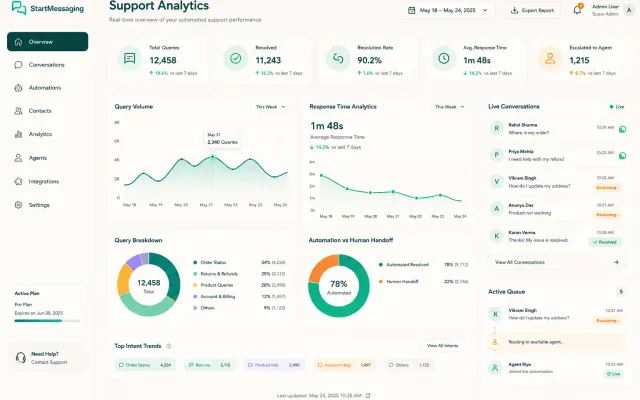
Support Automation Dashboard Preview
Shared Inbox

What Agents Get in the Inbox

On the Team and Business plans: everything a support team needs to answer from one WhatsApp number.

  • Search by Name or Number

    Find any chat by the customer’s name or phone number, then filter by unread, assignee, window or tag.

  • Photos, Videos and Voice Notes

    Open photos full size and play videos and voice notes in the chat. Quoted replies, reactions, locations and contact cards customers send are shown too.

  • Campaign Context on Replies

    A reply to a campaign is labelled “Campaign: name”, so the agent knows which offer or reminder the customer is answering.

  • Claim, Assign and Round-Robin

    Claim a chat, assign it to a teammate or resolve it, and let round-robin share new chats among available agents. Teammates see when someone else has the same chat open.

  • Push Notifications

    New messages reach the teammates who can see the chat, in the browser, even when the tab is closed.

  • Keyword Auto-Replies

    Answer common questions with text or a template when a message matches a keyword. Keywords match whole words, and a rule stays quiet for 30 seconds after anything is sent in the chat.

Handoff Logic

Seamless Bot-to-Human Handoff

01

1. Bot Resolution

The chatbot flow answers FAQs with reply buttons and lists, and saves details such as an order number to the contact.

02

2. Agent Request

When the customer taps 'Talk to an agent', the flow's assign-agent step hands the chat to your team.

03

3. Live Takeover

The agent picks up the chat in the shared inbox with the full history and replies within the 24-hour window, using quick replies or templates.

Support Channels

WhatsApp Chatbot Support vs. Traditional Email Queue vs. Live Call Center

Compare response speed, availability and running costs across support channels.

Factor WhatsApp Bot Support Email Queue Support Live Call Center
Average Response Speed Instant (automated replies) 2 - 24 hours 5 - 30 minutes (Hold queue)
Support Availability 24/7/365 (Unattended) Business hours queue Shift-work availability
Costs Flat subscription; Meta bills messages to your own WABA Per-agent CRM licenses High telecom & staff overhead
Messages API

Reply inside the 24-hour window via API

curl -X POST https://waba-api.startmessaging.com/api/v1/messages \
  -H "Authorization: Bearer sm_live_your_api_key" \
  -H "Content-Type: application/json" \
  -H "Idempotency-Key: ticket-2291-refund" \
  -d '{
    "to": "+919812345678",
    "type": "text",
    "text": {
      "body": "Hi Asha, your refund for order #1042 was processed today. It reaches your account in 3–5 working days."
    },
    "clientReference": "ticket-2291"
  }'
const res = await fetch('https://waba-api.startmessaging.com/api/v1/messages', {
  method: 'POST',
  headers: {
    'Authorization': 'Bearer ' + process.env.SM_API_KEY,
    'Content-Type': 'application/json',
    'Idempotency-Key': 'ticket-2291-refund',
  },
  body: JSON.stringify({
    "to": "+919812345678",
    "type": "text",
    "text": {
      "body": "Hi Asha, your refund for order #1042 was processed today. It reaches your account in 3–5 working days."
    },
    "clientReference": "ticket-2291"
  }),
});

const { data } = await res.json();
console.log(data.id, data.status);
import os, requests

res = requests.post(
    'https://waba-api.startmessaging.com/api/v1/messages',
    headers={
        'Authorization': f"Bearer {os.environ['SM_API_KEY']}",
        'Idempotency-Key': 'ticket-2291-refund',
    },
    json={
      "to": "+919812345678",
      "type": "text",
      "text": {
        "body": "Hi Asha, your refund for order #1042 was processed today. It reaches your account in 3–5 working days."
      },
      "clientReference": "ticket-2291"
    },
)

data = res.json()['data']
print(data['id'], data['status'])
<?php
$body = <<<'JSON'
{
  "to": "+919812345678",
  "type": "text",
  "text": {
    "body": "Hi Asha, your refund for order #1042 was processed today. It reaches your account in 3–5 working days."
  },
  "clientReference": "ticket-2291"
}
JSON;

$ch = curl_init('https://waba-api.startmessaging.com/api/v1/messages');
curl_setopt_array($ch, [
    CURLOPT_POST => true,
    CURLOPT_RETURNTRANSFER => true,
    CURLOPT_HTTPHEADER => [
        'Authorization: Bearer ' . getenv('SM_API_KEY'),
        'Content-Type: application/json',
        'Idempotency-Key: ticket-2291-refund',
    ],
    CURLOPT_POSTFIELDS => $body,
]);
$data = json_decode(curl_exec($ch), true)['data'];
echo $data['id'] . ' ' . $data['status'];
FAQs

Customer Support — FAQ

Can the chatbot handle multiple languages?

Yes. Build one flow per language, or start with reply buttons or a list that asks customers to choose a language and branch from there. Message templates can be created in 16 languages.

Are there specific localized regulations for customer support chatbots?

A customer's message opens a 24-hour window in which you can reply freely; outside it, WhatsApp only delivers Meta-approved templates. Local data-protection laws still apply to the chat data you store.

Can I route customer chats to multiple support agents?

Yes. Turn on round-robin auto-assignment to share new chats across available agents, or add an assign-agent step to a chatbot flow after a button or list choice (for example sales or billing). Agents can also claim, reassign and resolve chats in the shared inbox. Round-robin comes with the shared inbox on Team and Business. Chatbot flows, and sending replies to a campaign to a chosen teammate, are on Business.

Do you support customer support CRM integrations?

Yes, through the REST API and signed webhooks. Subscribe to message.received, conversation.assigned and conversation.resolved to mirror chats into your helpdesk or CRM, or connect through Zapier, Make or Pabbly. There are no built-in native apps for Salesforce, HubSpot or Zendesk.

Which plan do I need for WhatsApp support?

Team covers a support desk: the shared inbox, quick replies, interactive buttons and lists, round-robin, contacts and keyword auto-replies. Business adds chatbot flows, agent analytics and reply routing for campaigns. The 14-day free trial includes everything in Business, so you can build your support flows before you choose.

What does Meta charge for support chats?

Service replies, the free-form messages you send to a customer who wrote to you, inside the 24-hour window, are free from Meta up to a monthly allowance per number, then charged at Meta’s service rate. Every delivered template is charged, utility ones included even inside the window. Meta bills your own WhatsApp Business Account directly; StartMessaging charges a flat subscription with no per-message markup.

WhatsApp API

Automate Your Support Today

The 14-day free trial includes everything in Business: chatbot flows, the shared inbox and the API. Meta bills message charges directly to your own WhatsApp Business Account.