WhatsApp for E-Commerce
Automate your entire e-commerce customer journey on WhatsApp — from order confirmation to delivery update to review request. Recover 15-25% of abandoned carts with timely WhatsApp reminders.
✦ No credit card required · Free plan available · Setup in 5 minutes
Complete E-Commerce Toolkit
-
Order Updates
Automated order confirmation, processing, shipped, out-for-delivery, and delivered notifications with tracking links.
-
Abandoned Cart Recovery
Send WhatsApp reminders 1 hour after cart abandonment. Include product images, prices, and a direct checkout link.
-
Review Requests
Automated post-delivery review requests with star rating buttons. Boost your product reviews and social proof.
-
Product Catalogs
Share product catalogs directly in WhatsApp with images, descriptions, and 'Add to Cart' quick-reply buttons.
E-Commerce Integrations
Connect your Shopify, WooCommerce, or Magento backend via webhooks. Automatically fire structured message dispatches to customer chats the moment actions occur on your store storefront database, retaining absolute control over message flow.
- Plug-and-play webhook integrations
- Abandoned cart checkout shortcuts
- Direct user catalogs sharing
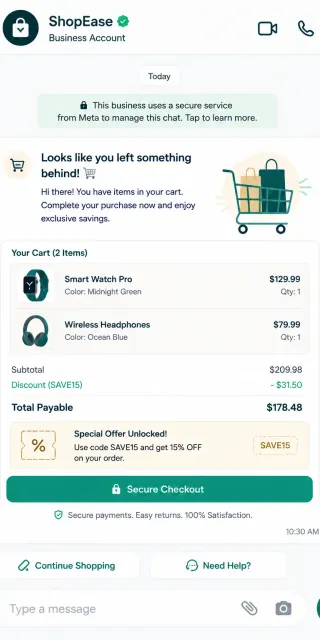
Cart Recovery Automation Sequence
1. Event Trigger
Customer adds items to cart on your store database, inputting checkout contact detail but leaving without buying.
2. Queued Timeout
Our API queues a cart recovery dispatch event, waiting 60 minutes for potential order completions.
3. Direct Blast
If order is not placed, a personalized WhatsApp template fires with direct checkout links.
WhatsApp Cart Recovery vs. Email Cart Recovery vs. Web Push Notifications
Compare checkout returns, client engagement rates, and unsubscribe ratios.
| Parameter | WhatsApp Recovery | Email Recovery | Web Push Alerts |
|---|---|---|---|
| Recovery Success Rate | 15% - 25% (Extremely high) | 3% - 5% (Low conversion) | 1% - 2% (Rarely clicked) |
| Click-Through Rate | 45% - 55% | 8% - 12% | 3% - 5% |
| User Opt-out Friction | Low (Opt-out templates support) | High (Subscribed lists) | Immediate blocker settings |
| Multimedia Catalogs | ✓ (Render image slide catalogs) | ✓ (Heavy static HTML) | ✗ (Static small icon) |
Trigger Abandoned Cart Flows
curl -X POST https://api.startmessaging.com/v1/ecommerce/cart-abandoned \
  -H "Content-Type: application/json" \
  -H "X-API-Key: sm_live_your_api_key_here" \
  -d '{
    "phoneNumber": "+919876543210",
    "cartId": "cart_abc12345",
    "customerName": "Rahul",
    "cartTotal": "₹1,499.00",
    "checkoutUrl": "https://yourstore.com/checkout?cart=abc12345"
  }'
await fetch("https://api.startmessaging.com/v1/ecommerce/cart-abandoned", {
method: "POST",
headers: {
"Content-Type": "application/json",
"X-API-Key": "sm_live_your_api_key_here"
},
body: JSON.stringify({
phoneNumber: "+919876543210",
cartId: "cart_abc12345",
customerName: "Rahul",
cartTotal: "₹1,499.00",
checkoutUrl: "https://yourstore.com/checkout?cart=abc12345"
})
});import requests
res = requests.post(
"https://api.startmessaging.com/v1/ecommerce/cart-abandoned",
headers={
"Content-Type": "application/json",
"X-API-Key": "sm_live_your_api_key_here"
},
json={
"phoneNumber": "+919876543210",
"cartId": "cart_abc12345",
"customerName": "Rahul",
"cartTotal": "₹1,499.00",
"checkoutUrl": "https://yourstore.com/checkout?cart=abc12345"
}
)E-Commerce Use Case — FAQ
How do I integrate WhatsApp with my e-commerce platform?
StartMessaging integrates with all major e-commerce platforms through webhooks. When an order is placed, shipped, or delivered in your store, a webhook triggers our API to send the appropriate WhatsApp notification. We provide pre-built integration guides for Shopify, WooCommerce, Magento, and custom platforms.
Can I integrate WhatsApp with regional e-commerce and shipping gateways?
Yes. Our webhook-driven API triggers order tracking notifications across global e-commerce systems, including regional carriers and local checkout methods.
Can I send automated customer review requests?
Yes. Once our webhook detects a 'delivered' status from your e-commerce platform, the API can schedule a review request template after a set time (e.g., 24 hours). You can include quick-reply rating buttons to make it easy for customers.
How are WhatsApp transactional messages billed?
They are billed as utility conversations under Meta's pricing model. Delivering a message starts a 24-hour conversation window. All subsequent utility messages to that user within the window are free.
Boost Your E-Commerce with WhatsApp
Start in 5 minutes. No credit card required.