Notifications That Get Read
Stop losing important notifications to spam folders. Send appointment reminders, payment alerts and account updates as approved WhatsApp templates from your backend, and track sent, delivered, read and failed status on signed webhooks.
✦ 14-day free trial · Your own WhatsApp Business number · Meta bills messages directly
Notification Types
-
Appointment Reminders
Automated appointment reminders with confirm and reschedule quick-reply buttons. Each tap reaches your webhook.
-
Payment Alerts
Payment confirmations, invoice reminders, subscription renewals, and overdue payment notifications.
-
Account Notifications
Welcome messages, password resets, security alerts, and account activity notifications.
-
Service Updates
Maintenance windows, feature releases, policy changes, and system status notifications.
Delivery You Can Track
Every send returns a message ID, and your own clientReference (an invoice or appointment ID) comes back on every sent, delivered, read and failed webhook. A failed message carries a code and a plain-language reason, so your system decides what happens next, such as retrying later or emailing the customer. There is no automatic fallback to SMS.
- Your clientReference on every delivery receipt
- Real-time delivery status receipts and webhook logs
- Idempotency-Key header for safe retries
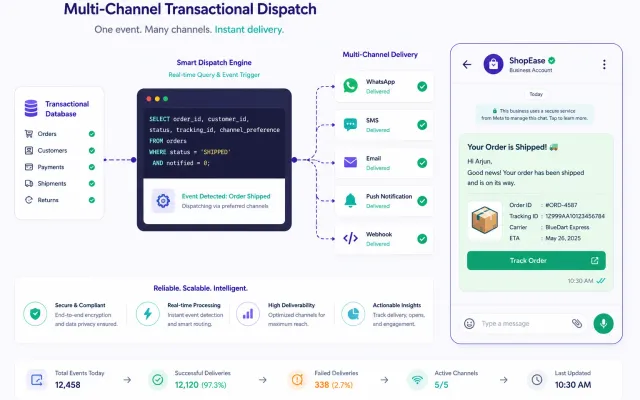
Notification Delivery Lifecycle
1. Event Triggered
An event in your system (payment, reminder) calls POST /api/v1/messages with an approved utility template and your clientReference.
2. Sent to WhatsApp
Meta accepts the message and a message.sent webhook fires; message.delivered and message.read follow as they happen.
3. You Act on the Result
If message.failed arrives, it carries the failure code, the reason and your clientReference, so your system can retry, alert your team or reach the customer another way.
WhatsApp Transactional Alerts vs. SMS Alerts vs. Email Notifications
Compare formatting, interactivity and delivery tracking.
| Outreach Factor | WhatsApp Alerts | SMS Alerts | Email Notifications |
|---|---|---|---|
| Interactive Buttons | ✓ (Clickable CTAs / Quick replies) | ✗ (Raw hyperlinks only) | ✓ (HTML layout links) |
| Delivery & Read Receipts | ✓ (Sent, delivered, read and failed webhooks) | Delivery reports only | Open tracking (often blocked) |
| Rich PDF Receipts | ✓ (Sent as direct file attachment) | ✗ (No files support) | ✓ (Standard attachments) |
Send a transactional alert on WhatsApp
curl -X POST https://waba-api.startmessaging.com/api/v1/messages \
  -H "Authorization: Bearer sm_live_your_api_key" \
  -H "Content-Type: application/json" \
  -H "Idempotency-Key: appt-5512-reminder" \
  -d '{
    "to": "+919812345678",
    "type": "template",
    "template": {
      "name": "appointment_reminder",
      "language": "en_US",
      "parameters": [
        {
          "text": "Asha"
        },
        {
          "text": "Dr. Mehta"
        },
        {
          "text": "12 Oct, 4:30 PM"
        }
      ]
    },
    "clientReference": "appt-5512"
  }'
const res = await fetch('https://waba-api.startmessaging.com/api/v1/messages', {
method: 'POST',
headers: {
'Authorization': 'Bearer ' + process.env.SM_API_KEY,
'Content-Type': 'application/json',
'Idempotency-Key': 'appt-5512-reminder',
},
body: JSON.stringify({
"to": "+919812345678",
"type": "template",
"template": {
"name": "appointment_reminder",
"language": "en_US",
"parameters": [
{
"text": "Asha"
},
{
"text": "Dr. Mehta"
},
{
"text": "12 Oct, 4:30 PM"
}
]
},
"clientReference": "appt-5512"
}),
});
const { data } = await res.json();
console.log(data.id, data.status);import os, requests
res = requests.post(
'https://waba-api.startmessaging.com/api/v1/messages',
headers={
'Authorization': f"Bearer {os.environ['SM_API_KEY']}",
'Idempotency-Key': 'appt-5512-reminder',
},
json={
"to": "+919812345678",
"type": "template",
"template": {
"name": "appointment_reminder",
"language": "en_US",
"parameters": [
{
"text": "Asha"
},
{
"text": "Dr. Mehta"
},
{
"text": "12 Oct, 4:30 PM"
}
]
},
"clientReference": "appt-5512"
},
)
data = res.json()['data']
print(data['id'], data['status'])<?php
$body = <<<'JSON'
{
"to": "+919812345678",
"type": "template",
"template": {
"name": "appointment_reminder",
"language": "en_US",
"parameters": [
{
"text": "Asha"
},
{
"text": "Dr. Mehta"
},
{
"text": "12 Oct, 4:30 PM"
}
]
},
"clientReference": "appt-5512"
}
JSON;
$ch = curl_init('https://waba-api.startmessaging.com/api/v1/messages');
curl_setopt_array($ch, [
CURLOPT_POST => true,
CURLOPT_RETURNTRANSFER => true,
CURLOPT_HTTPHEADER => [
'Authorization: Bearer ' . getenv('SM_API_KEY'),
'Content-Type: application/json',
'Idempotency-Key: appt-5512-reminder',
],
CURLOPT_POSTFIELDS => $body,
]);
$data = json_decode(curl_exec($ch), true)['data'];
echo $data['id'] . ' ' . $data['status'];Notifications — FAQ
Can I send notifications via both WhatsApp and SMS?
Yes, as two separate StartMessaging products with their own sign-up and API keys. There is no automatic fallback between them. If you want SMS as a backup, listen for the WhatsApp message.failed webhook and send the SMS from your own code.
Are there local restrictions for sending transactional notifications?
On WhatsApp, notifications must use approved utility templates tied to a specific transaction or account, and you still need the customer's opt-in to message them on WhatsApp. SMS in India additionally requires DLT registration.
What does Meta charge for a WhatsApp notification?
Meta charges every delivered utility template at its utility rate, billed directly to your own WhatsApp Business Account. Since 1 October 2026 that includes utility templates sent while the customer’s 24-hour window is open, which used to be free. StartMessaging adds nothing per message, and each message’s pricing field shows the category Meta charged it under.
How do I know if a notification was not delivered?
Subscribe to the message.delivered, message.read and message.failed webhooks. Each carries the message ID and your clientReference, and message.failed adds a failure code and reason. You can also check GET /api/v1/messages/{id}. Deliveries are signed with HMAC-SHA256 and retried for about 20 hours if your endpoint is down.
Can I attach PDF receipts to transactional notifications?
Yes. Use a template with a document header and pass the PDF's public URL as headerMediaUrl. Meta fetches the file and the customer receives it as a downloadable document in the chat.
Related Pages
Upgrade Your Notifications
Start with a 14-day WhatsApp free trial with every Business plan feature.