Marketing Campaigns with 98% Open Rates
Move beyond email's 20% open rate. WhatsApp marketing campaigns deliver 98% open rates, 45-60% click rates, and 3-5x higher conversion rates. Send rich media promotions with interactive buttons directly to your customers' phones.
✦ No credit card required · Free plan available · Setup in 5 minutes
Campaigns That Convert
WhatsApp marketing messages support rich media (images, videos, carousels), interactive buttons (quick reply, CTA), and personalization variables. Combined with audience segmentation and A/B testing, you can create highly targeted campaigns that drive real revenue.
- Rich media support: product catalogs, images, PDFs
- Interactive quick-reply & CTA buttons
- Timezone-aware queue scheduling & A/B testing
Automated A/B Testing Workflow
1. Draft Variations
Create Template A (discount focus) and Template B (feature focus) inside our templates dashboard.
2. Send Test Split
Dispatch variants to a localized 10% test audience to measure engagement, clicks, and read success rates.
3. Rollout Winner
The system determines the winning template variant after 3 hours and dispatches it to the remaining 90% queue.
WhatsApp Campaigns vs. Traditional SMS Marketing vs. Email Newsletters
Analyze open rates, click-through performance, and media rich formatting.
| Channel Feature | WhatsApp Campaigns | Traditional SMS | Email Newsletters |
|---|---|---|---|
| Average Open Rate | 98% (Within minutes) | 90% (often marked spam) | 15% - 22% (Delayed reads) |
| Average Click Ratio | 45% - 60% | 4% - 7% (Plain URL links) | 2% - 3% |
| Styled Rich Media | ✓ (Images, Videos, PDFs, Carousels) | ✗ (Plain text limits) | ✓ (HTML layout tags) |
| Direct Two-Way Chat | ✓ (Instant user replies) | ✗ (One-way dispatch shortcodes) | ✓ (Email responses) |
Schedule and Launch Marketing Campaigns
curl -X POST https://api.startmessaging.com/v1/marketing/campaigns \
  -H "Content-Type: application/json" \
  -H "X-API-Key: sm_live_your_api_key_here" \
  -d '{
    "campaignName": "black_friday_2026",
    "segmentId": "seg_sale_loyalists",
    "templateName": "promo_offer_vip",
    "scheduledTime": "2026-11-27T09:00:00Z"
  }'
await fetch("https://api.startmessaging.com/v1/marketing/campaigns", {
method: "POST",
headers: {
"Content-Type": "application/json",
"X-API-Key": "sm_live_your_api_key_here"
},
body: JSON.stringify({
campaignName: "black_friday_2026",
segmentId: "seg_sale_loyalists",
templateName: "promo_offer_vip",
scheduledTime: "2026-11-27T09:00:00Z"
})
});import requests
res = requests.post(
"https://api.startmessaging.com/v1/marketing/campaigns",
headers={
"Content-Type": "application/json",
"X-API-Key": "sm_live_your_api_key_here"
},
json={
"campaignName": "black_friday_2026",
"segmentId": "seg_sale_loyalists",
"templateName": "promo_offer_vip",
"scheduledTime": "2026-11-27T09:00:00Z"
}
)Marketing Campaigns — FAQ
What ROI can I expect from WhatsApp marketing?
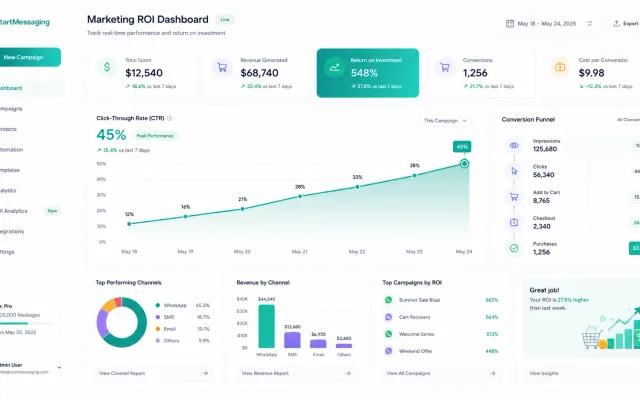
Businesses typically see 3-5x higher ROI from WhatsApp marketing compared to email campaigns. Key metrics: 98% open rate (vs 20% email), 45-60% click rate (vs 2-3% email), and 10-15% conversion rate for promotional offers. Abandoned cart recovery campaigns alone can recover 15-25% of lost sales.
What are the local restrictions on sending marketing campaigns?
Marketing messages must always respect user opt-ins and be sent via official pre-approved templates. Restrictions like quiet hours or region-specific costs may apply depending on the target country.
Do I need user consent (opt-in) before sending marketing campaigns?
Yes. WhatsApp strictly requires users to opt-in before receiving promotional messages. You can collect opt-ins via web forms, during checkout, or via inbound chat interactions.
How can I prevent my WhatsApp number from being blocked during campaigns?
To avoid blocks: only target opted-in users, personalize message templates, keep templates highly relevant, and provide a clear, easy opt-out option (such as a 'Stop' quick-reply button).
Launch Your First Campaign
Start in 5 minutes. No credit card required.