Broadcast to Millions on WhatsApp
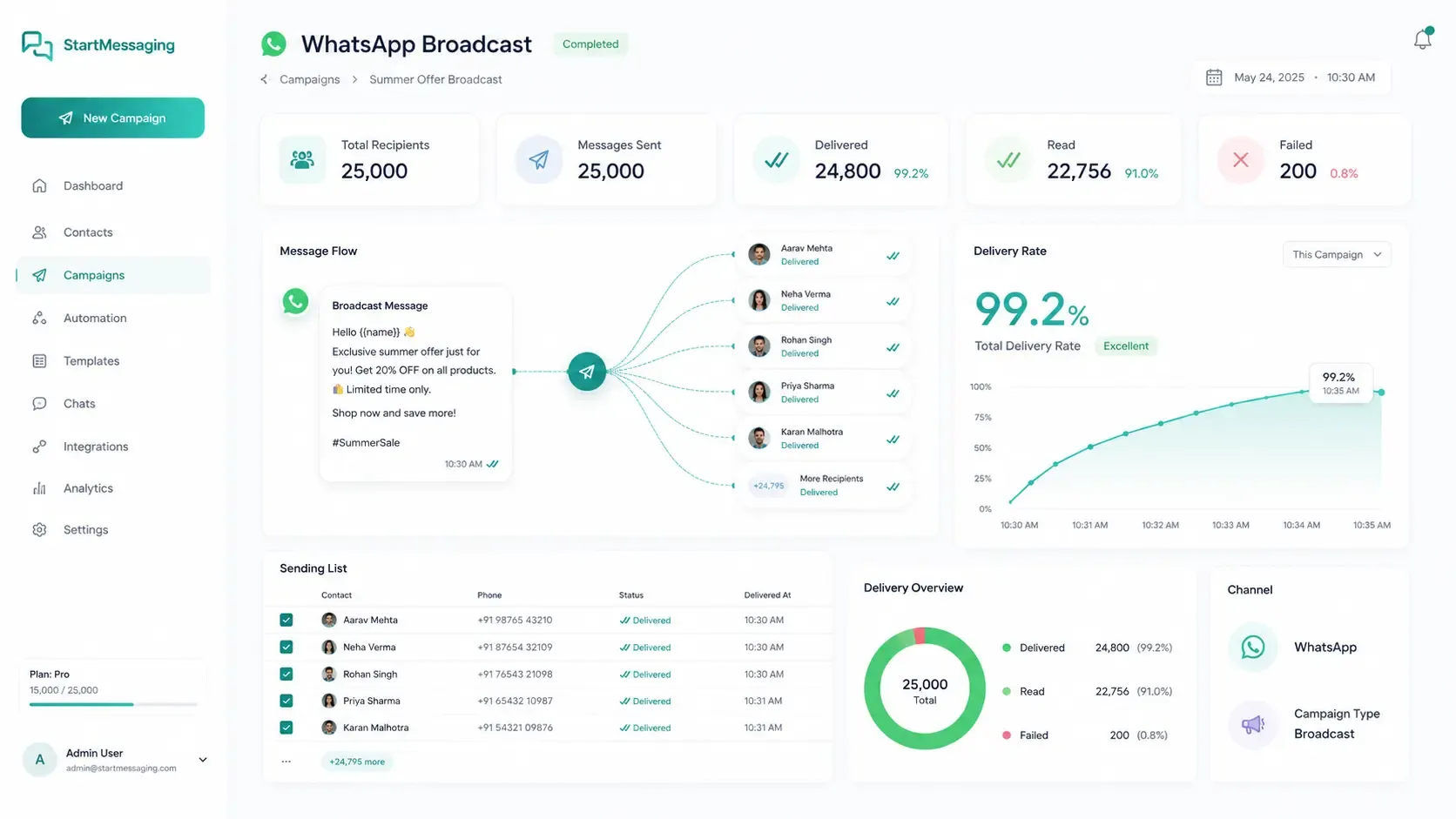
Send templated messages to thousands of opted-in contacts with real-time delivery tracking, rich media support, and intelligent throttling — all via a single API call.
✦ No credit card required · Free plan available · Setup in 5 minutes
Official, Zero-Ban Risk Broadcasting
StartMessaging utilizes Meta's official Cloud API structure. By sending pre-approved templates (Utility, Marketing, or Authentication) to opted-in audiences, you bypass the spam filters that trigger number bans. Our intelligent system manages delivery rates dynamically to keep your sender score high.
- Supports up to 100K+ contacts per broadcast
- Rich media support: images, documents, interactive buttons
- Real-time delivery confirmation and read receipts
Broadcast vs. Campaigns vs. Unofficial Spam Blasting
Why choosing official broadcasts protects your brand reputation and phone number.
| Comparison Metrics | StartMessaging Broadcast | Sequence Campaigns | Unofficial Web Scrapers |
|---|---|---|---|
| Setup Time | Instant (Direct API) | Instant (Sequence Flow Builder) | Requires manual web login |
| Opt-In Compliance Checks | Required | Required | ✗ (High spam rate) |
| Delivery Speed | Up to 80 messages/second | Throttled based on trigger rules | Very slow (manual delays) |
| Phone Number Ban Risk | 0% (TRAI/Meta Compliant) | 0% (TRAI/Meta Compliant) | 99% (Immediate number block) |
Trigger a Broadcast Message Programmatically
curl -X POST https://api.startmessaging.com/v1/broadcast \
  -H "Content-Type: application/json" \
  -H "X-API-Key: sm_live_your_api_key_here" \
  -d '{
    "templateName": "order_shipped",
    "languageCode": "en",
    "recipients": ["+919876543210", "+918765432109"],
    "variables": {
      "+919876543210": { "name": "Rahul", "orderId": "#5521" },
      "+918765432109": { "name": "Aarav", "orderId": "#5522" }
    }
  }'
const response = await fetch("https://api.startmessaging.com/v1/broadcast", {
method: "POST",
headers: {
"Content-Type": "application/json",
"X-API-Key": "sm_live_your_api_key_here",
},
body: JSON.stringify({
templateName: "order_shipped",
languageCode: "en",
recipients: ["+919876543210", "+918765432109"],
variables: {
"+919876543210": { name: "Rahul", orderId: "#5521" },
"+918765432109": { name: "Aarav", orderId: "#5522" }
}
})
});
const data = await response.json();
console.log(data);import requests
response = requests.post(
"https://api.startmessaging.com/v1/broadcast",
headers={
"Content-Type": "application/json",
"X-API-Key": "sm_live_your_api_key_here",
},
json={
"templateName": "order_shipped",
"languageCode": "en",
"recipients": ["+919876543210", "+918765432109"],
"variables": {
"+919876543210": { "name": "Rahul", "orderId": "#5521" },
"+918765432109": { "name": "Aarav", "orderId": "#5522" }
}
}
)
print(response.json())$ch = curl_init("https://api.startmessaging.com/v1/broadcast");
curl_setopt_array($ch, [
CURLOPT_RETURNTRANSFER => true,
CURLOPT_POST => true,
CURLOPT_HTTPHEADER => [
"Content-Type: application/json",
"X-API-Key: sm_live_your_api_key_here",
],
CURLOPT_POSTFIELDS => json_encode([
"templateName" => "order_shipped",
"languageCode" => "en",
"recipients" => ["+919876543210", "+918765432109"],
"variables" => [
"+919876543210" => ["name" => "Rahul", "orderId" => "#5521"],
"+918765432109" => ["name" => "Aarav", "orderId" => "#5522"]
]
]),
]);
$response = curl_exec($ch);
curl_close($ch);
$data = json_decode($response, true);import java.net.http.*;
import java.net.URI;
HttpClient client = HttpClient.newHttpClient();
String body = """
{
"templateName": "order_shipped",
"languageCode": "en",
"recipients": ["+919876543210", "+918765432109"],
"variables": {
"+919876543210": { "name": "Rahul", "orderId": "#5521" },
"+918765432109": { "name": "Aarav", "orderId": "#5522" }
}
}
""";
HttpRequest request = HttpRequest.newBuilder()
.uri(URI.create("https://api.startmessaging.com/v1/broadcast"))
.header("Content-Type", "application/json")
.header("X-API-Key", "sm_live_your_api_key_here")
.POST(HttpRequest.BodyPublishers.ofString(body))
.build();
HttpResponse<String> response = client.send(request, HttpResponse.BodyHandlers.ofString());
System.out.println(response.body());package main
import (
"bytes"
"encoding/json"
"fmt"
"net/http"
"io"
)
func main() {
payload, _ := json.Marshal(map[string]interface{}{
"templateName": "order_shipped",
"languageCode": "en",
"recipients": []string{"+919876543210", "+918765432109"},
"variables": map[string]interface{}{
"+919876543210": map[string]string{ "name": "Rahul", "orderId": "#5521" },
"+918765432109": map[string]string{ "name": "Aarav", "orderId": "#5522" },
},
})
req, _ := http.NewRequest("POST", "https://api.startmessaging.com/v1/broadcast", bytes.NewBuffer(payload))
req.Header.Set("Content-Type", "application/json")
req.Header.Set("X-API-Key", "sm_live_your_api_key_here")
resp, _ := http.DefaultClient.Do(req)
defer resp.Body.Close()
body, _ := io.ReadAll(resp.Body)
fmt.Println(string(body))
}Broadcast — Frequently Asked Questions
How many contacts can I send a broadcast to?
There's no hard limit on our side. You can broadcast to 100,000+ contacts per campaign. Meta applies per-phone-number throughput limits (typically 80 messages/second for Tier 4 numbers). Our engine handles throttling automatically.
Do I need to use pre-approved templates for broadcasts?
Yes. WhatsApp requires all business-initiated messages to use pre-approved templates. You can create templates through our dashboard. Most templates are reviewed and approved by Meta within minutes.
Is broadcasting on WhatsApp compliant with local anti-spam regulations?
Yes, official broadcasts are fully compliant because they require recipient opt-in and utilize pre-approved templates.
Related Pages
Start Broadcasting on WhatsApp Today
Free plan. No credit card required.