WhatsApp Business Verification in Nigeria: Get the Blue Badge
How Nigerian firms get the WhatsApp blue badge: Meta Verified vs Official Business Account, eligibility, cost, CAC documents and what to do if Meta refuses.
Ifeanyi runs a phone and gadgets store in Ikeja with a busy WhatsApp line. In November, a customer walked in with a bank-transfer receipt for an iPhone he had “already paid for”. He had bought it from a WhatsApp number using the store’s name, logo and product photos, which had offered Black Friday prices and asked for full payment before delivery. Two more customers called that week with the same story. In the chat list, the fake number looked exactly like the real one. That evening Ifeanyi searched “WhatsApp business verification badge” and found dozens of adverts promising the blue tick in 24 hours for a fee.
None of them can deliver it. Only Meta grants the WhatsApp verified badge, and there are two official routes with different rules and costs. This guide explains which route fits a business on the WhatsApp Business app and which fits one on the official API, which documents a Nigerian company needs, what it costs, and what to do when Meta says no.
What the WhatsApp Blue Badge Is
The badge is the blue checkmark beside a business’s name in chats, in its business profile and in WhatsApp search results. Before 2024 it was green; WhatsApp then switched to the blue checkmark used on Facebook and Instagram. Guides about the “green tick” describe the same verification.
For a customer, the badge answers one question: is this number really the brand it claims to be? That was exactly the question Ifeanyi’s customers couldn’t answer before they paid.
What the badge doesn’t do
The badge is a trust signal. It doesn’t raise your messaging limit, lower Meta’s per-message charges or speed up template approval. Your messaging limit depends on business verification and message quality, and your costs depend on each message’s category, as our guide to WhatsApp Business API pricing in Nigeria explains. Agencies selling “blue tick plus unlimited bulk messages” are bundling two unrelated things.
Two Routes: Meta Verified and the Official Business Account
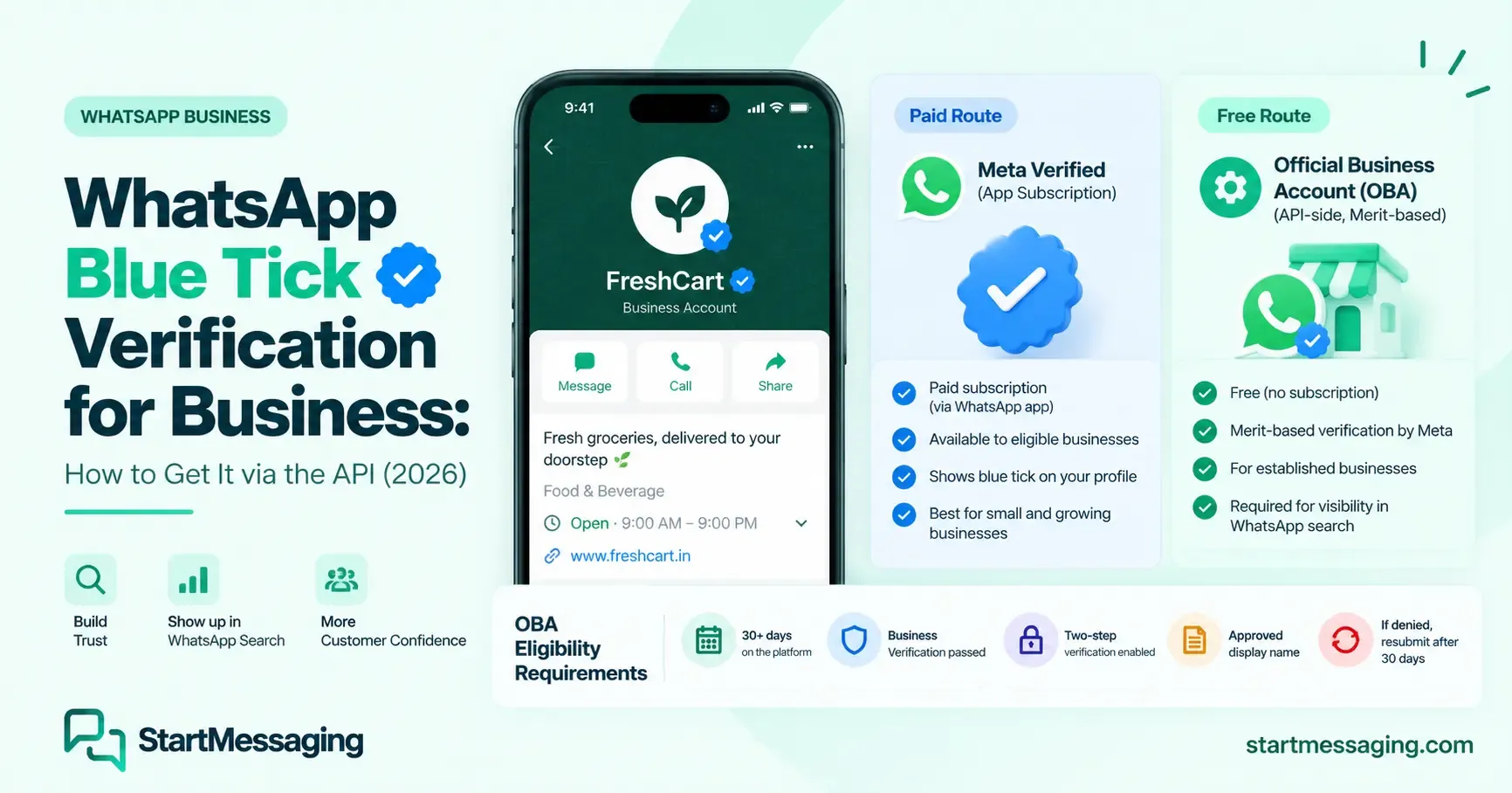
| Meta Verified for business | Official Business Account | |
|---|---|---|
| Where you use WhatsApp | WhatsApp Business app on a phone | The official API (WhatsApp Business Platform), through a provider |
| How you get it | Paid monthly subscription inside the app | Free request reviewed by Meta |
| What Meta checks | Identity of the business and account | Business verification, time on the platform and how well known the brand is |
| Cost | The price shown in the app, where available | Free |
| Availability in Nigeria | Varies by country and account | Available for numbers on the API |
Meta Verified: the app route
Meta Verified is a subscription for businesses that run WhatsApp from the WhatsApp Business app. Meta launched it for WhatsApp first in markets such as Brazil, India, Indonesia and Colombia, and availability, price and benefits vary by country and account. To see whether it’s available to you in Nigeria, open the WhatsApp Business app and look for Meta Verified in Settings. If the option isn’t there, it hasn’t reached your account yet.
This route suits a business run by one person on one phone, with no link to an online store or order system.
Official Business Account: the API route
A number connected to the official API, which is what you use through a provider such as StartMessaging, gets the badge as an Official Business Account (OBA). There’s no subscription: you submit a request, and Meta approves or denies it.
Meta’s official documentation lists the requirements:
- The business complies with the WhatsApp Business Messaging Policy.
- The business has been on the WhatsApp Business Platform for at least 30 days.
- The business portfolio that owns the number has passed Business Verification.
- Two-step verification is switched on for the number.
- The number’s display name is approved.
Employee accounts, test numbers and WhatsApp Business app numbers can’t become Official Business Accounts. Meta also notes that numbers without OBA status don’t appear in WhatsApp search results unless the user has saved them.
Who Actually Gets the Official Business Account
The five requirements are the minimum, not a guarantee. Meta also judges whether the brand is notable: whether people search for it, and whether it’s the kind of brand fraudsters would impersonate. Providers report that, in practice, Meta looks for coverage of the brand in independent news outlets, and that paid articles, advertorials and the company’s own content don’t count.
That’s where Ifeanyi’s first request failed. The store had a strong Instagram following and hundreds of positive reviews, but almost no press coverage. Meta doesn’t measure followers, revenue or reviews.
Business verification with CAC documents
Business Verification happens in Meta Business Manager (Security Centre), not in WhatsApp. Meta checks that the portfolio belongs to a real, registered business. For Nigerian businesses, providers commonly report these documents being accepted:
- CAC Certificate of Incorporation, or Certificate of Registration for a business name
- CAC status report or memorandum and articles of association
- A utility bill or bank statement in the business’s name as proof of address
Most rejections come from small mismatches: the legal name in Business Manager doesn’t match the CAC certificate exactly, the address is formatted differently, or the phone number given isn’t on any document. Meta lets you confirm you control the business with a code sent to a business phone number or email, or by verifying your website’s domain. Meta’s accepted documents can change, so follow the list Business Manager shows on the day you apply.
Business verification is also one of the ways to raise your messaging limit from 250 to 2,000 customers a day, so it’s worth completing even if the badge isn’t your priority yet.
How to Request the Blue Badge on the API
Once the requirements are in place, the request takes a few minutes.
- Open WhatsApp Manager and go to Account tools → Phone numbers.
- Select the number. If two-step verification is off, switch it on. On StartMessaging, the 6-digit PIN you set when you connected your number is that two-step verification PIN.
- Open the number’s Profile tab and find Official business account.
- Click Submit request and add links that show the brand is notable: news coverage of the business, not your own website or social pages.
- Submit and wait. Meta reviews each request individually and there’s no way to speed it up.
You can also read the request status through the Graph API, in the number’s official_business_account field. If the option doesn’t appear even though you meet the requirements, contact your provider’s support or Meta Support.
Checklist before you submit
- Business Verification shows Verified in Business Manager.
- The number has been on the platform for 30 days or more.
- The display name is approved and matches the brand name customers know.
- The business profile is complete: logo, description, email, website and address.
- You have 2 to 5 links to independent coverage of the brand.
On StartMessaging, the Connect page shows business verification status, quality rating and messaging limit straight from Meta, so you can check the first item without opening Business Manager.
When Meta Says No
Denials are common and not permanent. Meta lets you submit a new request 30 days after a denial. Use that time to fix the real reason:
- Notability: the most common reason. Earn coverage in independent outlets, such as business and technology news sites or industry publications. Press releases on paid distribution sites don’t help.
- Mismatched details: align the legal name, display name and website so a reviewer can see they’re the same business.
- Quality: if your quality rating is low or templates have been paused, fix that first. A number customers keep blocking won’t be approved.
A denial doesn’t restrict anything else. You can still complete your business profile, and customers who save your number see your display name. Publish your official number on your website, Jumia store page and social media so customers can check it before they pay.
Protecting customers while you wait
The badge can take weeks, and fraudsters don’t wait. Impersonation peaks around the January and February 2027 elections, so start the review before December. Ifeanyi’s team took four steps during the first review. They reported the fake number inside WhatsApp and asked affected customers to do the same. They added a clear “this is our only WhatsApp number” notice to the website and Instagram bio. They started sending order confirmations from the official number using approved templates with the customer’s name and order number, so genuine messages looked consistent and personal. And they told customers plainly that the store never asks for full payment by bank transfer before a confirmed order, with Paystack or Flutterwave payment links sent only from the official number.
Beware of anyone who “guarantees” the badge
An agency can help you prepare documents and the request, which is legitimate work. But only Meta decides. Never share your Business Manager admin access, two-step verification PIN or WhatsApp registration codes; that’s exactly the access an impersonator needs. If you collect customer data over WhatsApp, the Nigeria Data Protection Act also requires you to control who can access it; see our NDPA and WhatsApp Business API guide.
Frequently Asked Questions
Q: What is the WhatsApp business verification price in Nigeria?
A: On the API, the Official Business Account badge is free: Meta reviews the request and charges nothing. In the app, the badge comes with a Meta Verified subscription, priced in the app where the service is available to your account.
Q: How do I get the WhatsApp verification badge for free?
A: Request an Official Business Account if your number is on the official API. You’ll need a verified business, 30 days on the platform, two-step verification, an approved display name and independent press coverage that shows the brand is notable.
Q: Is Meta Verified for WhatsApp available in Nigeria?
A: It depends on your account. Meta launched Meta Verified for WhatsApp in other markets first and is adding countries over time. Check Settings in the WhatsApp Business app; if the option isn’t there, it isn’t available to you yet.
Q: Does verifying my business with CAC documents give me the blue badge?
A: No. Business Verification is one requirement, but Meta also judges how well known the brand is before approving an Official Business Account. Verification does help raise your messaging limit from 250 to 2,000 customers a day.
Q: How long after a rejection can I apply again?
A: Meta lets you submit a new request 30 days after a denial. Use that time to fix the reason, which is most often a lack of independent press coverage.
Ifeanyi’s second request went in 45 days after the first, with links to two features on Nigerian business news sites and a display name that matched the store’s CAC registration exactly. It was approved. The fake number still exists, but the store now has one rule printed on every receipt and post: no blue badge, not us. If your whole team needs to answer customers from one official number, see StartMessaging plans, explore the shared team inbox or talk to our sales team.
StartMessaging Team
StartMessaging Team