WhatsApp Business App vs WhatsApp Business API: Which to Use?
WhatsApp Business app vs WhatsApp Business API for Indian businesses: cost, broadcast limits, team inbox, automation, GST and website rules, and when to switch.
Sameer opened his Pune bakery in 2022 and ran every order through the WhatsApp Business app on his own phone. It worked well at 20 orders a day. At 120 orders a day during the wedding season, it stopped working. Two staff members were passing his phone around the counter, customers were asking why their cake confirmation never came, and a broadcast list of 256 contacts meant his festive menu went out in nine separate lists, to customers who had saved his number and no one else. A friend told him to “get the API.” An agency quoted him a setup fee, a monthly fee and per-message charges, and Sameer wasn’t sure what any of it bought him.
That is the real decision behind “WhatsApp Business app vs WhatsApp Business API.” Both are official products from Meta, both put your business name on WhatsApp, and both are legitimate. They are built for different stages of a business. This guide compares them on what actually changes day to day: cost, broadcasts, team access, automation, verification and the paperwork Indian businesses ask about most, such as GST and having a website.
Two Official Products, Built for Different Jobs
The WhatsApp Business app is a free app for Android and iPhone. You install it, register a number and start chatting. It adds business features on top of normal WhatsApp: a business profile, a product catalogue, labels, quick replies, and automatic greeting and away messages. One person runs it from one phone, with a few linked devices such as WhatsApp Web.
The WhatsApp Business API, which Meta calls the WhatsApp Business Platform, has no app of its own. Your number is connected to Meta’s Cloud API, and you use it through software: a provider’s dashboard and shared inbox, your own code through an API, or both. It is built for businesses where several people answer customers, where messages are triggered by systems such as an order or payment, or where you message thousands of customers.
The short version
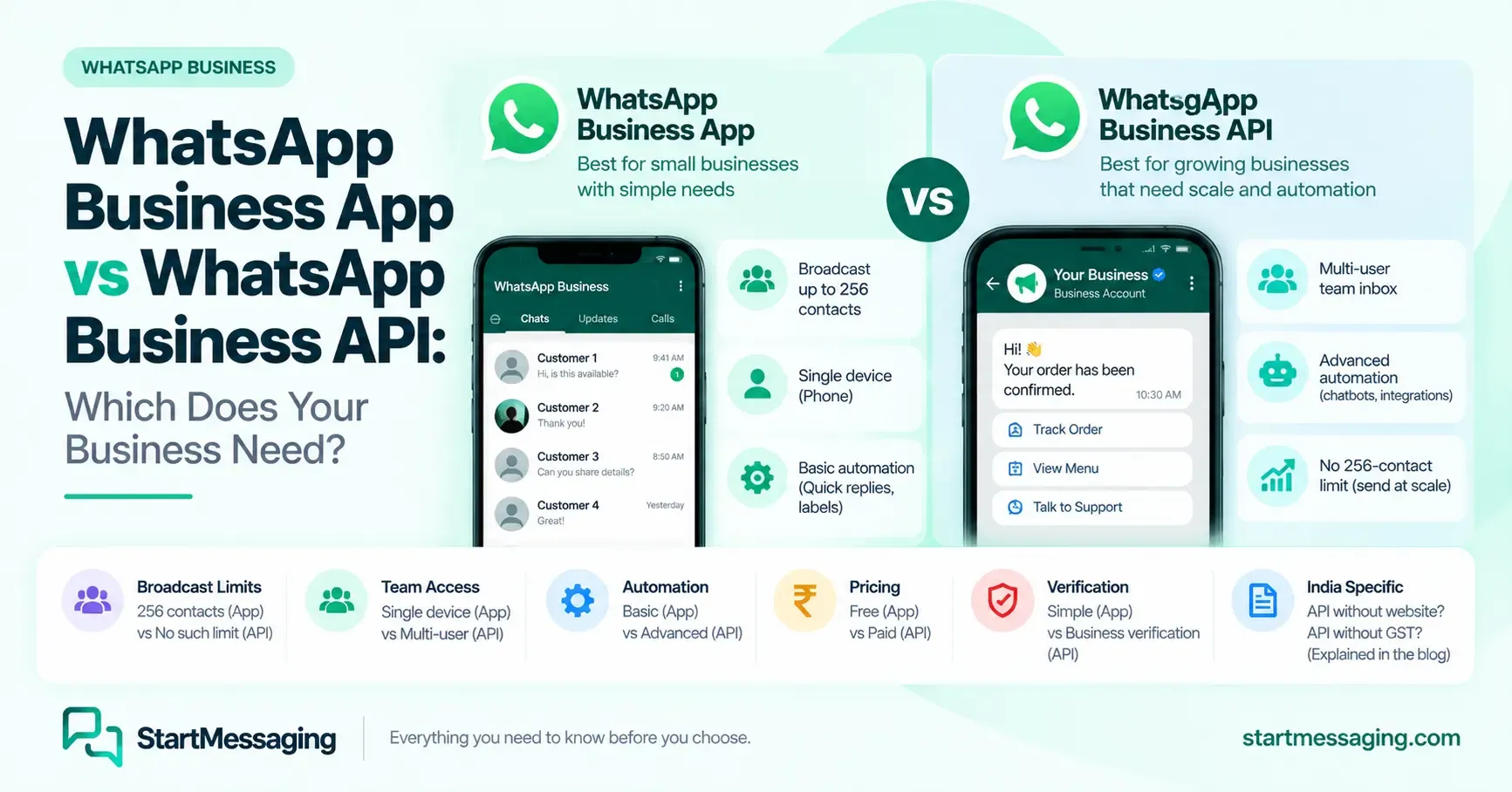
| WhatsApp Business app | WhatsApp Business API | |
|---|---|---|
| Who runs it | One person on one phone | A team, your systems, or both |
| Cost to Meta | Free | Meta charges per delivered message by category |
| Software cost | None | A provider plan, or your own build; see Meta Tech Provider vs BSP for who bills what, and the Wati alternatives comparison for the vendors |
| Broadcasts | Lists of up to 256 contacts who saved your number | Approved templates to opted-in customers, within your messaging limit |
| Automation | Greeting, away messages and quick replies | Chatbots, order and payment triggers, webhooks |
| Team access | Linked devices on one account | Shared inbox with per-agent logins and assignment |
| Verification badge | Meta Verified subscription | Official Business Account, free on request |
| Setup | Minutes | Meta’s signup, a payment method and template approval |
Cost: Is the WhatsApp Business API Free or Paid?
The app is free. The API is paid, and the bill has two parts that are worth separating, because agencies often blend them into one quote.
What Meta charges
On the API, Meta charges per delivered template message, and the price depends on the template’s category: marketing, utility or authentication, with India-specific rates. Since 1 October 2026, Meta also charges for service messages (your free-form replies inside a customer’s 24-hour window) beyond a free tier of 1,000 per business phone number each month. Meta bills these charges directly to the WhatsApp Business Account you own, using the payment method you add in WhatsApp Manager. Rates change by quarter, so take the current India figures from Meta’s pricing page. Our India WhatsApp API pricing guide explains how to read the rate card.
What the software costs
You also need software to use the API. Providers charge differently: some add a markup to every message, some charge setup fees, some charge a flat subscription. StartMessaging charges only a flat plan and adds nothing per message:
| Plan | Price (GST included) | Includes |
|---|---|---|
| Developer | Free, or from ₹100/month | The API for your own code, with a monthly API message allowance |
| Team | ₹999/month | Shared inbox, contacts, campaigns and auto-replies, 3 seats |
| Business | ₹2,999/month | Adds chatbot flows, WhatsApp Forms, advanced campaigns and a sales pipeline |
Every first workspace starts with a 14-day free trial of Business. Whichever provider you compare, ask two questions: do you add anything to Meta’s per-message charge, and is there a setup fee?
For Sameer, the maths worked out simply. His festive menu was a marketing template to about 2,000 past customers, a few times a season. His order confirmations were utility templates. The total Meta bill was smaller than one day of a part-time employee’s wages, and the time saved at the counter was the real return.
Broadcasts: The 256-Contact Ceiling vs Messaging Limits
Broadcasts are usually the reason businesses outgrow the app.
Broadcasts on the WhatsApp Business app
In the app, a broadcast list holds up to 256 contacts, and a message only reaches people who have saved your number in their phone. Anyone who hasn’t saved it simply doesn’t receive the broadcast, and you get no error. There is no delivery reporting per list, no scheduling, and no way to personalise each message with the customer’s name. You can create several lists, but you send each one by hand.
Broadcasts on the API
On the API, you send approved message templates to customers who have opted in. They don’t need to have saved your number. Each message can be personalised with variables such as the customer’s name or order number, and you get delivery and read status for every recipient. The constraint is Meta’s messaging limit: new businesses start at 250 unique customers in a moving 24 hours and scale to 2,000, 10,000, 100,000 and unlimited. Our guide to WhatsApp Business API messaging limits explains how to move up.
| App broadcast | API campaign | |
|---|---|---|
| Recipients per send | 256 per list | Your messaging limit, from 250 up to unlimited |
| Recipient must save your number | Yes | No, but must have opted in |
| Personalised fields | No | Yes, template variables |
| Delivery and read reports | No | Per recipient |
| Scheduling | No | Yes, on most providers |
| Message review | None | Meta approves each template |
Team Inbox and Automation
The second reason businesses switch is that one phone can’t be shared by a team without chaos.
Running a team on the app
The app supports linked devices, so the owner’s account can be open on a laptop through WhatsApp Web while the phone stays at the counter. Everyone using it sees every chat and replies as the same account. There is no way to assign a chat to one person, see who answered, or stop two people replying to the same customer at once. Sameer’s staff once confirmed the same cake order twice with different delivery times.
Running a team on the API
On the API, a shared team inbox gives every agent their own login on the same number. Chats can be assigned, transferred and resolved, and each reply shows who sent it. Automation goes much further than greeting and away messages:
- Triggered messages from your systems: order confirmed, payment received, out for delivery.
- Chatbots that answer common questions or collect order details before a human takes over.
- Webhooks that send every incoming message and delivery update to your own software.
- Integrations with stores and CRMs, so customer history follows the chat.
If none of this sounds necessary yet, it probably isn’t. The app is the right tool until a second person needs to answer customers, or until a system, not a person, needs to send messages.
Without GST, Without a Website: What Indian Businesses Ask
Two questions come up constantly from Indian small businesses: can you get the WhatsApp Business API without a GST number, and without a website?
Without a GST number
You can start on the API without completing Business Verification. Meta lets an unverified business connect a number and send messages, with a messaging limit of 250 unique customers in 24 hours. GST matters when you verify the business, which you’ll want to do to reach 2,000 and above and to request the blue tick.
GST isn’t the only document Meta accepts. Indian businesses are commonly verified with a Certificate of Incorporation, a GST certificate, an Udyam (MSME) registration certificate or a Shop and Establishment licence. A sole proprietor without GST can often verify with Udyam registration, which is free on the government portal. The legal name and address on the document must match what you enter in Meta Business Manager exactly.
Without a website
A website helps but isn’t mandatory everywhere. Meta lets you confirm that you control the business by a code sent to a business phone number or email, or by verifying a website domain. A simple one-page site on your own domain does make verification and your business profile more credible, and Meta’s Official Business Account review looks for an established web presence. Meta’s accepted documents and methods change, so follow the list Business Manager shows when you apply.
When to Switch, and What Happens to Your Number
Stay on the app if one person handles customers, you send fewer broadcasts than your contact lists can hold, and nothing in your business needs to send messages automatically.
Move to the API when any of these is true:
- More than one person needs to reply to customers on the same number.
- You want order, payment or delivery messages sent automatically.
- Your broadcasts have outgrown lists of 256 people who saved your number.
- You need delivery reports, chatbots or integration with your store or CRM.
- You want the blue tick without a monthly subscription.
Moving your existing number
Your current number can move to the API, so customers keep messaging the number they already know. Traditionally, a number registered on the API can’t stay active in the WhatsApp Business app at the same time, so the move ends app use on that number. Meta has introduced an option called coexistence that lets a Business app number also connect to the API, but availability and limits depend on your provider, so confirm before you migrate. On StartMessaging, you connect the number through Meta’s Embedded Signup on the Connect page, and Meta’s flow explains what happens to a number that is currently on the app. Take a backup of important chats before you start.
Frequently Asked Questions
Q: What is the difference between the WhatsApp Business app and the WhatsApp Business API?
A: The app is a free phone app for one person to chat with customers, with broadcast lists of up to 256 contacts. The API connects your number to Meta’s Cloud API so a team, chatbots and your own systems can message customers at scale, with Meta charging per delivered template message.
Q: Is the WhatsApp Business API free or paid?
A: Paid. Meta charges per delivered message by category (marketing, utility or authentication), plus service messages beyond 1,000 free per number each month since October 2026. You also pay for the software you use it through, such as a provider’s plan.
Q: Can I get the WhatsApp Business API without a GST number?
A: Yes, you can start without Business Verification at a limit of 250 customers a day. To verify later, Meta accepts other documents too, such as Udyam registration, a Certificate of Incorporation or a Shop and Establishment licence.
Q: Can I use the WhatsApp Business app and API on the same number?
A: Traditionally no: moving a number to the API ends its use in the app. Meta’s coexistence option lets some businesses keep both, but support depends on the provider, so check with yours before migrating.
Q: How many people can I broadcast to on the WhatsApp Business app?
A: Up to 256 contacts per broadcast list, and only people who have saved your number receive it. On the API, the cap is your messaging limit, which starts at 250 unique customers a day and scales to unlimited.
Sameer moved his bakery’s number to the API in the off-season. His two counter staff now have their own logins, orders confirm themselves from his billing software, and the festive menu went to 2,100 past customers in one personalised campaign instead of nine lists. The phone stays in his pocket. If you’re at the same point, you can start a 14-day free trial of StartMessaging, connect your own WhatsApp Business Account and try the shared inbox with your team. Compare WhatsApp CRM plans or see what the WhatsApp Business API can do.
StartMessaging Team
StartMessaging Team